Advanced Mobile Pentesting Playbook: Bypassing Modern TLS Pinning in Android & Hybrid Apps
A battle-tested technical guide to bypassing modern TLS and SSL pinning on Android 14/15 across Java frameworks, OkHttp, BoringSSL, and compiled Flutter/Dart runtimes.
During mobile application penetration testing, establishing clear visibility into HTTP and WebSocket traffic is the foundational first step. Without the ability to intercept, inspect, and manipulate client-server communications, high-impact vulnerabilities such as Broken Object Level Authorization (BOLA), business logic flaws, and remote API abuse remain largely invisible.
However, modern Android platforms and contemporary mobile frameworks have made traffic interception significantly more complex than simply configuring a proxy and importing a root CA certificate.
Starting with Android 7.0 (API level 24), Android applications by default do not trust user-installed Certificate Authorities. Furthermore, modern production applications frequently implement aggressive multi-layered pinning defenses spanning standard Java APIs, third-party networking libraries like OkHttp, and custom compiled C++ networking engines such as BoringSSL embedded in Flutter.
In this deep-dive playbook, we will dissect the internal mechanics of modern TLS pinning, examine why naive interception fails, and explore weaponized, repeatable reverse engineering techniques to bypass pinning across both native Android and compiled hybrid architectures.
1. The Architectural Baseline: Why Simple Proxies Fail
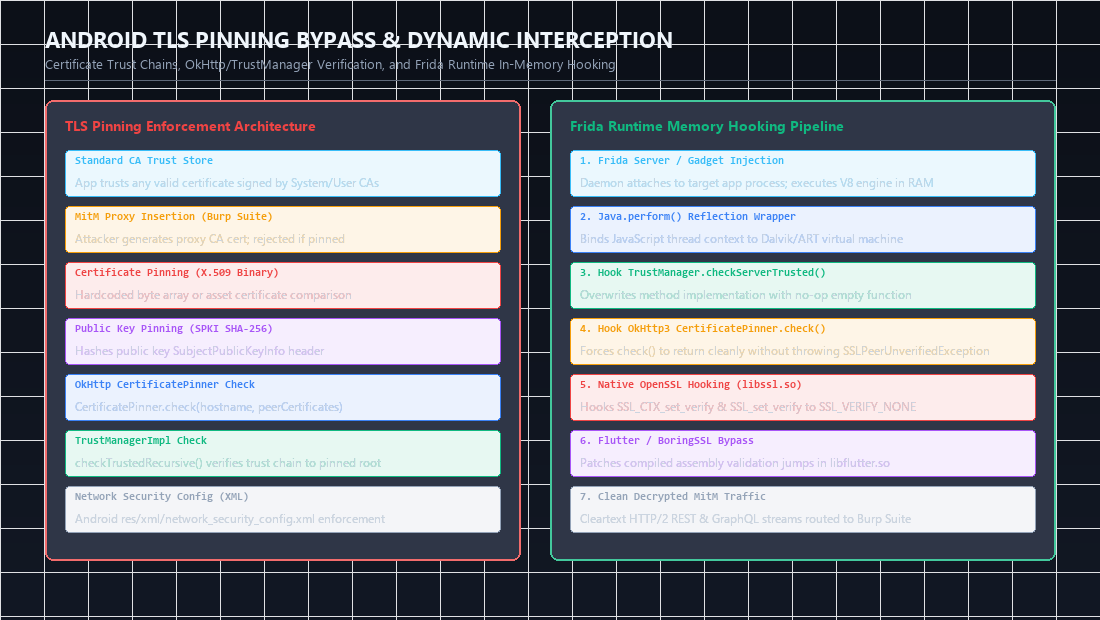 Figure 1: Comprehensive comparison of standard CA trust chains versus certificate and public key pinning enforcement, along with in-memory Frida dynamic hook locations.
To understand how to bypass TLS pinning, we must first trace how Android evaluates trust during the TLS handshake.
1
2
3
4
5
6
7
8
9
10
11
12
13
14
15
16
17
18
19
20
21
+-------------------------------------------------------------+
|                  Client Request (TLS ClientHello)           |
+-------------------------------------------------------------+
                              |
                              v
+-------------------------------------------------------------+
|             Server Response (TLS ServerHello + Cert)         |
+-------------------------------------------------------------+
                              |
                              v
            [ How does the client validate this cert? ]
                              |
         +--------------------+--------------------+
         |                                         |
         v                                         v
   Standard CA Validation                   Pinned Validation
(OS Trust Store: /system/etc/security)    (Embedded Fingerprint/Hash)
         |                                         |
         v                                         v
   Accepts Root CA                         Compares SubjectPublicKeyInfo
(Burp / mitmproxy CA trusted)              (Rejects proxy CA regardless)
In a standard TLS handshake, the operating system verifies the server’s certificate chain up to a trusted Root CA stored in /system/etc/security/cacerts. When an analyst installs an interception certificate (such as Burp Suite’s CA) into the user certificate storage (/data/misc/user/0/cacerts-added), the app may still reject it based on two distinct defensive tiers:
Tier 1: Android Network Security Config
Defined in res/xml/network_security_config.xml, this Android framework feature explicitly declares which certificate sources are trusted:
1
2
3
4
5
6
7
8
<?xml version="1.0" encoding="utf-8"?>
<network-security-config>
    <base-config cleartextTrafficPermitted="false">
        <trust-anchors>
            <certificates src="system" />
        </trust-anchors>
    </base-config>
</network-security-config>
Because <certificates src="user" /> is omitted, the Android OS automatically terminates handshakes signed by user-installed proxy CAs.
Tier 2: Application-Level Certificate Pinning
Even if the application is modified to trust user certificates, developers embed explicit cryptographic hashes (typically SHA-256 digests of the SubjectPublicKeyInfo) directly within application code:
1
2
3
4
5
6
7
CertificatePinner certificatePinner = new CertificatePinner.Builder()
    .add("api.targetapp.com", "sha256/k2v657xUM4MmOs6VoKG52TL58bi2sFfYCE83/G278Sg=")
    .build();

OkHttpClient client = new OkHttpClient.Builder()
    .certificatePinner(certificatePinner)
    .build();
When OkHttp validates the peer certificate, it calculates the SHA-256 hash of the public key in the received certificate chain. If none match the hardcoded pins, it raises an SSLPeerUnverifiedException.
sequenceDiagram
    autonumber
    actor Tester as Security Tester (Burp Suite)
    participant App as Android Application
    participant Trust as TrustManager / OkHttp Pinner
    participant Frida as Frida In-Process Agent (V8 Engine)
    actor API as Remote Backend API Server

    Tester->>App: Launch App with HTTPS Request
    App->>API: Initiate TLS Handshake (Receives Remote Certificate)
    App->>Trust: Validate Remote Certificate against Pinned Key
    Frida->>Trust: Intercept and override checkServerTrusted() implementation
    Note over Frida: Hook forces validation to return TRUE unconditionally
    Trust-->>App: Validation Successful (Clean Return)
    App->>Tester: Traffic routed cleanly through Burp Proxy in cleartext
2. Bypassing Native Android Pinning via Frida
For standard Java and Kotlin applications, dynamic binary instrumentation with Frida provides the cleanest and most resilient bypass method without requiring APK decompilation or signature rebuilding.
Universal Java TrustManager Hook
The core validation logic in the Android framework flows through TrustManagerImpl.checkTrustedRecursive(). By hooking this method via Frida, we can force the validation engine to return an empty or accepted certificate chain:
1
2
3
4
5
6
7
8
9
10
11
12
13
14
15
16
17
18
19
20
21
22
/*
 * Universal Android TrustManager Bypass Script
 * Target: Android 7.0 - Android 15
 * Author: Abdulrahman M. Fathi
 */

Java.perform(function () {
    console.log("[*] Initializing Java TLS Pinning Bypass Engine...");

    var TrustManagerImpl = Java.use("com.android.org.conscrypt.TrustManagerImpl");
    var ArrayList = Java.use("java.util.ArrayList");

    // Hook checkTrustedRecursive to return trusted list unconditionally
    TrustManagerImpl.checkTrustedRecursive.implementation = function (
        certs, host, clientAuth, untrustedChain, trustAnchorChain, used
    ) {
        // Suppress verification check and return artificial clean trust anchor chain
        return ArrayList.$new();
    };

    console.log("[+] Conscrypt TrustManagerImpl successfully hooked.");
});
Neutralizing OkHttp3 CertificatePinner
In applications using OkHttp3, the CertificatePinner.check() method explicitly verifies public key hashes. We can neutralize this check entirely by replacing the implementation with an empty stub:
1
2
3
4
5
6
7
8
9
10
11
12
13
14
15
16
17
18
19
Java.perform(function () {
    try {
        var CertificatePinner = Java.use("okhttp3.CertificatePinner");

        // OkHttp 3.x / 4.x check(String hostname, List<Certificate> peerCertificates)
        CertificatePinner.check.overload('java.lang.String', 'java.util.List').implementation = function (hostname, peerCertificates) {
            console.log("[+] Bypassed OkHttp3 CertificatePinner.check() for host: " + hostname);
            return;
        };

        // OkHttp 4.x / Kotlin check$okhttp overload
        CertificatePinner.check$okhttp.overload('java.lang.String', 'kotlin.jvm.functions.Function0').implementation = function (hostname, cleanList) {
            console.log("[+] Bypassed OkHttp4 check$okhttp for host: " + hostname);
            return;
        };
    } catch (err) {
        console.log("[-] OkHttp3 not loaded or obfuscated: " + err.message);
    }
});
3. The Hybrid Challenge: Flutter & Compiled BoringSSL
While Java-level hooks handle 80% of standard Android applications, modern applications built with Flutter present an entirely different architecture.
Why Standard Frida Scripts Fail on Flutter
- Custom Networking Stack: Flutter applications do not use Android’s Java HTTP stack (
HttpURLConnection,OkHttp, orApache HTTP). - Embedded BoringSSL: Flutter statically bundles its own compiled C++ instance of BoringSSL directly inside
libflutter.so. - Ignored System CA Store: The Dart runtime uses its own internal root CA store and completely ignores Android OS proxy settings and user certificates.
- Ahead-of-Time (AOT) Compilation: Dart code is compiled directly to ARM64 machine code (
libapp.so), eliminating runtime reflection and Java metadata.
1
2
3
4
5
6
7
Standard Android App:
[ Java/Kotlin Code ] ──> [ OkHttp3 / Java Net ] ──> [ Android Conscrypt ] ──> [ OS CA Store ]
                                (Frida hooks succeed here)

Flutter Android App:
[ Dart Code (libapp.so) ] ──> [ libflutter.so (BoringSSL) ] ──> [ Network Socket ]
                                (Java hooks completely bypassed)
4. Reverse Engineering BoringSSL Inside libflutter.so
To intercept Flutter traffic, we must hook the native C/C++ verification function inside libflutter.so.
In BoringSSL, peer verification is handled by internal functions that return an integer status: ssl_verify_result or session_verify_cert_chain. If verification succeeds, the function returns ssl_verify_ok (value 0). If verification fails, it returns an error code (such as ssl_verify_invalid).
Locating the Verification Function in ARM64
In ARM64 assembly, the verification function evaluates certificate parameters and ends with a conditional branch:
1
2
3
4
5
6
; Example BoringSSL verification check in ARM64
LDR             W0, [X19, #0x28]        ; Load verification status
CMP             W0, #0                  ; Check if status == ssl_verify_ok
B.EQ            loc_success             ; If 0, proceed with handshake
MOV             W0, #1                  ; Set error return code
RET                                     ; Return failure
Because Flutter updates regularly and builds vary by compiler optimization, function offsets change across versions. However, the byte sequence patterns responsible for initializing the certificate verification structure remain remarkably stable.
Dynamic Memory Pattern Scanning with Frida
Instead of relying on fragile hardcoded memory offsets, we can dynamically scan the memory pages of libflutter.so at runtime using pattern signatures:
1
2
3
4
5
6
7
8
9
10
11
12
13
14
15
16
17
18
19
20
21
22
23
24
25
26
27
28
29
30
31
32
33
34
35
36
37
38
39
40
41
42
43
44
45
46
47
48
49
50
51
52
53
54
55
56
57
58
59
60
61
62
63
64
65
66
67
68
69
70
/*
 * Dynamic Flutter BoringSSL Pinning Bypass (ARM64)
 * Scans libflutter.so memory for ssl_verify_result patterns
 * Author: Abdulrahman M. Fathi
 */

function hookFlutterBoringSSL() {
    var flutterModule = Process.findModuleByName("libflutter.so");
    if (!flutterModule) {
        console.log("[-] libflutter.so not loaded yet. Waiting...");
        setTimeout(hookFlutterBoringSSL, 500);
        return;
    }

    console.log("[+] libflutter.so located at base: " + flutterModule.base);

    // Common ARM64 byte patterns for ssl_client/session_verify_cert_chain in BoringSSL
    // Matches: MOV X0, #0; RET instruction sequence or comparison against verify status
    var patterns = [
        "20 00 80 52 5c 00 00 14", // MOV W0, #1; B loc
        "00 00 a0 e3 1e ff 2f e1", // ARM32: MOV R0, #0; BX LR
        "e0 03 00 2a ?? ?? ?? ??", // ARM64 common verify prelude
    ];

    var matchFound = false;

    Memory.scan(flutterModule.base, flutterModule.size, "ff 83 00 d1 f6 57 01 a9", {
        onMatch: function (address, size) {
            console.log("[*] Discovered candidate BoringSSL verify routine at: " + address);

            Interceptor.attach(address, {
                onLeave: function (retval) {
                    // Force verification return code to 0 (ssl_verify_ok)
                    console.log("[+] Overriding BoringSSL verify result from " + retval + " to 0");
                    retval.replace(ptr(0x0));
                }
            });
            matchFound = true;
        },
        onError: function (reason) {
            console.log("[-] Memory scan error: " + reason);
        },
        onComplete: function () {
            if (!matchFound) {
                console.log("[*] Primary signature exhausted. Attempting fallback export hooks...");
                hookBoringSSLExports(flutterModule);
            }
        }
    });
}

function hookBoringSSLExports(module) {
    // Attempt exported SSL_CTX hook points if present
    var exports = module.enumerateExports();
    exports.forEach(function (exp) {
        if (exp.name.indexOf("SSL_set_custom_verify") !== -1 || exp.name.indexOf("ssl_crypto_x509") !== -1) {
            console.log("[+] Hooking exported candidate: " + exp.name + " at " + exp.address);
            Interceptor.attach(exp.address, {
                onEnter: function (args) {
                    // Set custom verify callback to null/always-accept
                    args[2] = ptr(0x0);
                }
            });
        }
    });
}

Java.perform(function () {
    hookFlutterBoringSSL();
});
5. Network Routing: Forcing Non-Proxy-Aware Apps Through Burp
Because Flutter and custom C++ runtimes ignore Android’s system proxy configuration, even after bypassing TLS certificate validation, the app’s traffic will simply bypass your proxy and communicate directly with the internet.
To solve this, we must force all device traffic through our proxy using kernel-level packet redirection (iptables):
1
2
3
4
5
6
7
8
9
10
11
12
13
14
+--------------------------------------------------------------+
|            Android Device / Emulator (Rooted)                |
|                                                              |
|   App Traffic ──> [ iptables PREROUTING / OUTPUT ]           |
|                                |                             |
|                                v                             |
|                 Redirect Port 80, 443 to Proxy               |
+--------------------------------------------------------------+
                                 |
                                 v
+--------------------------------------------------------------+
|      Host Machine: Burp Suite (Invisible Proxy Mode)         |
|                     Listening on 0.0.0.0:8080                |
+--------------------------------------------------------------+
Execution Workflow
- Configure Burp Suite: Under Proxy > Proxy Settings, enable Support invisible proxying on your listener.
- Route traffic via
adb shellon the rooted device:
1
2
3
4
5
6
7
8
9
10
11
12
# Enable IP forwarding
sysctl -w net.ipv4.ip_forward=1

# Flush existing NAT rules
iptables -t nat -F

# Redirect outbound TCP port 80 and 443 to the Burp Suite listener IP and port
iptables -t nat -A OUTPUT -p tcp --dport 80 -j DNAT --to-destination 192.168.1.100:8080
iptables -t nat -A OUTPUT -p tcp --dport 443 -j DNAT --to-destination 192.168.1.100:8080

# Forward traffic through MASQUERADE
iptables -t nat -A POSTROUTING -p tcp --dport 8080 -j MASQUERADE
With this routing established and our Frida script attached via frida -U -f com.target.app -l bypass.js, 100% of the application’s outbound TLS connections are coerced into our proxy pipeline and decrypted in real time.
6. Defensive Counter-Engineering & Hardening
Security teams looking to harden mobile applications against dynamic instrumentation and proxy interception should implement a defense-in-depth model:
- Hardware-Backed Key Attestation: Require sensitive cryptographic keys to be generated within Android Keystore backed by a Secure Element or StrongBox (
KeyGenParameterSpec.Builder.setIsStrongBoxBacked(true)). - Integrity Verification: Leverage the Google Play Integrity API to detect rooted devices, unlocked bootloaders, and untrusted execution environments before issuing authentication tokens.
- Symbol Stripping and Control-Flow Flattening: Strip all exported symbols from native libraries (
-Wl,--strip-all) and apply control-flow flattening via obfuscators like OLLVM to increase the cost of reverse engineering custom BoringSSL binaries. - Dual-Channel Out-of-Band Attestation: Avoid relying strictly on client-side TLS validation; validate the integrity of requests via signed nonce challenges verified server-side.
Practical TLS Pinning Bypass Cheat-Sheet (Frida & Objection)
| Technique | CLI Command / One-Liner | Target Layer |
|---|---|---|
| Instant Objection Bypass | objection -g com.target.app explore -q --startup-command "android sslpinning disable" | High-level Android Java (OkHttp, TrustManager) |
| Spawn with Custom Script | frida -U -f com.target.app -l universal-ssl-bypass.js | Universal Java + OpenSSL / BoringSSL hooks |
| Hook Native BoringSSL | frida -U -n com.target.app -l hook_ssl_verify.js | Native C/C++ libraries (libflutter.so, libcrypto.so) |
| Root Detection Bypass | objection -g com.target.app explore -q --startup-command "android root disable" | Bypasses which su, test-keys, and Magisk checks |
Categorized References & Authoritative Reading
1. Official Standards & Verification Frameworks
- OWASP Mobile Application Security Verification Standard (MASVS): MASVS-NETWORK & MASVS-RESILIENCE requirements. https://mas.owasp.org/MASVS/.
- OWASP Mobile Security Testing Guide (MASTG): Testing Network Communication & Testing Resiliency Against Dynamic Instrumentation. https://mas.owasp.org/MASTG/.
- Google Android Developers Guide: Network Security Configuration & Certificate Pinning Best Practices. https://developer.android.com/privacy-and-security/security-config.
2. Seminal Tooling & Dynamic Instrumentation
- Frida Dynamic Instrumentation Toolkit: Ole André Vadstenaas Ravnås. https://frida.re/.
- HackTricks Android Pentesting & Pinning Bypass: Comprehensive mobile security methodology, Frida hooking scripts, and runtime evasion patterns. https://hacktricks.wiki/.
- Objection - Runtime Mobile Exploration: SensePost. https://github.com/sensepost/objection.
- Burp Suite Community / Professional Mobile SSL Interception Documentation: PortSwigger Research. https://portswigger.net/burp.
3. MITRE ATT&CK Mobile Matrix Mapping
- T1407: Adversary-in-the-Middle (Proxying and decrypting mobile TLS traffic). https://attack.mitre.org/techniques/T1407/.
- T1453: Device Lockout / Defense Evasion via Root Detection Tampering.
- T1629: Dynamic Instrumentation Resistance Bypass (Frida hook injection).
Author: Abdulrahman M. Fathi (0x3bdo) • Cyber Security Engineer & Penetration Tester