Mobile Penetration Testing Guide: Chapter 2 - APK Dissection, Reverse Engineering, Smali Patching & Native Layer Analysis
Master Android binary reverse engineering: dissecting APK architectures, analyzing Dalvik bytecode, modifying Smali assembly to defeat client-side checks, and analyzing compiled C/C++ native .so libraries via Ghidra and JNI.
Static analysis is the cornerstone of every mobile penetration test. Before executing an application or intercepting network traffic, a security engineer must dissect the compiled package, map its attack surface, inspect its business logic, and determine what defensive controls have been baked into the client binary.
However, modern Android applications rarely present themselves as clean, unencumbered Java code. Enterprise applications employ code obfuscation (ProGuard, R8, DexGuard), implement multi-dex architectures, and increasingly migrate sensitive operations—such as cryptographic key generation, integrity verification, and root checks—into compiled native C/C++ libraries loaded via the Java Native Interface (JNI).
In this chapter, we dissect the internal architecture of Android packages (APKs), master the mechanics of Dalvik Executable (DEX) bytecode and Smali assembly, execute surgical client-side code patches to defeat defensive controls, and reverse engineer compiled native .so binaries using Ghidra.
1. Anatomy of an Android Package (APK)
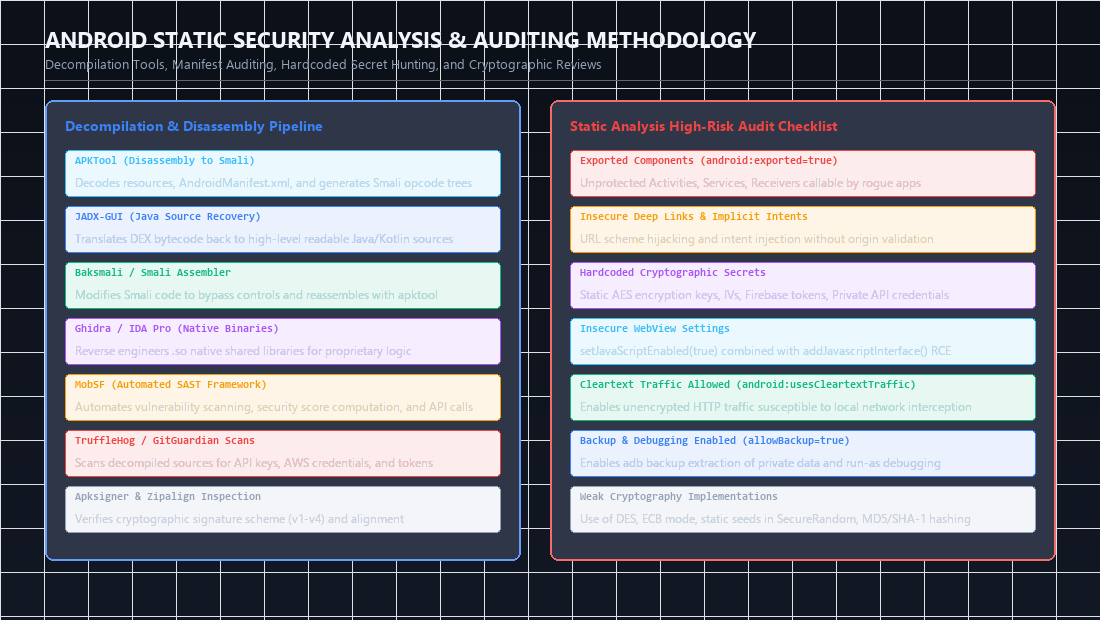 Figure 1: Static analysis toolchain workflow (APKTool, JADX, MobSF) and high-risk vulnerability checklist covering exported components, hardcoded secrets, and cleartext traffic.
An Android Package (.apk) is structurally a ZIP archive containing compiled code, resources, assets, and cryptographic signing manifests.
1
2
3
4
5
6
7
8
9
10
11
12
13
14
15
16
17
18
19
20
21
22
23
24
+---------------------------------------------------------------------------------+
|                               TARGET_APP.APK                                    |
+---------------------------------------------------------------------------------+
|                                                                                 |
|  [ AndroidManifest.xml ] -> Binary XML declaring permissions, components & flags |
|                                                                                 |
|  [ classes.dex / classes2.dex ] -> Dalvik bytecode executed by ART runtime      |
|                                                                                 |
|  [ resources.arsc ]      -> Compiled binary resource table (strings, IDs, layouts)|
|                                                                                 |
|  [ res/ ]                -> Compiled XML resources, drawables, raw data files   |
|                                                                                 |
|  [ assets/ ]             -> Uncompiled raw assets (fonts, certificates, bundles)|
|                                                                                 |
|  [ lib/ ]                -> Native compiled shared object libraries (.so)       |
|    |-- arm64-v8a/        -> 64-bit ARM architecture (modern physical devices)   |
|    |-- armeabi-v7a/      -> 32-bit ARM architecture (legacy mobile devices)     |
|    `-- x86_64/           -> 64-bit x86 architecture (modern desktop emulators)  |
|                                                                                 |
|  [ META-INF/ ]           -> Cryptographic signatures, certs & manifest digests  |
|    |-- MANIFEST.MF       -> SHA-256 hashes of every file in the package         |
|    |-- CERT.SF           -> Digest of the manifest file                         |
|    `-- CERT.RSA          -> Developer digital certificate and signature block   |
+---------------------------------------------------------------------------------+
The Android Signing Scheme Evolution
Android verifies APK authenticity through a succession of signature schemes:
- v1 (JAR Signing): Signs only individual ZIP entry contents. Susceptible to APK signature bypass vulnerabilities (such as the Janus vulnerability, CVE-2017-13156), where arbitrary code can be prepended to the archive without breaking the ZIP file hashes.
- v2 (Whole-File Signing): Introduced in Android 7.0. Protects the entire ZIP archive by hashing all bytes across the ZIP structure, detecting modifications anywhere in the binary.
- v3 (Key Rotation): Introduced in Android 9.0. Embeds a cryptographic proof-of-rotation linking older signing keys to new ones.
- v4 (Merkle Tree): Introduced in Android 11. Enables streaming installation via an external
.idsigfile.
When repacking and tampering with an application, understanding which signing scheme the target enforces dictates how the final binary must be signed.
flowchart LR
    APK["Target APK"] --> ATool["APKTool Disassembly"]
    APK --> JADX["JADX Decompilation"]

    ATool --> Smali["Smali Opcode Trees & Binary XML"]
    JADX --> Java["High-Level Java / Kotlin Sources"]

    Smali --> Patch["Modify Smali Logic<br/>(e.g., return-void in root checks)"]
    Patch --> Rebuild["apktool b (Recompile)"]
    Rebuild --> Sign["zipalign & apksigner<br/>(Resign with Test Key)"]
    Sign --> ModifiedAPK["Patched Production APK"]
2. The Decompilation Pipeline: Bytecode vs Source Code
Reverse engineering Android applications involves two distinct paths:
1
2
3
4
5
6
7
8
9
10
11
12
13
                          [ Target APK ]
                                |
        +-----------------------+-----------------------+
        |                                               |
        v                                               v
  [ Apktool ]                                      [ Jadx-GUI ]
  - Decodes binary XML files                       - Decompiles DEX into Java
  - Extracts resources.arsc                        - Resolves cross-references
  - Disassembles DEX into Smali (lossless)         - High-level readability (lossy)
        |                                               |
        v                                               v
[ Smali Assembly ]                               [ Java Source ]
(Ideal for surgical patching)                    (Ideal for logic auditing)
Why Smali Matters
Decompilers like Jadx perform best-effort translation from low-level register bytecode to high-level Java syntax. When an application utilizes complex control flow flattening, reflection, or obfuscated structures, Jadx often fails, outputting incomplete code blocks or throwing decompilation errors.
Smali, by contrast, is a human-readable assembly representation of Dalvik bytecode. It possesses a direct, 1-to-1 mapping with the raw bytes interpreted by the Android Runtime (ART). Modifying a single Smali opcode guarantees that the application can be cleanly rebuilt without decompilation corruption.
3. Dalvik Bytecode & Smali Assembly Deep Dive
To patch applications effectively, you must understand how the Dalvik virtual machine manages state, registers, and method invocations.
The Dalvik Register Architecture
Unlike the Java Virtual Machine (JVM), which is a stack-based architecture, the Dalvik VM is register-based. Methods specify how many registers they require, divided into two categories:
- Local Registers (
v0, v1, v2...): Used for intermediate computations, local variables, and scratch calculations. - Parameter Registers (
p0, p1, p2...): Hold the arguments passed into the method. In an instance (non-static) method,p0is always reserved for thethisreference.
.method public checkUserStatus(Ljava/lang/String;)Z
    .registers 3      # Allocates 3 total registers (v0, p0, p1)

    # p0 = this reference
    # p1 = String username argument
    # v0 = local scratch register
Dalvik Type Descriptors
Dalvik represents data types using compact character identifiers:
| Identifier | Dalvik / Java Equivalent | Smali Representation |
|---|---|---|
Z | boolean | Z |
B | byte | B |
C | char | C |
S | short | S |
I | int | I |
J | long (occupies two registers) | J |
F | float | F |
D | double (occupies two registers) | D |
V | void | V |
L...; | Object reference | Ljava/lang/String; |
[ | Array of type | [B (byte array), [Ljava/lang/String; |
Core Smali Instructions
1. Constants & Data Loading
const/4 v0, 0x1            # Load 4-bit integer literal (1 = true) into v0
const/4 v0, 0x0            # Load 4-bit integer literal (0 = false) into v0
const-string v0, "secret"  # Load reference to string literal into v0
2. Conditionals & Branching
if-eqz v0, :cond_target   # Jump to :cond_target if v0 == 0 (false / null)
if-nez v0, :cond_target   # Jump to :cond_target if v0 != 0 (true / non-null)
if-eq v0, v1, :cond_match # Jump if v0 == v1
goto :label_always        # Unconditional jump to :label_always
3. Method Invocations
invoke-virtual {p0, v0}, Lcom/target/App;->validate(Ljava/lang/String;)Z
move-result v1            # Move primitive boolean return value into register v1

invoke-static {}, Lcom/target/Security;->getRootStatus()Z
move-result v0            # Store return value of static call in v0

invoke-direct {p0}, Ljava/lang/Object;-><init>()V # Call private/constructor
4. Practical Client-Side Code Tampering: Defeating Root Detection
Consider a financial application that checks for root status before allowing user authentication.
Original Java Source Code (as viewed in Jadx)
1
2
3
4
5
6
7
8
9
10
11
12
13
14
15
16
17
18
19
20
package com.target.security;

import java.io.File;

public class SecurityManager {
    public static boolean isDeviceRooted() {
        String[] paths = {
            "/system/bin/su",
            "/system/xbin/su",
            "/sbin/su",
            "/data/local/xbin/su"
        };
        for (String path : paths) {
            if (new File(path).exists()) {
                return true;
            }
        }
        return false;
    }
}
Disassembling to Smali with Apktool
1
apktool d target_banking.apk -o ./banking_src/
Navigate to banking_src/smali/com/target/security/SecurityManager.smali. The original Smali method appears as follows:
.method public static isDeviceRooted()Z
    .registers 5

    # Array allocation and path checks...
    # (Iterates over su binary paths)

    :cond_rooted
    const/4 v0, 0x1
    return v0

    :cond_not_rooted
    const/4 v0, 0x0
    return v0
.end method
Surgical Patch 1: Short-Circuiting the Method
The cleanest bypass overrides the method entirely at its entry point. Regardless of what checks follow, force the method to load 0x0 (false) and return immediately:
.method public static isDeviceRooted()Z
    .registers 1

    const/4 v0, 0x0
    return v0
.end method
Surgical Patch 2: Inverting Conditional Logic
If the application validates a license key:
# Original logic: If v0 != 0 (valid), jump to :license_ok
invoke-virtual {p0, v1}, Lcom/target/License;->verify(Ljava/lang/String;)Z
move-result v0
if-nez v0, :license_ok

# License invalid block
invoke-virtual {p0}, Lcom/target/App;->terminate()V
return-void

:license_ok
invoke-virtual {p0}, Lcom/target/App;->grantAccess()V
return-void
To invert the check, simply change if-nez to if-eqz, or replace the conditional jump with an unconditional jump:
# Inverted patch: Regardless of return value, always proceed to license_ok
goto :license_ok
Rebuilding, Aligning, and Signing the Patched Binary
1
2
3
4
5
6
7
8
9
10
11
12
13
14
15
# 1. Rebuild the application package
apktool b ./banking_src/ -o ./banking_patched.apk

# 2. Align memory boundaries to 4-byte offsets (Mandatory for Android execution)
zipalign -v -p 4 ./banking_patched.apk ./banking_aligned.apk

# 3. Sign the application using apksigner
apksigner sign --ks ~/.android/debug.keystore \
               --ks-pass pass:android \
               --key-pass pass:android \
               --out ./banking_final_signed.apk \
               ./banking_aligned.apk

# 4. Verify the cryptographic signature on the rebuilt package
apksigner verify --verbose ./banking_final_signed.apk
Now, push the patched APK directly to your test device:
1
adb install -r ./banking_final_signed.apk
5. Native Layer Reverse Engineering: JNI & .so Binaries
When developers realize that Java and Smali can be trivially decompiled and patched, they frequently relocate sensitive logic into compiled C/C++ shared libraries located in the lib/ directory.
1
2
3
4
5
6
7
8
9
10
11
12
+---------------------------------------------------------------------------------+
|                         JAVA NATIVE INTERFACE (JNI)                             |
+---------------------------------------------------------------------------------+
|                                                                                 |
|   [ Java Runtime (ART) ]                      [ Native Shared Library (.so) ]   |
|   SecurityCore.java                           libnative-crypto.so               |
|                                                                                 |
|   System.loadLibrary("native-crypto")  ---->  JNI_OnLoad()                      |
|                                                   |                             |
|   public native String getApiKey();    ---->  Java_com_target_SecurityCore_     |
|                                               getApiKey(JNIEnv*, jobject)       |
+---------------------------------------------------------------------------------+
Locating Native Methods in Java
In Jadx, native methods are declared with the native modifier and lack a method body:
1
2
3
4
5
6
7
8
9
10
11
package com.target.core;

public class SecurityCore {
    static {
        System.loadLibrary("security-lib");
    }

    // Native bridge methods
    public static native boolean verifyIntegrity();
    public static native String decryptMasterToken(byte[] payload);
}
Extracting and Analyzing .so Binaries with Ghidra
- Unzip the APK or navigate to
banking_src/lib/arm64-v8a/libsecurity-lib.so. - Launch Ghidra, create a new project, and import
libsecurity-lib.so. - Select the file, run the automated analysis suite, and open the Symbol Tree.
Static JNI Method Resolution
If the developer used standard JNI naming conventions, native functions follow a deterministic symbol pattern:
1
2
Java_<Package_Name>_<Class_Name>_<Method_Name>
Example: Java_com_target_core_SecurityCore_verifyIntegrity
In Ghidra’s decompiler, inspect the function signature:
1
2
3
4
5
6
7
8
jboolean Java_com_target_core_SecurityCore_verifyIntegrity(JNIEnv *env, jclass clazz) {
    // Inspect string comparisons, su binary checks, or cryptographic hashes
    int check = check_su_binary();
    if (check == 0) {
        return JNI_TRUE;
    }
    return JNI_FALSE;
}
Dynamic JNI Method Resolution via JNI_OnLoad
Sophisticated applications obscure function names by registering them dynamically during runtime initialization. In this pattern, you will not find Java_com_... symbols.
Instead, locate the JNI_OnLoad function in Ghidra. Look for invocations of RegisterNatives:
1
2
3
4
5
6
7
8
9
10
11
12
13
14
jint JNI_OnLoad(JavaVM *vm, void *reserved) {
    JNIEnv *env;
    (*vm)->GetEnv(vm, (void**)&env, JNI_VERSION_1_6);

    JNINativeMethod methods[] = {
        {"verifyIntegrity", "()Z", (void*)hidden_integrity_check},
        {"decryptMasterToken", "([B)Ljava/lang/String;", (void*)aes_decrypt_routine}
    };

    jclass clazz = (*env)->FindClass(env, "com/target/core/SecurityCore");
    (*env)->RegisterNatives(env, clazz, methods, 2);

    return JNI_VERSION_1_6;
}
By double-clicking (void*)hidden_integrity_check in Ghidra, you immediately jump to the actual underlying C implementation regardless of symbol stripping.
Extracting Hardcoded Keys from Native Memory via Frida
Rather than reversing complex assembly, dynamic instrumentation can intercept native JNI calls in process memory:
1
2
3
4
5
6
7
8
9
10
11
12
// frida_hook_native.js
Java.perform(function () {
    const SecurityCore = Java.use("com.target.core.SecurityCore");

    // Intercept native method directly on Java boundary
    SecurityCore.decryptMasterToken.implementation = function (payload) {
        console.log("[*] Intercepted decryptMasterToken call!");
        const result = this.decryptMasterToken(payload);
        console.log("[+] Decrypted Result: " + result);
        return result;
    };
});
Execute the hook:
1
frida -U -f com.target.app -l frida_hook_native.js
6. Automated Static Triage with MobSF
While manual reverse engineering reveals deeper business logic flaws, automated static analysis provides rapid reconnaissance across the attack surface.
1
2
3
4
5
6
7
8
9
10
11
12
MobSF Static Scan Checklist:
[+] Manifest Analysis:
    - android:debuggable="true" -> Allows JDWP runtime debugger attachment.
    - android:allowBackup="true" -> Allows complete local sandbox data extraction via adb backup.
    - Exported activities, services, and content providers without permission guards.
[+] Secret Extraction:
    - Hardcoded AWS, Google Maps, and Firebase API keys.
    - Embedded private keys (.p12, .pem, .key) in assets/ or res/raw/.
[+] Code Analysis:
    - Insecure cryptographic algorithms: DES, MD5, SHA1.
    - Hardcoded IVs and AES keys in ECB mode.
    - Insecure WebView settings (setAllowUniversalAccessFromFileURLs).
7. Chapter Summary & Next Steps
In this chapter, we unpacked the foundational mechanisms of Android binary analysis:
- Dissected the APK archive, resource tables, and signature verification schemes.
- Decoded Dalvik bytecode, register models, and conditional Smali instructions.
- Rebuilt, zipaligned, and re-signed patched applications to defeat client-side controls.
- Decompiled native
.solibraries in Ghidra, resolving both static JNI functions and dynamicRegisterNativesregistrations.
In Chapter 3, we will turn our attention to the application runtime: exploiting Android Component Security, Inter-Process Communication (IPC), Intent spoofing, and Deep Link hijacking using Drozer.