Android Security Internals: Chapter 6 - Network Security and PKI
A deep technical exploration of Chapter 6 of Nikolay Elenkov's 'Android Security Internals', dissecting Android's TLS/SSL stack, TrustManager validation, system CA stores, certificate pinning, and MITM interception vectors with Frida bypass scripts.
Hello everyone,
Welcome back to our book summary series covering “Android Security Internals” by Nikolay Elenkov, expanded with network interception tradecraft and dynamic instrumentation methods from the OWASP Mobile Application Security Testing Guide (MASTG).
In Chapter 5, we examined cryptographic providers and PRNG entropy architecture. In this installment, we explore Chapter 6: Network Security and PKI, dissecting how Android protects data-in-transit across untrusted wireless networks, validates Public Key Infrastructure (PKI) certificate chains, manages root Certificate Authorities (CAs), and enforces transport layer security.
As mobile security engineers and penetration testers, intercepting network traffic via Man-In-The-Middle (MITM) proxies is one of our most fundamental workflows. In this chapter, we explore the deep internal mechanics of Android’s TLS stack, understand the difference between system and user CA stores, analyze flawed custom TrustManager implementations, deconstruct certificate pinning defenses, and deploy advanced Frida scripts to bypass pinning across Java, OkHttp, and Flutter native BoringSSL runtimes.
Series Navigation
| Previous Chapter | Current Chapter | Next Chapter |
|---|---|---|
| Chapter 5: Cryptographic Providers | Chapter 6: Network Security and PKI | Chapter 7: Credential Storage |
Key Takeaways
- The Android TLS Stack: Android transitioned from the legacy Apache
HttpClienttoHttpURLConnectionpowered by Conscrypt/OpenSSL, providing modern TLS protocol support, SNI (Server Name Indication), and optimized session resumption. - The Certificate Validation Chain: TLS validation is executed by
TrustManagerImpl. The engine validates the remote server certificate against local trusted root CAs, checks validity date windows, parses certificate revocation lists (CRLs/OCSP), and verifies hostname matching. - The System CA Store: System-trusted CAs reside in the read-only partition at
/system/etc/security/cacerts/. Files are named according to a cryptographic hash of the Subject DN ([hash].0). - The Android 7.0+ Trust Boundary: Starting in Android 7.0 (Nougat, API 24), user-installed certificates (located in
/data/misc/keychain/cacerts-added/) are ignored by applications by default, requiring customnetwork_security_config.xmlconfigurations or root privileges to intercept. - Certificate Pinning & Runtime Hooking: Certificate and public key pinning prevent CA compromise from enabling MITM attacks. However, pinning can be bypassed dynamically in memory using Frida or Xposed by hooking validation methods in
TrustManagerImplor binary-patching native BoringSSL libraries in Flutter apps.
1. The Android TLS/SSL Stack
Historically, Android provided two HTTP client implementations:
- Apache
HttpClient: Bundled in Android 1.0, but deprecated in Android 5.1 and completely removed from the SDK in Android 6.0 due to high technical debt and maintenance overhead. HttpURLConnection: The official Java networking standard, backed by Google’s Conscrypt (BoringSSL JNI wrapper).
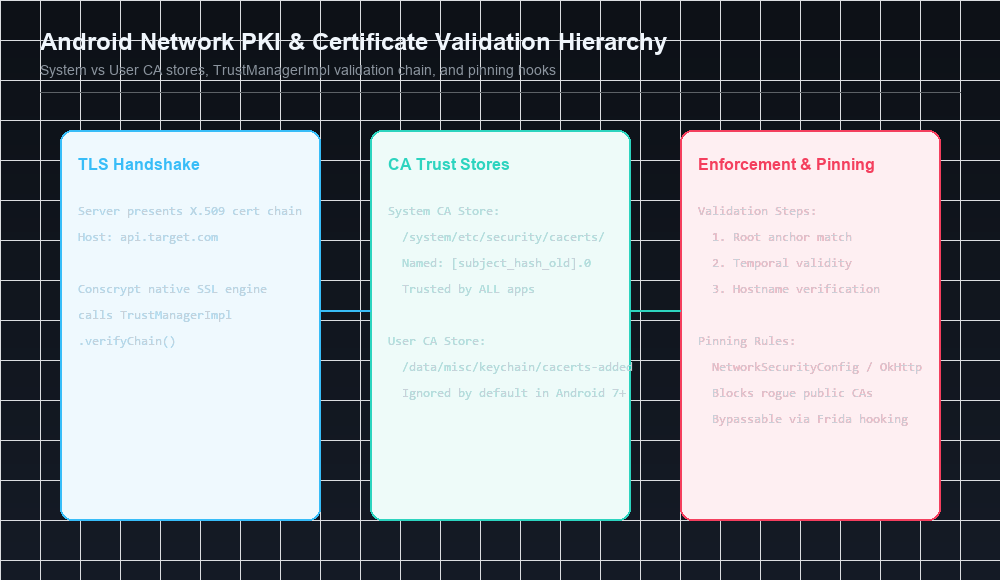
The TLS Handshake Flow
When an application opens an HTTPS connection:
1
2
3
4
5
6
7
8
9
10
11
12
App -> HttpsURLConnection -> Conscrypt Engine -> Native libssl.so
                                                      |
                                    [TLS Client Hello + SNI]
                                                      |
                                    <-- [Server Hello + Cert Chain]
                                                      |
                             Conscrypt calls TrustManagerImpl.verifyChain()
                                                      |
                                    +---> Check System CA Store
                                    +---> Check Validity Dates
                                    +---> Verify Hostname (CN / SAN)
                                    +---> Check Pinning Rules
2. Certificate Validation: TrustManagerImpl
In Java and Android, certificate validation is delegated to implementations of the X509TrustManager interface. In Android, the core implementation is com.android.org.conscrypt.TrustManagerImpl.
The Validation Algorithm
When a remote TLS server presents its X.509 certificate chain:
- Chain Parsing:
TrustManagerImplparses the server certificate (leaf) and intermediate certificates into an ordered array. - Anchor Resolution: The validator searches local root CA stores to find an authority certificate whose Subject DN and public key match the issuer of the top intermediate certificate.
- Cryptographic Signature Verification: It traverses the chain from root to leaf, cryptographically verifying each certificate’s digital signature using the public key of the issuing certificate above it.
- Temporal Validity Checks: Verifies that the current system time falls between
Not BeforeandNot Aftertimestamps for every certificate in the chain. - Hostname Verification: Validates that the hostname in the requested URL matches either the Common Name (
CN) or a Subject Alternative Name (SAN) extension inside the leaf certificate.
3. The Android CA Certificate Store Architecture
Android segregates trusted certificates into two physically and logically distinct filesystem repositories:
1. The System CA Store (/system/etc/security/cacerts/)
- Location: Mounted on the read-only
/systempartition. - Permissions: Owned by
root:rootwith permissions0644. - Trust Scope: Trusted by the operating system, system daemons, Google Play services, and all third-party applications.
- Contents: Over 130 globally recognized commercial Certificate Authorities (e.g., DigiCert, Let’s Encrypt, Sectigo).
Installing a Custom System CA via OpenSSL
For penetration testers on a rooted device or emulator:
1
2
3
4
5
6
7
8
9
10
11
12
13
14
# 1. Export Burp Suite / mitmproxy certificate in DER or PEM format
openssl x509 -inform DER -in burp.der -out burp.pem

# 2. Compute legacy subject hash
HASH=$(openssl x509 -inform PEM -subject_hash_old -in burp.pem | head -n 1)

# 3. Rename certificate file
mv burp.pem ${HASH}.0

# 4. Push to device and remount /system as read-write
adb root
adb remount
adb push ${HASH}.0 /system/etc/security/cacerts/
adb shell chmod 644 /system/etc/security/cacerts/${HASH}.0
2. The User CA Store (/data/misc/keychain/cacerts-added/)
- Location: Stored in the writable user data partition.
- Creation: Created when a user installs a certificate via
Settings -> Security -> Install from storage(requires setting a secure lockscreen PIN). - Isolation: In Android 7.0+ (API 24+), user-added certificates are strictly confined to user-facing applications that explicitly opt in.
4. The Android 7.0+ Trust Boundary & Network Security Config
Prior to Android 7.0, installing a proxy CA into the User CA store was sufficient to intercept HTTPS traffic across virtually all installed applications.
In Android 7.0, Google altered the default trust configuration:
1
2
3
4
5
6
7
8
9
<!-- Default Network Security Configuration in Android 7.0+ -->
<network-security-config>
    <base-config>
        <trust-anchors>
            <!-- Third-party apps ONLY trust the system store by default! -->
            <certificates src="system" />
        </trust-anchors>
    </base-config>
</network-security-config>
Opting In via network_security_config.xml
To permit debugging proxies during development, developers must explicitly add a Network Security Configuration file:
1
2
3
4
5
6
7
8
9
10
<!-- res/xml/network_security_config.xml -->
<network-security-config>
    <debug-overrides>
        <trust-anchors>
            <!-- Allow user-installed proxy CAs ONLY in debug builds -->
            <certificates src="user" />
            <certificates src="system" />
        </trust-anchors>
    </debug-overrides>
</network-security-config>
5. Insecure Custom TrustManager Vulnerabilities
Mobile developers frequently encounter TLS handshake errors during development when testing against internal staging servers with self-signed certificates. A tragically common anti-pattern is replacing Android’s default TrustManager with a “Trust-All” dummy implementation:
The “Trust-All” Anti-Pattern
1
2
3
4
5
6
7
8
9
10
11
12
13
14
15
16
17
18
19
20
21
// DANGEROUS SECURITY FLAW: Bypasses all TLS validation!
TrustManager[] trustAllCerts = new TrustManager[] {
    new X509TrustManager() {
        @Override
        public void checkClientTrusted(X509Certificate[] chain, String authType) {}

        @Override
        public void checkServerTrusted(X509Certificate[] chain, String authType) {
            // EMPTY BODY: Trusts ANY certificate, expired, forged, or self-signed!
        }

        @Override
        public X509Certificate[] getAcceptedIssuers() {
            return new X509Certificate[0];
        }
    }
};

SSLContext sc = SSLContext.getInstance("TLS");
sc.init(null, trustAllCerts, new java.security.SecureRandom());
HttpsURLConnection.setDefaultSSLSocketFactory(sc.getSocketFactory());
6. Advanced Pinning Bypasses via Frida
High-security applications implement certificate pinning using OkHttp, TrustManagerImpl, or native C/C++ libraries.
Universal Frida Unpinning Script
1
2
3
4
5
6
7
8
9
10
11
12
13
14
15
16
17
18
19
20
21
22
23
24
25
26
// Universal Android TLS Pinning Bypass (OkHttp3 + TrustManagerImpl)
Java.perform(function() {
    console.log('[*] Initializing Dynamic TLS Unpinning Engine...');

    // 1. Bypass TrustManagerImpl
    try {
        var TrustManagerImpl = Java.use('com.android.org.conscrypt.TrustManagerImpl');
        TrustManagerImpl.verifyChain.implementation = function(untrustedChain, trustAnchorChain, host, clientAuth, ocspData, tlsSctData) {
            console.log('[+] Bypassed TrustManagerImpl.verifyChain for: ' + host);
            return untrustedChain;
        };
    } catch (e) {
        console.log('[-] Conscrypt TrustManagerImpl not found');
    }

    // 2. Bypass OkHttp3 CertificatePinner
    try {
        var CertificatePinner = Java.use('okhttp3.CertificatePinner');
        CertificatePinner.check.overload('java.lang.String', 'java.util.List').implementation = function(hostname, peerCertificates) {
            console.log('[+] Bypassed OkHttp3 CertificatePinner for: ' + hostname);
            return;
        };
    } catch (e) {
        console.log('[-] OkHttp3 CertificatePinner not found');
    }
});
Next in the Series: Chapter 7 Preview
In Chapter 7: Credential Storage, we will examine:
- The architecture of the
/system/bin/keystorenative daemon and modern Rust-basedkeystore2. - Master key generation, PBKDF2 derivation, and lockscreen integration.
- Hardware-backed encryption via Keymaster HAL, StrongBox, and ARM TrustZone (TEE).
- The difference between the system
KeyChainAPI and the privateAndroidKeyStoreprovider.
References & Authoritative Reading
- Elenkov, Nikolay. Android Security Internals. No Starch Press, 2015. Chapter 6: “Network Security and PKI,” pp. 145–170.
- Android Developers - Network Security Configuration
- Android Open Source Project - Conscrypt Java TLS Provider
- OWASP Mobile Security Testing Guide - Testing Network Communication (MASTG-NETW-1 to MASTG-NETW-4)
- PortSwigger Research - Bypassing Android 7.0+ Network Security Config
Let’s Connect
Have you analyzed mobile TLS implementations or bypassed certificate pinning in engagements?
- Abdulrahman Mohamed
This technical content and everything shared across this blog is dedicated with sincere intention to serve as enduring, beneficial knowledge (علم يُنتفع به) and an ongoing charity (صدقة جارية). If you find value in this research, please remember me and my family in your sincere prayers.