Mobile Penetration Testing Guide: Chapter 1 - Modern Lab Setup, Architecture & Testing Methodology
The definitive guide to building a modern, battle-tested Android penetration testing lab, mastering the OWASP MASTG methodology, and configuring essential toolchains spanning ADB, MobSF, Drozer, and Frida.
Mobile application penetration testing has evolved far beyond running an automated scanner or inspecting cleartext HTTP traffic through an unconfigured proxy. Modern enterprise Android applications are complex distributed systems: they execute on untrusted consumer hardware, communicate across multi-tiered cloud microservices, leverage compiled native C/C++ runtimes via JNI, and deploy multi-layered anti-tampering, root detection, and cryptographic protections.
To systematically uncover high-impact vulnerabilities, security engineers must approach mobile assessments with an adversarial mindset backed by a structured, repeatable methodology and a fully instrumented security laboratory.
This master series unifies the core principles of the OWASP Mobile Application Security Testing Guide (MASTG), practical industry playbooks, and hands-on offensive research into an exhaustive reference guide. In this foundational chapter, we establish the core testing methodology, dissect the internal security architecture of the Android OS, and build an enterprise-grade mobile security testing laboratory from the ground up.
flowchart TD
    subgraph MASTG_Phases["OWASP MASTG Testing Pipeline"]
        P1["Phase 1: Architecture & Scope<br/>(Target Identification, Endpoints, Threat Model)"] --> P2["Phase 2: Static Analysis (SAST)<br/>(Decompilation, Manifest Audit, Hardcoded Secrets)"]
        P2 --> P3["Phase 3: Dynamic Analysis (DAST)<br/>(Frida Hooking, IPC Injection, Memory Inspection)"]
        P3 --> P4["Phase 4: Network & Cryptography<br/>(MitM Interception, TLS Pinning Bypass, API Auditing)"]
        P4 --> P5["Phase 5: Reporting & Remediation<br/>(Vulnerability Severity Scoring & Mitigations)"]
    end
1. Mobile Penetration Testing Methodology: The OWASP MASTG Framework
A rigorous mobile assessment follows a five-phase testing lifecycle designed to evaluate both the client-side binary running on the device and its underlying server-side communication interfaces.
1
2
3
4
5
6
7
8
9
10
11
12
13
14
15
16
17
18
19
20
21
22
23
+---------------------------------------------------------------------------------+
|                        OWASP MASTG TESTING LIFECYCLE                            |
+---------------------------------------------------------------------------------+
                                         |
    +------------------------------------+------------------------------------+
    |                                    |                                    |
    v                                    v                                    v
[ Phase 1: Recon & Intel ]    [ Phase 2: Static Analysis ]       [ Phase 3: Dynamic Analysis ]
- Package metadata harvesting  - Manifest permission auditing     - Runtime method hooking
- APK extraction from device   - Source code decompilation (Jadx) - Root & emulator bypasses
- Attack surface mapping       - Hardcoded secret discovery       - TLS/SSL pinning bypass
    |                          - Native .so library analysis      - Memory inspection & dumps
    |                                    |                                    |
    +------------------------------------+------------------------------------+
                                         |
    +------------------------------------+------------------------------------+
    |                                                                         |
    v                                                                         v
[ Phase 4: IPC & Component Auditing ]                     [ Phase 5: Network & API Testing ]
- Exported Activity intent spoofing                       - Proxy traffic interception (Burp/Caido)
- Broadcast Receiver injection                            - WebSockets & gRPC inspection
- Content Provider SQLi & Path Traversal                  - Broken Object Level Auth (BOLA)
- Background Service abuse & DoS                          - Business logic & payment flow testing
The Comprehensive Android AppSec Testing Checklist
Synthesized from industry standards and field testing methodologies (including Mosaad Sallam’s Sec-88 checklist and OWASP MASTG controls), every assessment must validate the following critical vectors:
| Testing Domain | Core Verification Checks | Primary Tools & Techniques |
|---|---|---|
| Network & Transport | TLS enforcement, custom CA trust, certificate pinning validation, cleartext traffic allowance | Burp Suite, Caido, Frida, Objection, NetworkSecurityConfig |
| Device & Runtime Defenses | Root detection mechanisms, emulator detection, debugger detection (ptrace), integrity verification | Magisk DenyList, Zygisk, Frida anti-root scripts, Smali patching |
| Local Storage & Data Leakage | Plaintext SharedPreferences, unencrypted SQLite databases, external storage exposure, world-readable files | ADB shell, SQLite3, run-as, strings, MobSF |
| Logs & System Artifacts | Sensitive token and PII leakage in system logs, crash dump exposure | adb logcat, pidcat, grep |
| User Interface Protection | Screen caching in recent app switcher, FLAG_SECURE enforcement, sensitive field keyboard caching (textNoSuggestions) | Manual UI inspection, ADB screencap |
| IPC & Component Security | Exported activities, intent redirection, broadcast interception, Content Provider SQLi and directory traversal | Drozer, ADB Activity Manager (am), Content Manager (content) |
| WebView Security | JavaScript interface bridges, local file scheme access (file://), Universal file access, XSS injection | Drozer, Chrome Remote Debugger, Frida |
| Cryptography & Key Management | Hardcoded symmetric keys, insecure cipher modes (ECB), static IVs, broken PRNGs, Keystore usage | Jadx, Ghidra, Frida cryptographic hooks |
| Client Code Tampering | Smali bytecode modification, signature check bypass, application repackaging, binary patching | Apktool, Uber-APK-Signer, Zipalign, Ghidra |
2. Android Architecture & The Low-Level Security Model
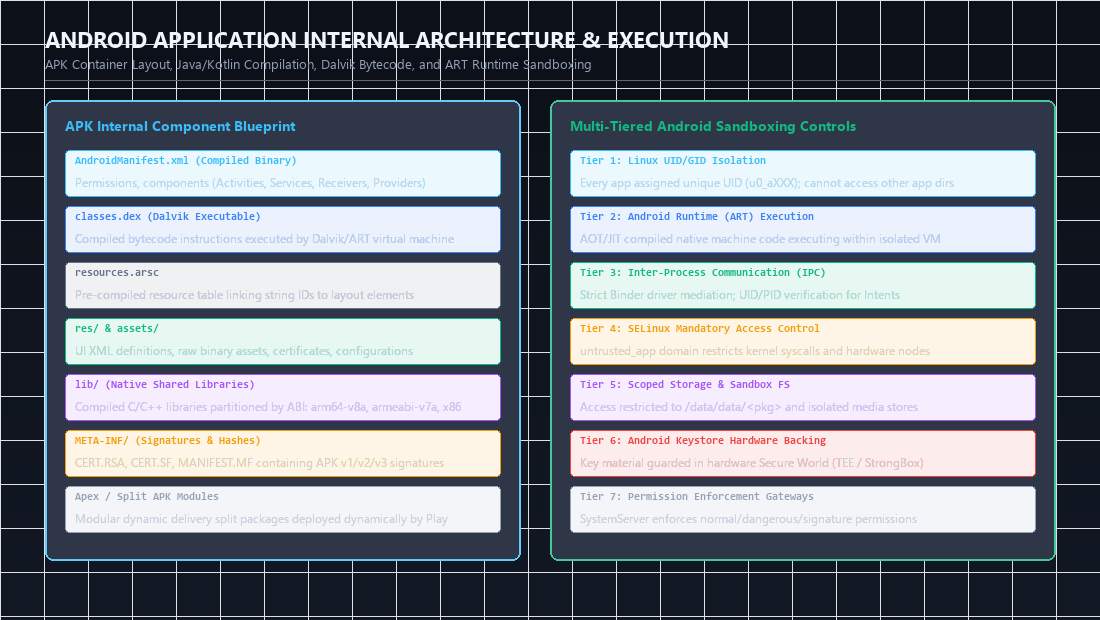 Figure 1: Complete APK container layout (DEX, resources, native libraries) alongside the multi-tiered Android sandboxing isolation architecture.
To exploit or defend an operating system, one must understand its foundational architecture. Android is not a standard Linux distribution; it is a customized software stack built on top of a modified Linux kernel, enforcing strict process isolation and privilege boundaries.
1
2
3
4
5
6
7
8
9
10
11
12
13
14
15
16
17
18
19
20
21
22
23
24
+---------------------------------------------------------------------------------+
|                                APPLICATION LAYER                                |
|           Banking App    -    Social Media    -    System Contacts              |
+---------------------------------------------------------------------------------+
                                         |
+---------------------------------------------------------------------------------+
|                              APPLICATION FRAMEWORK                              |
|   Activity Manager  |  Package Manager  |  Telephony Manager  |  Content Providers  |
+---------------------------------------------------------------------------------+
                                         |
+---------------------------------------------------------------------------------+
|                       ANDROID RUNTIME & PLATFORM LIBRARIES                      |
|      Android Runtime (ART)  |  Core Java Libraries  |  Bionic Libc  |  Webkit   |
+---------------------------------------------------------------------------------+
                                         |
+---------------------------------------------------------------------------------+
|                            HARDWARE ABSTRACTION LAYER                           |
|            Camera    -    Bluetooth    -    Audio    -    Fingerprint / TEE     |
+---------------------------------------------------------------------------------+
                                         |
+---------------------------------------------------------------------------------+
|                                  LINUX KERNEL                                   |
|   IPC (Binder)  |  Process Sandboxing (UIDs)  |  SELinux Policies  |  Memory Mgmt  |
+---------------------------------------------------------------------------------+
The Sandboxing Mechanism: Multi-User Isolation
In conventional desktop Linux systems, multiple user applications typically run under the same User ID (e.g., UID 1000). If one application is compromised, all user files belonging to UID 1000 are immediately exposed.
Android inverts this model:
- Every installed application is assigned a distinct, unique Linux User ID (e.g.,
u0_a145, corresponding to UID10145). - The Linux kernel strictly isolates processes based on these UIDs. An application cannot read, modify, or execute code within another application’s private directory (
/data/data/<package_name>/) because standard Linux Discretionary Access Control (DAC) permissions restrict access to that specific UID:
1
2
3
4
# Inspecting private app directory permissions via ADB shell
ls -la /data/data/ | grep com.target.app
# Output:
# drwx------ 4 u0_a145 u0_a145 4096 2026-11-08 10:15 com.target.app
Mandatory Access Control: SELinux
Beyond Linux DAC, Android enforces Mandatory Access Control (MAC) via Security-Enhanced Linux (SELinux) in Enforcing mode. SELinux confines each application process inside a restricted security domain (such as untrusted_app). Even if an application successfully escapes its DAC boundaries or achieves local privilege escalation, SELinux policies prevent the process from accessing unauthorized raw device nodes, socket types, or system services.
Inter-Process Communication (IPC) via Binder
Because applications run in strictly isolated process memory spaces, they cannot share memory directly. All inter-process communication—from launching an Activity to querying a Content Provider—is mediated by the Binder kernel driver (/dev/binder). The Binder driver facilitates high-performance Remote Procedure Calls (RPC) while performing reference validation and UID verification at the kernel boundary.
3. Laboratory Setup: Physical Devices vs Emulators
A reliable testing environment must provide full root control, network inspection flexibility, and support for modern Android API levels (API 30 through API 34+).
Choosing Your Testing Platform
1
2
3
4
5
6
7
8
9
10
11
12
13
14
15
+-------------------------------------+-------------------------------------+
|      PHYSICAL ROOTED DEVICE         |         EMULATED ENVIRONMENT        |
|  (e.g., Google Pixel 6/7/8)         |   (Android Virtual Device / AVD)    |
+-------------------------------------+-------------------------------------+
| Pros:                               | Pros:                               |
| - 100% native hardware fidelity.    | - Zero hardware cost; easily cloned.|
| - ARM64 native binary execution     | - Instant snapshot and restore.     |
|   without translation overhead.     | - Writable system images out of box.|
| - Tests genuine biometric/camera/NFC| - Flexible resolution/API choices.  |
|                                     |                                     |
| Cons:                               | Cons:                               |
| - Risk of bricking during flashing. | - Architecture emulation lag when   |
| - Fixed hardware specifications.    |   running ARM64 apps on x86_64 host.|
| - Requires physical USB connection. | - Easily flagged by emulator checks.|
+-------------------------------------+-------------------------------------+
Preparing a Rooted Android Virtual Device (AVD)
For daily testing, an AVD configured with a Google APIs system image (NOT Google Play, which locks root access) is ideal:
- Launch Android Studio and open the Device Manager.
- Create a new Virtual Device (e.g., Pixel 6 Pro).
- Select an image with Google APIs (e.g.,
API Level 33 - Android 13.0 - x86_64). - Start the emulator from the command line with a writable system partition:
1
2
# Launch emulator with root and writable system flags
emulator -avd Pixel_6_API_33 -writable-system -no-snapshot-load
- Acquire root access and remount the system partition as read-write:
1
2
3
4
5
6
7
8
9
10
# Request root daemon execution
adb root

# Disable dm-verity verification (requires reboot on modern images)
adb disable-verity
adb reboot

# Re-establish root and remount partition
adb root
adb remount
4. The Core Pentester Toolchain: Installation & Configuration
A professional mobile security workflow relies on a synchronized suite of reverse engineering, decompilation, and dynamic instrumentation tools.
1
2
3
4
5
6
7
+---------------------------------------------------------------------------------+
|                       MOBILE PENTESTING CORE TOOLCHAIN                          |
+---------------------------------------------------------------------------------+
|   ADB (Communication)   |   Jadx (Static Java)    |   Apktool (Smali & Res)     |
|   MobSF (SAST Auto)     |   Drozer (IPC Auditing) |   Frida (Runtime Hooking)   |
|   Objection (Runtime)   |   Burp Suite (Network)  |   Ghidra (Native .so Code)  |
+---------------------------------------------------------------------------------+
1. Android Debug Bridge (ADB) Mastery
ADB is the primary command-line bridge between your host workstation and the Android device.
1
2
3
4
5
6
7
8
9
10
11
12
13
14
15
16
# 1. Verify connected devices and authorization state
adb devices -l

# 2. Extract the target application package name and APK path
adb shell pm list packages | grep target
adb shell pm path com.target.app
# Output: package:/data/app/~~.../com.target.app-xyz==/base.apk

# 3. Pull the APK to your local workstation for reverse engineering
adb pull /data/app/~~.../com.target.app-xyz==/base.apk ./target_base.apk

# 4. Inspect running app user IDs and process IDs
adb shell ps -A | grep com.target.app

# 5. Monitor real-time application logs filtered by PID
adb shell "logcat --pid=$(adb shell pidof -s com.target.app) -v time"
2. Jadx & Jadx-GUI (Decompilation & Static Analysis)
Jadx deconstructs Android DEX files back into readable Java source code while resolving resource IDs to their symbolic names.
- Install via package manager or direct binary release:
1 2
# Launch GUI interface jadx-gui - Recommended Configuration:
- In
Preferences: Enable Deobfuscation (maps short/scrambled class and method names to consistent identifiers). - Enable Show Inconsistent Code to inspect bytecode fragments where Java reconstruction failed.
- Export decompiled project directly via
File -> Save as gradle project.
- In
3. Apktool (Disassembly, Resource Decoding & Patching)
Apktool decodes the raw binary XML files (AndroidManifest.xml), decomposes DEX code into Smali assembly representation, and allows modified applications to be rebuilt:
1
2
3
4
5
6
7
8
9
10
11
12
# Disassemble the target APK
apktool d target_base.apk -o ./target_disassembled/

# Rebuild modified Smali/resources back into a binary APK
apktool b ./target_disassembled/ -o ./target_patched.apk

# Align memory offsets to 4-byte boundaries for execution performance
zipalign -v 4 target_patched.apk target_aligned.apk

# Re-sign the APK using a custom debugging keystore
keytool -genkey -v -keystore debug.keystore -storepass android -alias androiddebugkey -keypass android -keyalg RSA -keysize 2048 -validity 10000
apksigner sign --ks debug.keystore --ks-pass pass:android --out target_signed.apk target_aligned.apk
4. Mobile Security Framework (MobSF)
MobSF provides automated static and dynamic security assessments, scanning manifests, checking for known CVEs, and flagging dangerous API usages:
1
2
# Run MobSF via Docker for clean dependency isolation
docker run -it --rm -p 8000:8000 opensecurity/mobsf:latest
Navigate to http://127.0.0.1:8000, upload the target APK, and review the automated vulnerability breakdown, manifest permission audit, and extracted hardcoded secrets.
5. Drozer (Comprehensive IPC & Component Auditing)
Drozer allows security researchers to assume the role of an untrusted third-party application on the device to interact with and exploit exposed IPC components:
1
2
3
4
5
6
7
8
9
10
# 1. Install Drozer Agent APK on the test device
adb install drozer-agent.apk

# 2. Forward the Drozer communication port from device to host
adb forward tcp:31415 tcp:31415

# 3. Launch Drozer Agent on the device and turn ON the embedded server

# 4. Connect from your host machine console
drozer console connect
Once connected to the Drozer console (dz>), verify connectivity:
1
2
3
# Retrieve basic device and environment details
dz> list
dz> run app.package.info -a com.target.app
6. Frida & Objection (Dynamic Instrumentation Suite)
Frida injects JavaScript scripts and custom hooks into running native process memory, while Objection provides a pre-packaged mobile exploration environment built on Frida.
1
2
3
4
5
6
7
8
9
10
11
12
13
14
15
16
17
18
# 1. Install Frida and Objection on host workstation
pip install frida-tools objection

# 2. Identify target device CPU architecture
adb shell getprop ro.product.cpu.abi
# Example output: x86_64 (or arm64-v8a)

# 3. Download matching frida-server release, push to device, and execute as root
adb root
adb push frida-server-16.x.x-android-x86_64 /data/local/tmp/frida-server
adb shell "chmod 755 /data/local/tmp/frida-server"
adb shell "/data/local/tmp/frida-server &"

# 4. Verify Frida can communicate with target device processes
frida-ps -U

# 5. Launch Objection to instrument target application
objection -g com.target.app explore
5. Setting Up Vulnerable Testing Targets
To build reliable muscle memory throughout this guide, deploy the primary open-source training targets utilized by security researchers:
1
2
3
4
5
6
7
8
# 1. InjuredAndroid (OWASP MASTG training lab covering XSS, crypto, root bypass)
adb install InjuredAndroid.apk

# 2. Sieve (Enterprise password manager lab targeting Content Provider flaws)
adb install sieve.apk

# 3. InsecureBankv2 (Financial app targeting IPC, broadcast spoofing, and SharedPreferences)
adb install InsecureBankv2.apk
6. Summary Checklist & Roadmap
Your mobile testing environment is now fully configured and validated:
- Operating system mechanics, UID sandboxing, and SELinux boundaries are understood.
- ADB communication and device file extraction workflows are operational.
- Static decompilation (Jadx, Apktool) and automated analysis (MobSF) pipelines are ready.
- Dynamic instrumentation (Frida, Objection) and IPC assessment (Drozer) servers are live.
In Chapter 2, we will dive straight into binary internals: dissecting APK architectures, reverse engineering native .so libraries using Ghidra, and modifying Smali bytecode to defeat client-side validation logic.
Practical Mobile Pentesting Lab Setup Cheat-Sheet
| Tool / Component | Quick Verification Command | Operational Role |
|---|---|---|
| ADB Connectivity | adb devices -l & adb shell getprop ro.build.version.release | Verifies root shell access and target Android version |
| Frida Server Check | adb shell "/data/local/tmp/frida-server &" followed by frida-ps -U | Validates dynamic instrumentation daemon is listening |
| Jadx GUI Decompile | jadx-gui target.apk | Fast decompilation of APK dex bytecode into readable Java |
| Extract APK from Phone | adb shell pm path com.target.app & adb pull <path> app.apk | Pulls base APK file directly from physical or emulated device |
Categorized References & Authoritative Reading
1. Official Standards & Verification Frameworks
- OWASP Mobile Application Security Verification Standard (MASVS): Architectural, Storage, and Platform standards. https://mas.owasp.org/MASVS/.
- OWASP Mobile Security Testing Guide (MASTG): Android Testing Guide & Static Analysis Best Practices. https://mas.owasp.org/MASTG/.
- Google Android Open Source Project (AOSP): Security Architecture & Process Sandboxing. https://source.android.com/docs/security.
2. Industry Tooling & Decompilers
- Jadx - Dex to Java Decompiler: Skylot. https://github.com/skylot/jadx.
- Apktool - Reverse Engineering Tool for Android Applications: iBotPeaches. https://apktool.org/.
- MobSF (Mobile Security Framework): Automated static and dynamic testing framework. https://github.com/MobSF/Mobile-Security-Framework-MobSF.
3. MITRE ATT&CK Mobile Matrix Mapping
- T1404: Exploitation for Privilege Escalation (Local device root exploit vectors).
- T1418: Software Discovery (Probing installed packages via
pm list packages). - T1426: System Information Discovery (Querying build properties and hardware sensors).
Author: Abdulrahman M. Fathi (0x3bdo) • Cyber Security Engineer & Penetration Tester