Android Security Internals: Chapter 7 - Credential Storage
A rigorous technical analysis of Chapter 7 of Nikolay Elenkov's 'Android Security Internals', examining the keystore native daemon, master key derivation, hardware-backed keys, Keymaster HAL, StrongBox, and ARM TrustZone integration.
Hello everyone,
Welcome back to our book summary series covering “Android Security Internals” by Nikolay Elenkov, expanded with hardware security research from Google Project Zero and the OWASP Mobile Application Security Verification Standard (MASVS).
In Chapter 6, we dissected network security, the system CA store, and TLS certificate validation. In this installment, we explore Chapter 7: Credential Storage, examining the architecture responsible for protecting cryptographic keys, digital certificates, and user secrets when the device is at rest.
Storing private cryptographic keys on a mobile device presents a classic security paradox: If malicious code or a local root exploit compromises the Android operating system, how can private keys remain secure?
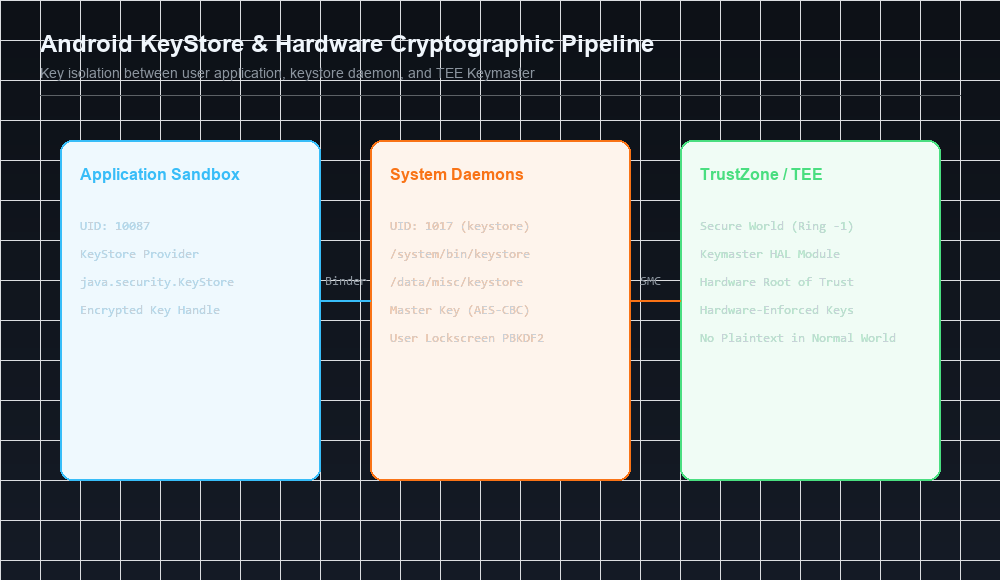
Android resolves this through a multi-layered credential subsystem anchored by the native /system/bin/keystore daemon, user-derived master keys, hardware isolation powered by the Keymaster Hardware Abstraction Layer (HAL) running inside ARM TrustZone, and dedicated tamper-resistant StrongBox security chips.
Series Navigation
| Previous Chapter | Current Chapter | Next Chapter |
|---|---|---|
| Chapter 6: Network Security and PKI | Chapter 7: Credential Storage | Chapter 8: Online Account Management |
Key Takeaways
- The Insecurity of Software Storage: Storing cryptographic secrets in
SharedPreferences, SQLite databases, or hardcoded strings leaves them vulnerable to backup extraction, memory dumping, and root compromise. - The
keystoreDaemon: Android offloads key operations to/system/bin/keystore(and modern Rust-basedkeystore2), a dedicated native daemon running under its own isolated UID (1017,AID_KEYSTORE). - Per-UID Key Namespaces: Keys stored in the keystore are indexed by the calling application’s Linux UID, cryptographically isolating one application’s keys from another.
- Master Key Derivation: Keystore files on disk are encrypted using an AES master key, which is itself encrypted using a key derived from the user’s lockscreen PIN/password via PBKDF2 or scrypt.
- Hardware-Backed Root of Trust: Modern Android integrates Keymaster/KeyMint HAL modules running inside ARM TrustZone (TEE) or dedicated StrongBox microcontrollers. Private keys never enter Linux kernel or userspace RAM; cryptographic signing and decryption occur exclusively inside the secure enclave.
1. The Credential Storage Landscape
Before diving into the native KeyStore architecture, let’s contrast the storage models available to Android applications:
| Storage Mechanism | Storage Path | Encryption State | Threat Exposure |
|---|---|---|---|
SharedPreferences | /data/data/<pkg>/shared_prefs/ | Plaintext XML | Trivial extraction via ADB backup or root |
| SQLite Database | /data/data/<pkg>/databases/ | Plaintext binary | Direct extraction; requires third-party SQLCipher for encryption |
| Internal Flash File | /data/data/<pkg>/files/ | Plaintext | Readable by any process sharing the UID or root |
| Android KeyStore | /data/misc/keystore/ | Encrypted AES blob / TEE | Hardware-isolated; private keys never leave secure hardware |
2. The keystore Native Daemon & Rust keystore2
The core of Android’s credential management is /system/bin/keystore, launched by init during boot:
1
2
3
4
service keystore /system/bin/keystore /data/misc/keystore
    class main
    user keystore
    group keystore drmrpc readproc
The Shift to Rust: keystore2 in Android 12+
In Android 12, Google completely rewrote the KeyStore daemon in Rust (keystore2), eliminating entire classes of memory safety vulnerabilities (use-after-free, buffer overflows, integer overflows) that historically plagued C++ native system daemons.
Storage Namespace
Encrypted keys are saved to disk in /data/misc/keystore/user_0/ using a strict naming pattern:
1
<caller_uid>_<key_type>_<key_alias>
For example, an RSA private key named auth_key owned by UID 10087 is stored on disk as:
1
10087_USRPKEY_auth_key
If UID 10088 attempts to read or sign with auth_key, the keystore daemon checks the calling UID against the file prefix and terminates the operation with a permission error.
3. Hardware-Backed Keys: Keymaster HAL & StrongBox
Software encryption in userspace has a fatal vulnerability: if an attacker exploits a Linux kernel vulnerability to gain root privileges, they can read the master key directly from keystore daemon memory.
To neutralize this threat, Android introduced hardware-backed credential storage.
ARM TrustZone vs. StrongBox Keymaster
Android supports two tiers of hardware isolation:
- Trusted Execution Environment (TEE - ARM TrustZone):
- Shares the main application processor silicon.
- CPU core switches into Secure World via the
SMC(Secure Monitor Call) instruction. - Isolated microkernel (e.g., Qualcomm QSEE, Trusty OS).
- StrongBox Keymaster (Dedicated Hardware Security Module):
- A physically separate, discrete microcontroller with its own CPU, RAM, and secure flash memory (e.g., Google Titan M on Pixel devices, Samsung Knox Vault).
- Completely immune to side-channel or speculative execution attacks (Spectre/Meltdown) affecting the main SoC.
- Certified to Common Criteria EAL5+ physical tamper resistance.
The Keymaster Hardware Pipeline
1
2
3
4
5
6
7
8
9
10
11
12
13
14
15
// Generating a hardware-backed key in Android
KeyPairGenerator kpg = KeyPairGenerator.getInstance(
    KeyProperties.KEY_ALGORITHM_RSA, "AndroidKeyStore");

kpg.initialize(new KeyGenParameterSpec.Builder(
    "SecureEnterpriseKey",
    KeyProperties.PURPOSE_SIGN | KeyProperties.PURPOSE_VERIFY)
    .setDigests(KeyProperties.DIGEST_SHA256)
    .setSignaturePaddings(KeyProperties.SIGNATURE_PADDING_RSA_PSS)
    .setUserAuthenticationRequired(true)
    .setUserAuthenticationValidityDurationSeconds(30)
    .setIsStrongBoxBacked(true) // Enforces StrongBox discrete chip!
    .build());

KeyPair keyPair = kpg.generateKeyPair();
4. Hardware Key Attestation
How can an enterprise MDM or mobile banking backend verify that an encryption key was genuinely generated inside authentic hardware and not simulated by an attacker inside an emulator or rooted device?
Android provides Key Attestation:
- When generating a key, the application requests an attestation challenge.
- The TEE/StrongBox generates an X.509 certificate chain rooted in a Google Hardware Root Certificate.
- Inside the leaf certificate, an ASN.1 extension (
1.3.6.1.4.1.11129.2.1.17) embeds verified hardware security details:attestationSecurityLevel: Software, TrustedEnvironment, or StrongBox.bootloader: Verified locked or unlocked status.verifiedBootState: Verified, SelfSigned, or Unverified.osVersionandosPatchLevel.
5. Gal Beniamini’s Research: Attacking Qualcomm TrustZone
In 2016, vulnerability researcher Gal Beniamini (Google Project Zero) published groundbreaking research analyzing Qualcomm’s TrustZone implementation (QSEE).
Beniamini identified memory corruption vulnerabilities within the QSEE Keymaster trustlet:
- By sending crafted structures across the Linux
/dev/qseecomdriver, an attacker could trigger a buffer overflow inside the Secure World memory space. - This allowed arbitrary code execution in Ring -1 (Secure World).
- The attacker extracted the hardware-fused device master key, enabling offline decryption of Android Full Disk Encryption without brute-forcing on the physical device.
Next in the Series: Chapter 8 Preview
In Chapter 8: Online Account Management, we will examine:
- Centralized single sign-on via the
AccountManagerarchitecture. - Developing custom authenticators with
AbstractAccountAuthenticator. - OAuth token delegation, caching in
accounts.db, and invalidation. - Security risks including account token hijacking and rogue authenticators.
References & Authoritative Reading
- Elenkov, Nikolay. Android Security Internals. No Starch Press, 2015. Chapter 7: “Credential Storage,” pp. 171–190.
- Android Developers - Hardware-backed Keystore Guide
- AOSP Documentation - Keymaster & KeyMint Architecture
- Beniamini, Gal. Extracting Qualcomm’s KeyMaster Keys - Breaking the Encryption of Android Full Disk Encryption. Project Zero Research, 2016.
- AOSP Documentation - Android KeyStore 2.0 Rust Architecture
Let’s Connect
Have you analyzed Android hardware key attestation or audited KeyStore implementations?
- Abdulrahman Mohamed
This technical content and everything shared across this blog is dedicated with sincere intention to serve as enduring, beneficial knowledge (علم يُنتفع به) and an ongoing charity (صدقة جارية). If you find value in this research, please remember me and my family in your sincere prayers.