Building a Python-Based System Information Gathering Tool
A comprehensive guide to automating network reconnaissance, port scanning, system enumeration, and service discovery using Python and Nmap.

Hello everyone,
I hope you’re doing well and having a great day.
In today’s article, I’d like to share a Python project I developed to simplify and automate one of the most important phases of any security assessment: reconnaissance.
Whether you’re performing a penetration test, conducting a security audit, or simply trying to understand the structure of a network, information gathering is often the foundation upon which everything else is built. The more accurately and efficiently information is collected, the easier it becomes to identify potential attack surfaces, exposed services, and security weaknesses.
The primary goal of this project was to automate several common reconnaissance tasks while keeping the workflow simple, organized, and easy to use. By combining system information gathering, network scanning, port enumeration, and operating system detection into a single tool, the process becomes significantly more efficient and less repetitive.
In this article, we’ll explore how the tool works, review the source code, and discuss how each component contributes to the overall reconnaissance process.
Let’s get started.
In today’s interconnected world, cybersecurity has become a fundamental priority for individuals and organizations alike. One of the key steps in securing any environment is network reconnaissance — the process of systematically collecting information about systems and networks. For cybersecurity professionals, gaining a comprehensive understanding of the infrastructure is not just useful but essential.
Automation tools play a critical role in making reconnaissance faster, more accurate, and efficient. This article introduces a Python-based tool I developed to streamline the network reconnaissance process. It simplifies the task of gathering detailed system and network information, transforming complex manual efforts into a seamless, automated workflow.
Project Overview
The Python-based reconnaissance tool was designed with four key objectives in mind:
- System Information Gathering: Extracts critical details, including the operating system, machine type, processor specifications, and IP information.
- Network Scanning: Discovers devices across a specified network range, offering a comprehensive overview of the network topology.
- Port and Service Enumeration: Identifies open ports and running services on target devices, revealing potential vulnerabilities.
- Report Generation: Consolidates the collected data into a structured and easily accessible report for documentation and analysis.
With these capabilities, this tool is more than just a network scanner — it’s a versatile asset for cybersecurity assessments, penetration testing, and routine audits.
Code Implementation: Building the Advanced Reconnaissance Tool
Here is the complete Python script for the tool. It integrates Python’s standard libraries with the powerful nmap scanner via subprocess calls.
1
2
3
4
5
6
7
8
9
10
11
12
13
14
15
16
17
18
19
20
21
22
23
24
25
26
27
28
29
30
31
32
33
34
35
36
37
38
39
40
41
42
43
44
45
46
47
48
49
50
51
52
53
54
55
56
57
58
59
60
61
62
63
64
65
66
67
68
69
70
71
72
73
74
75
76
77
78
79
80
81
82
83
84
85
86
87
88
89
90
91
92
93
94
95
96
97
98
99
100
101
102
103
104
105
106
107
108
109
110
111
112
113
114
115
116
117
118
119
120
121
122
123
import platform
import socket
import subprocess
from datetime import datetime

# Function to retrieve the local IP address
def get_local_ip():
    try:
        hostname = socket.gethostname()
        local_ip = socket.gethostbyname(hostname)
        return local_ip
    except Exception as e:
        return f"Could not retrieve IP: {e}"

# Function to display system information
def display_system_info():
    system_info = {
        "Operating System": platform.system(),
        "OS Release": platform.release(),
        "OS Version": platform.version(),
        "Machine Type": platform.machine(),
        "Processor": platform.processor(),
        "Local IP Address": get_local_ip(),
        "Python Version": platform.python_version()
    }
    print("\n" + "System Information".center(50, "-"))
    for key, value in system_info.items():
        print(f"{key}: {value}")
    print("-" * 50 + "\n")
    return system_info

# Function to scan the network using nmap
def scan_network(network):
    print(f"\nScanning network: {network}...\n")
    try:
        result = subprocess.run(["nmap", "-sP", network], capture_output=True, text=True)
        if result.returncode == 0:
            return result.stdout
        else:
            return f"Error: {result.stderr}"
    except Exception as e:
        return f"Network scan failed: {e}"

# Function to scan ports on a target IP using nmap
def scan_ports(target_ip):
    print(f"\nScanning ports on: {target_ip}...\n")
    try:
        result = subprocess.run(["nmap", "-sS", target_ip], capture_output=True, text=True)
        if result.returncode == 0:
            return result.stdout
        else:
            return f"Error: {result.stderr}"
    except Exception as e:
        return f"Port scan failed: {e}"

# Function to detect the operating system using nmap
def detect_os(target_ip):
    print(f"\nDetecting operating system for: {target_ip}...\n")
    try:
        result = subprocess.run(["nmap", "-O", target_ip], capture_output=True, text=True)
        if result.returncode == 0:
            return result.stdout
        else:
            return f"Error: {result.stderr}"
    except Exception as e:
        return f"OS detection failed: {e}"

# Function to perform a ping sweep (ICMP) to check if hosts are reachable
def ping_sweep(network):
    print(f"\nPerforming ICMP ping sweep on network: {network}...\n")
    try:
        result = subprocess.run(["nmap", "-sn", network], capture_output=True, text=True)
        if result.returncode == 0:
            return result.stdout
        else:
            return f"Error: {result.stderr}"
    except Exception as e:
        return f"Ping sweep failed: {e}"

# Main function to execute the tool
def main():
    print("\n" + "Advanced Recon Tool".center(50, "=") + "\n")
    system_info = display_system_info()

    # Input for network range with validation
    while True:
        network = input("Enter the network range (e.g., 192.168.1.0/24): ").strip()
        if network:
            break
        else:
            print("Invalid input. Please enter a valid network range.")

    start_time = datetime.now()

    # Perform network scan and ICMP ping sweep
    network_scan_result = scan_network(network)
    print(network_scan_result)
    ping_sweep_result = ping_sweep(network)
    print(ping_sweep_result)

    # Input for target IP with optional port scan and OS detection
    target_ip = input("\nEnter target IP for port scanning and OS detection (optional, press Enter to skip): ").strip()
    if target_ip:
        port_scan_result = scan_ports(target_ip)
        print(port_scan_result)

        os_detection_result = detect_os(target_ip)
        print(os_detection_result)
    else:
        port_scan_result = "No port scanning performed."
        os_detection_result = "No OS detection performed."

    # Calculate scan duration
    end_time = datetime.now()
    duration = end_time - start_time
    print(f"\nScan completed in: {duration}")
    print("\n" + "End of Report".center(50, "-") + "\n")

    # Report output to console (No file saving)
    print(f"\n{system_info}\n{network_scan_result}\n{ping_sweep_result}\n{port_scan_result}\n{os_detection_result}")

if __name__ == "__main__":
    main()
Sample Output and Explanation
Here is an example of the output that you would see when running the network reconnaissance tool. After entering the network range and optional target IP for port scanning, the tool will perform a series of scans and display the results.
Sample Output:
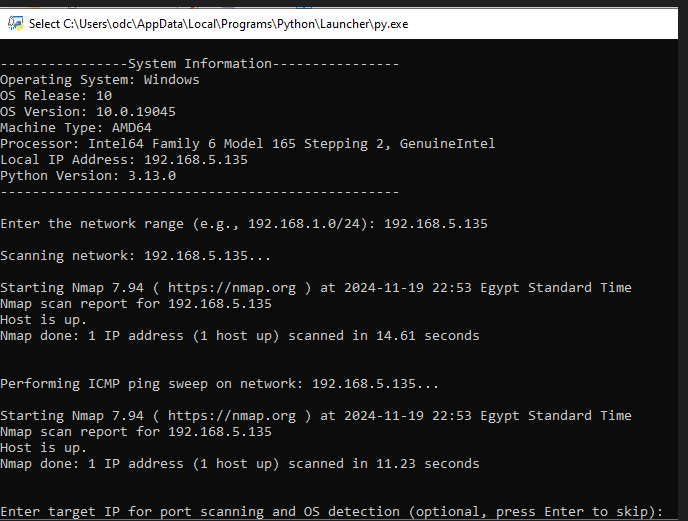 Figure: Terminal execution and scan results
The above screenshot shows the results of a network scan on the specified range (192.168.5.135). The tool uses nmap to identify active hosts on the network.
- System Information: The tool displays important system details, including the operating system, processor, and local IP address.
- Network Scan: In this example,
nmapsuccessfully discovered the host with IP192.168.5.135on the network and reported that the host is up. - Port Scan (Optional): If you provide a target IP, the tool will also scan for open ports and services. This step helps identify potential security vulnerabilities.
How to Read the Results:
- Host Status: The tool shows whether the host is up or down, along with the time it took to complete the scan.
- Port Scan Results: If you chose to scan a specific device (like
192.168.5.135), it will list open ports and associated services, helping you understand potential attack vectors.
Explanation of the Script Functions
1. get_local_ip()
- Purpose: Retrieves the local IP address of the machine.
- Explanation: This function uses the
socketlibrary to get the hostname of the machine, and then retrieves the local IP address associated with that hostname. The local IP address is essential for understanding the machine’s position on the local network.
2. display_system_info()
- Purpose: Gathers and displays essential system information.
- Explanation: This function collects key details about the machine’s environment, including the operating system, the version of the OS, machine type, processor, and Python version. It also retrieves the local IP address using the
get_local_ip()function. The gathered information is then printed in a structured format to give a quick overview of the system.
3. scan_network(network)
- Purpose: Scans a specified network range to detect active devices.
- Explanation: This function uses the
nmaptool to scan a given network range (e.g.,192.168.1.0/24) for active devices. The network scan helps identify which devices are connected to the network, allowing for a clear understanding of the network’s topology and connected devices.
4. scan_ports(target_ip)
- Purpose: Scans open ports on a specific target device.
- Explanation: This function performs a port scan on a specific target IP address using
nmap. It identifies open ports and the associated services on the target machine. This is useful for penetration testing or security audits, as it helps discover potential entry points into the target system.
5. main()
- Purpose: Coordinates the execution flow of the script.
- Explanation: This function serves as the entry point for the script. It organizes the overall flow by calling the necessary functions in order: gathering system info, scanning the network, and optionally scanning ports of a target IP. The results are displayed on the screen. The function also calculates the total duration of the scanning process.
Practical Benefits of This Tool
Automating the process of network reconnaissance offers a range of practical benefits:
- For Security Audits: The tool helps identify all devices on the network, potential vulnerabilities, and active services, making it easier to conduct comprehensive security audits.
- For Penetration Testers: By quickly gathering data on network structure and potential vulnerabilities, penetration testers can focus on finding weaknesses and exploits in a more efficient manner.
- For IT and Network Admins: This tool helps administrators monitor network changes, detect unauthorized devices, and ensure all networked systems are operating securely.
Sample Report Structure
After running the tool, you will get a comprehensive output containing:
- System Information: Information about the operating system, local IP address, and machine architecture.
- Network Scan Results: A list of devices detected on the network with IP addresses.
- Port Scan Results: Detailed results of open ports and active services on any specified target device.
- Scan Duration: The total time taken to perform the network and port scans.
The well-organized report ensures that the data can be easily referenced and analyzed for further actions.
Conclusion
Reconnaissance is often considered the foundation of both penetration testing and security assessments. The quality of information gathered during this phase directly influences the effectiveness of every stage that follows.
By automating common reconnaissance tasks, security professionals can reduce manual effort, improve consistency, and focus more on analyzing results rather than collecting them. While this project is intentionally simple, it demonstrates how Python can be used to integrate multiple reconnaissance techniques into a single workflow and serve as a foundation for more advanced tooling.
As the project continues to evolve, additional features such as reporting, service fingerprinting, vulnerability correlation, and improved scanning capabilities can be integrated to further enhance its usefulness during real-world engagements.
Thank you for taking the time to read this article.
I hope you found it useful and gained some ideas that may help you build or improve your own security automation projects.
Until the next article, stay curious and keep learning.
— Abdulrahman Mohamed
References & Further Reading
- Nmap Reference Guide — Official Network Mapper Documentation
- Python Standard Library —
socket&subprocessModules - OWASP Web Security Testing Guide (WSTG) — Information Gathering (WSTG-INFO)
- RFC 791 — Internet Protocol (IP) Specification
- RFC 793 — Transmission Control Protocol (TCP) Specification
Let’s Connect
Have a question, suggestion, or topic you’d like to discuss? Feel free to reach out or connect:
— Abdulrahman M. Fathi
This technical content and everything shared across this blog is dedicated with sincere intention to serve as enduring, beneficial knowledge (علم يُنتفع به) and an ongoing charity (صدقة جارية). If you find value in this research, please remember me and my family in your sincere prayers.