Android Security Internals: Chapter 4 - User Management
A technical dissection of Chapter 4 of Nikolay Elenkov's 'Android Security Internals', covering Android multi-user architecture, UID mathematical mapping formulas, per-user storage virtualization, and UserManagerService internals.
Hello everyone,
Welcome back to our book summary series covering “Android Security Internals” by Nikolay Elenkov, expanded with multi-tenant architecture analysis and enterprise container research.
In Chapter 3, we examined APK anatomy, DEX bytecode structure, the evolution of APK signature schemes (v1 through v4), and historic vulnerabilities like FakeID and Janus. In this installment, we explore Chapter 4: User Management, analyzing how Android implemented genuine multi-user support on top of an operating system that had already hijacked the Linux multi-user model for application sandboxing.
When Google introduced multi-user functionality in Android 4.2 (initially for tablets, and later in Android 5.0 for phones), they faced an architectural challenge: If Linux UIDs were already assigned to individual apps (UIDs 10000+), how could multiple human users coexist on the same filesystem without breaking process sandboxing?
The solution was an elegant mathematical range allocation formula combined with kernel-level storage virtualization and Linux mount namespaces.
Series Navigation
| Previous Chapter | Current Chapter | Next Chapter |
|---|---|---|
| Chapter 3: Package Management | Chapter 4: User Management | Chapter 5: Cryptographic Providers |
Key Takeaways
- The Multi-User Formula: Android maps multiple human users to distinct Linux UID spaces using the deterministic formula:
UID = (User_ID * 100000) + App_ID. - Primary vs. Secondary Users: User
0is the primary owner account that boots the device and runs core system daemons. Additional users (10,11, etc.) represent secondary profiles, guest accounts, or managed enterprise work profiles. - Storage Virtualization: Physical internal storage is partitioned into per-user directories (
/data/user/[userId]). Filesystem isolation is enforced via Discretionary Access Control (DAC) and Linux mount namespaces (CLONE_NEWNS). - Shared Binaries, Isolated State: When multiple users install the same application, only a single APK binary is stored in
/data/app. However, each user receives a completely isolated data sandbox and private SQLite databases. UserManagerService: The centralized framework service running insidesystem_serverthat manages user creation, lifecycle transitions, state serialization (/data/system/users/), and restricted profile policy enforcement.
1. The Multi-User UID Architecture
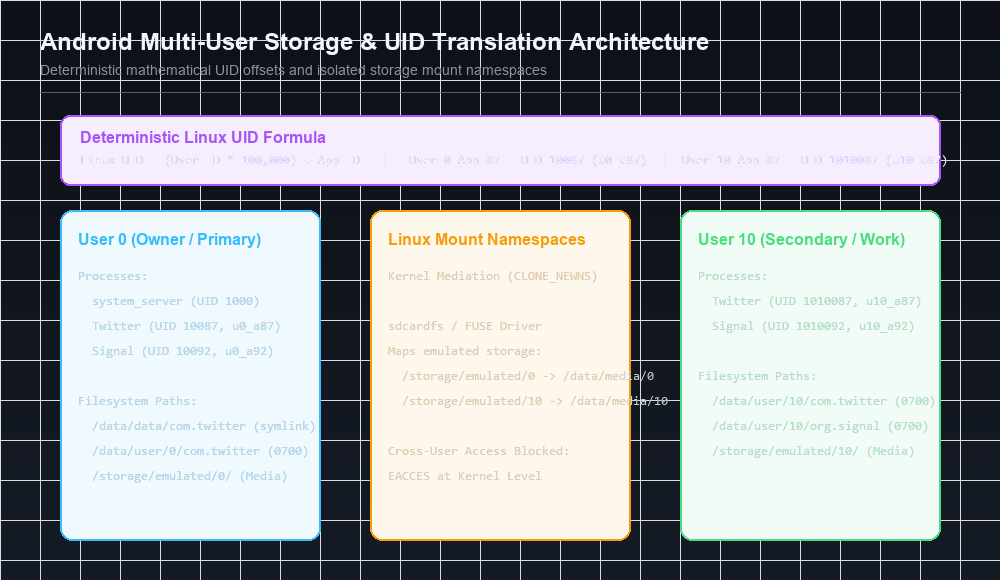
To accommodate multiple human profiles without altering the fundamental rule that each application must run in an isolated Linux UID sandbox, Android established a mathematical UID translation layer:
\[ext{Linux UID} = ( ext{User\_ID} imes 100000) + ext{App\_ID}\]Where:
User_ID: Integer identifying the human user profile (starting at0for the primary owner, followed by10,11,12for secondary accounts).App_ID: The application’s base identifier (ranging from10000to19999).
The Multi-User UID Allocation Matrix
| Entity | Base App ID | User 0 (Primary) | User 10 (Secondary User) | User 11 (Work Profile) |
|---|---|---|---|---|
AID_ROOT | 0 | 0 | 1000000 | 1100000 |
AID_SYSTEM | 1000 | 1000 | 1001000 | 1101000 |
AID_MEDIA | 1013 | 1013 | 1001013 | 1101013 |
| App: Twitter | 10087 | 10087 (u0_a87) | 1010087 (u10_a87) | 1110087 (u11_a87) |
| App: Signal | 10092 | 10092 (u0_a92) | 1010092 (u10_a92) | 1110092 (u11_a92) |
Linux Process Isolation Across Users
If User 0 and User 10 both launch Twitter simultaneously:
- User 0’s instance executes under Linux UID
10087. - User 10’s instance executes under Linux UID
1010087. - To the Linux kernel, these are two entirely different security principals. Neither process can inspect the memory, attach a
ptracedebugger, or send signals (kill) to the other.
2. Storage Virtualization & Isolated Namespaces
In a multi-user environment, private application files, external storage, and media downloads must be segregated so that User 10 cannot browse the photos or database records of User 0.
Internal Sandbox Virtualization
Internal application storage is laid out across isolated directory paths:
1
2
3
4
5
6
7
8
9
10
11
12
13
/data/
├── app/                              (Shared read-only APK binaries)
│   └── com.example.notes-1.apk
├── data/                             (Symlink to /data/user/0)
└── user/
    ├── 0/                            (User 0 Private Sandbox)
    │   └── com.example.notes/
    │       ├── databases/notes.db    (Owned by u0_a87:u0_a87 - 0700)
    │       └── shared_prefs/
    └── 10/                           (User 10 Private Sandbox)
        └── com.example.notes/
            ├── databases/notes.db    (Owned by u10_a87:u10_a87 - 0700)
            └── shared_prefs/
Under standard Linux filesystem DAC permissions:
/data/user/0/com.example.notes/databases/notes.dbis readable exclusively by UID10087./data/user/10/com.example.notes/databases/notes.dbis readable exclusively by UID1010087.- Even though both processes execute the exact same bytecode from
/data/app/com.example.notes-1.apk, their SQLite databases remain strictly isolated.
External Storage & FUSE / sdcardfs
External storage (/sdcard) introduces complexity because FAT32 and standard exFAT filesystems do not natively support Linux POSIX file ownership and permissions.
Android resolves this using filesystem virtualization:
- The physical storage partition
/data/mediais owned bymedia_rw:media_rw. - Storage is partitioned into subdirectories:
/data/media/0and/data/media/10. - An in-kernel FUSE daemon or sdcardfs driver mounts these directories:
- When User 0 accesses
/storage/emulated/0, the driver transparently maps requests to/data/media/0. - When User 10 accesses
/storage/emulated/10, requests map to/data/media/10.
- When User 0 accesses
- Using Linux Mount Namespaces (
unshare(CLONE_NEWNS)), each user’s Zygote child process sees only their own emulated storage mounted at/storage/emulated/, preventing path traversal into other user media folders.
3. UserManagerService & Lifecycle Architecture
User lifecycle events are coordinated by UserManagerService (UMS), a system service registered with ServiceManager:
1
2
3
4
5
6
SystemServer
    └── UserManagerService
            ├── /data/system/users/userlist.xml  (Registry of active users)
            ├── /data/system/users/0.xml         (User 0 metadata & flags)
            ├── /data/system/users/10.xml        (User 10 metadata & flags)
            └── /data/system/users/10/           (User 10 wallpaper, accounts)
Useful ADB Shell Commands for Multi-User Inspection
Security analysts can inspect and manipulate user profiles directly:
1
2
3
4
5
6
7
8
9
10
11
# List all active users on the device
pm list users

# Create a new secondary user profile
pm create-user "TestUser"

# Switch display focus to User 10
am switch-user 10

# Inspect detailed user manager state
dumpsys user
4. Multi-User Broadcast Routing & Work Profile Interaction
When an event occurs in the operating system (e.g., ACTION_BATTERY_LOW or ACTION_PACKAGE_ADDED), how does Android route the broadcast across multiple users?
Cross-User Broadcast APIs
System components utilize explicit multi-user messaging primitives:
1
2
3
4
5
// Broadcast delivered exclusively to User 10
context.sendBroadcastAsUser(intent, new UserHandle(10));

// System-wide broadcast delivered to all active users simultaneously
context.sendBroadcastAsUser(intent, UserHandle.ALL);
Security Verification: INTERACT_ACROSS_USERS
Regular applications are strictly prohibited from sending or receiving cross-user broadcasts. If an application attempts to interact across user boundaries, ActivityManagerService validates permissions:
android.permission.INTERACT_ACROSS_USERS: SignatureOrSystem permission allowing an application to query status across user profiles.android.permission.INTERACT_ACROSS_USERS_FULL: Higher-privilege permission required to initiate actions and modify settings on behalf of other users.
5. Attack Surfaces & Security Considerations
1. Cross-User IPC Data Leakage
System services that maintain in-memory caches or SQLite databases must tag every entry with the originating userId. Historically, vulnerabilities occurred in telephony and notification services that broadcasted incoming caller IDs or SMS snippet previews to UserHandle.ALL, leaking private notifications across user boundaries while a device was in Guest mode.
2. Shared External SD Card Vulnerabilities
If a physical removable MicroSD card is inserted into the device, FAT32 formatting prevents Linux UID segregation. Unless encrypted or managed via Storage Access Framework (SAF), any application with storage permissions running in User 10 can read files written to the external card by User 0.
3. Lockscreen Bypass via User Switching
In earlier Android releases, switching between a secure user profile (protected by a cryptographic PIN) and an unprotected Guest account caused race conditions in KeyguardViewMediator, temporarily exposing background activities of the primary user before Keyguard locked the display.
Next in the Series: Chapter 5 Preview
In Chapter 5: Cryptographic Providers, we will analyze:
- The Java Cryptography Architecture (JCA) in Android.
- The transition from Apache Harmony to
AndroidOpenSSL/ BoringSSL. SecureRandomentropy architecture and the historic Android PRNG vulnerability (CVE-2013-7372) that drained Bitcoin wallets.- Hardware-backed cryptographic operations and Keymaster provider integration.
References & Authoritative Reading
- Elenkov, Nikolay. Android Security Internals. No Starch Press, 2015. Chapter 4: “User Management,” pp. 87–114.
- AOSP Documentation - Supporting Multiple Users
- Android Enterprise - Work Profiles & Device Management
- Levin, Jonathan. Android Internals: A Confectioner’s Cookbook. Technologeeks, 2014.
- LWN.net - Android storage and the sdcardfs filesystem
Let’s Connect
Have you analyzed enterprise MDM containers or multi-user isolation on Android? Share your perspective:
- Abdulrahman Mohamed
This technical content and everything shared across this blog is dedicated with sincere intention to serve as enduring, beneficial knowledge (علم يُنتفع به) and an ongoing charity (صدقة جارية). If you find value in this research, please remember me and my family in your sincere prayers.