Android Security Internals: Chapter 9 - Enterprise Security
An in-depth review of Chapter 9 of Nikolay Elenkov's 'Android Security Internals', evaluating Device Administration APIs, DevicePolicyManagerService, enterprise containerization, Samsung KNOX, and MDM policy enforcement.
Hello everyone,
Welcome back to our book summary series covering “Android Security Internals” by Nikolay Elenkov, enriched with enterprise mobile architecture and threat intelligence analysis on mobile banking trojans and ransomware.
In Chapter 8, we explored online account management and authentication token delegation. In this installment, we explore Chapter 9: Enterprise Security, examining the architecture designed to allow corporate IT administrators and Mobile Device Management (MDM) solutions to enforce security baselines on corporate and Bring Your Own Device (BYOD) hardware.
Enterprise mobile security demands strict controls: enforcing complex PINs, preventing screen captures, disabling hardware cameras, isolating corporate email from personal social media apps, and executing cryptographic remote wipes if a device is lost.
In this deep dive, we dissect the Device Administration API, examine how DevicePolicyManagerService enforces hardware policies, explore the containerization models of Samsung KNOX and Managed Profiles, and analyze how Android ransomware abused these enterprise APIs to hold user devices hostage.
Series Navigation
| Previous Chapter | Current Chapter | Next Chapter |
|---|---|---|
| Chapter 8: Online Account Management | Chapter 9: Enterprise Security | Chapter 10: Device Security |
Key Takeaways
- The Device Administration API: Introduced in Android 2.2, this framework allows authorized applications to enforce system-wide security policies including PIN complexity, screen lock timeouts, and remote wiping.
- The
DeviceAdminReceiverComponent: Enterprise apps register a broadcast receiver that listens for administrative callbacks (onPasswordFailed,onPasswordSucceeded,onLockTaskModeEntering). - Declarative Policy Metadata: Admin permissions must be explicitly listed in
res/xml/device_admin.xmland approved by the user through a high-friction system confirmation dialog. - Dual-Persona Containerization: To reconcile employee privacy with enterprise security, Android evolved from all-or-nothing device control to Managed Profiles (Android for Work) and Samsung KNOX, creating a cryptographically isolated work container coexisting with personal applications.
- Malicious Abuse by Ransomware: Historically, Android ransomware leveraged Device Admin privileges to block uninstallation, override the screen lock PIN, and render devices unusable until a ransom was paid.
1. The Device Administration Architecture
The enterprise administration architecture consists of three core components:
1. DevicePolicyManager (DPM)
The public framework class used by enterprise applications to query policy states and issue commands (e.g., lockNow(), wipeData()).
2. DevicePolicyManagerService (DPMS)
The privileged system service running inside system_server (UID 1000). It coordinates with other core system services (WindowManagerService, Keyguard, vold) to enforce policies in real time.
3. Policy State Persistence: device_policies.xml
The active administrators and their policy configurations are saved in /data/system/device_policies.xml:
1
2
3
4
5
6
7
8
9
<policies setup-complete="true">
    <admin name="com.example.mdm/.EnterpriseAdminReceiver">
        <policies flags="415" />
        <password-quality quality="196608" />
        <password-minimum-length length="8" />
        <max-failed-password-wipe wipe="5" />
        <disable-camera value="true" />
    </admin>
</policies>
2. Implementing a Device Administrator
To become a Device Administrator, an application must declare a DeviceAdminReceiver subclass and register it with the BIND_DEVICE_ADMIN permission:
1
2
3
4
5
6
7
8
9
10
<receiver
    android:name=".EnterpriseAdminReceiver"
    android:permission="android.permission.BIND_DEVICE_ADMIN">
    <meta-data
        android:name="android.app.device_admin"
        android:resource="@xml/device_admin" />
    <intent-filter>
        <action android:name="android.app.action.DEVICE_ADMIN_ENABLED" />
    </intent-filter>
</receiver>
Declaring Policies: res/xml/device_admin.xml
1
2
3
4
5
6
7
8
9
10
11
12
<device-admin xmlns:android="http://schemas.android.com/apk/res/android">
    <uses-policies>
        <limit-password />
        <watch-login />
        <reset-password />
        <force-lock />
        <wipe-data />
        <expire-password />
        <encrypted-storage />
        <disable-camera />
    </uses-policies>
</device-admin>
3. Containerization: Samsung KNOX & Managed Profiles
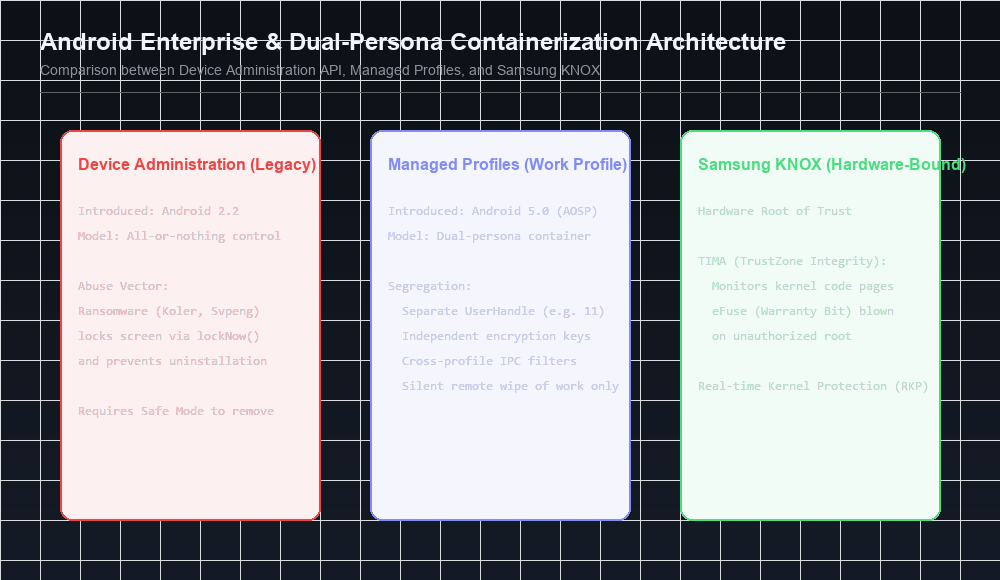
The early Device Administration API had a fatal usability flaw: it was all-or-nothing. If an employee enrolled their personal smartphone into their employer’s MDM, the IT administrator had the power to wipe the entire device, deleting family photos and personal data alongside corporate documents.
To solve this, the industry shifted toward dual-persona containerization.
Samsung KNOX Architecture
Samsung developed KNOX to provide enterprise containerization backed by hardware security:
- TrustZone-based Integrity Measurement Architecture (TIMA): Monitored the Linux kernel in real-time. If the kernel was exploited or rooted, TIMA permanently blew an electronic hardware fuse (eFuse / KNOX warranty bit), permanently revoking access to the encrypted enterprise container.
- Real-time Kernel Protection (RKP): Executes at ARM exception level 2 (EL2 hypervisor), trapping unauthorized modifications to kernel page tables.
Android for Work (Managed Profiles)
Beginning in Android 5.0, Google integrated native containerization into AOSP via Managed Profiles:
- A work profile is created as a secondary user profile (e.g.,
UserHandle(11)) with theFLAG_MANAGED_PROFILEflag. - Work applications and personal applications run side-by-side in the launcher, with work apps marked by a distinctive “work badge” briefcase icon.
- Data sharing between personal apps and work apps is blocked by default across the Binder IPC layer unless explicitly whitelisted by the enterprise admin.
- IT administrators can remotely wipe the work profile (
wipeData()) without touching a single byte of the user’s personal photos, messages, or apps!
4. Malicious Abuse: Android Ransomware
Between 2014 and 2018, the Device Administration API became the weapon of choice for mobile ransomware families, including Koler, Svpeng, and Simplocker.
The Ransomware Attack Flow
1
2
3
4
5
6
7
8
1. Malicious APK masquerades as "System Update" or "Flash Player"
2. Prompts user to activate Device Administrator privileges
3. Once granted, ransomware executes:
   ├── dpm.resetPassword("attacker_secret_pin");
   ├── dpm.lockNow();
   └── Overlays un-dismissible ransom screen demanding Bitcoin
4. Attempts to uninstall fail:
   Android blocks uninstallation of active Device Admin packages!
Defense: Booting into Safe Mode
The primary countermeasure against Device Admin ransomware is Safe Mode:
- When Android boots into Safe Mode (holding Power + Volume Down during startup), the system boots with all third-party applications disabled.
- The user navigates to Settings, safely revokes Device Admin privileges from the malware, and uninstalls the package cleanly.
- In Android 7.0+, Google deprecated
resetPassword()for third-party administrators, preventing apps from changing existing lockscreen credentials.
Next in the Series: Chapter 10 Preview
In Chapter 10: Device Security, we will analyze:
- The physical partition layout and boot sequence.
- Full Disk Encryption (FDE) vs. File-Based Encryption (FBE) and Direct Boot mode.
- The
crypto_footerstructure and Keymaster key derivation. - Verified Boot architecture and
dm-verityMerkle hash trees.
References & Authoritative Reading
- Elenkov, Nikolay. Android Security Internals. No Starch Press, 2015. Chapter 9: “Enterprise Security,” pp. 215–250.
- Android Developers - Device Administration API Overview
- Android Enterprise - Work Profile Architecture
- Samsung KNOX Whitepaper - An Overview of KNOX Security Architecture
- Securelist - The Evolution of Android Ransomware and Device Admin Abuse. Kaspersky Lab, 2016.
Let’s Connect
Have you configured Android Enterprise profiles or investigated ransomware abuse of Device Admin APIs?
- Abdulrahman Mohamed
This technical content and everything shared across this blog is dedicated with sincere intention to serve as enduring, beneficial knowledge (علم يُنتفع به) and an ongoing charity (صدقة جارية). If you find value in this research, please remember me and my family in your sincere prayers.