Android Security Internals: Chapter 2 - Permissions Architecture
An in-depth technical analysis of Chapter 2 of Nikolay Elenkov's 'Android Security Internals', detailing manifest definitions, protection levels, kernel GID mapping, runtime Binder checks, StrandHogg task hijacking, and content provider URI permissions.
Hello everyone,
Welcome back to our book summary series covering “Android Security Internals” by Nikolay Elenkov, enriched with real-world vulnerability research and offensive testing methodologies from the OWASP Mobile Application Security Testing Guide (MASTG).
In Chapter 1, we dissected Android’s kernel sandbox, UID allocation, and Binder IPC mechanics. In this installment, we explore Chapter 2: Permissions, the primary mechanism Android employs to restrict access to sensitive device APIs, hardware sensors, network interfaces, and private user datasets.
While users typically perceive permissions as interactive prompt dialogs, under the hood Android’s permission model is a multi-tier enforcement architecture spanning compiled XML manifests, Linux kernel Supplementary Group IDs (GIDs), framework-level Binder hook checks, and transient Content Provider URI delegation tokens.
Let’s dive into the technical internals of Android’s permission framework.
Series Navigation
| Previous Chapter | Current Chapter | Next Chapter |
|---|---|---|
| Chapter 1: Android’s Security Model | Chapter 2: Permissions Architecture | Chapter 3: Package Management |
Key Takeaways
- Declaration vs. Request: Applications define new permissions using
<permission>tags and request access to existing permissions via<uses-permission>tags inAndroidManifest.xml. - Protection Levels: The granting policy of a permission is governed strictly by its
protectionLevel(normal,dangerous,signature, andsignatureOrSystem). - Hardware & Network Isolation via Kernel GIDs: Permissions that touch sockets (
INTERNET) or physical storage (WRITE_EXTERNAL_STORAGE) are mapped directly to Linux kernel GIDs (AID_INET,AID_SDCARD_RW) during process forking. - IPC Hook Enforcement: System services enforce permissions inside Binder stubs using
checkCallingPermission()andenforceCallingPermission(), extracting verified caller credentials viaBinder.getCallingUid(). - Transient Capability Delegation: Content Provider URI permissions (
grantUriPermission) allow an application to pass temporary read/write access to specific data objects without granting global database permissions. - Offensive Attack Surfaces: Architectural permission vulnerabilities manifest through Confused Deputy bypasses, PendingIntent hijacking, and StrandHogg task hijacking (CVE-2019-8660).
1. Permission Declaration and Protection Levels
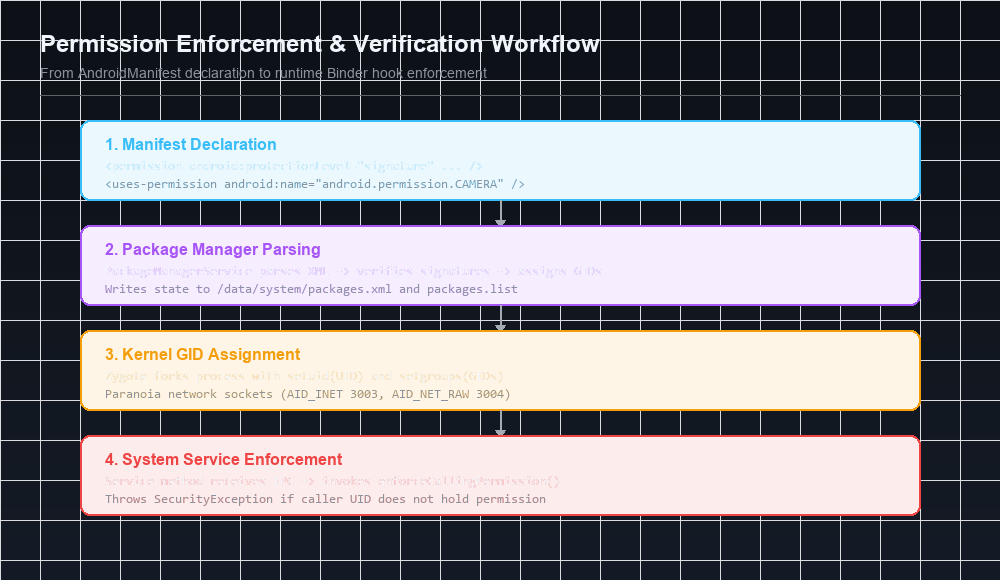
Every permission in the Android ecosystem has a unique identifier formatted as a reverse-domain string (e.g., android.permission.ACCESS_FINE_LOCATION).
The Permission Declaration Syntax
Third-party and system applications declare custom permissions inside AndroidManifest.xml:
1
2
3
4
5
6
<permission
    android:name="com.example.myapp.permission.READ_VAULT"
    android:label="@string/perm_vault_label"
    android:description="@string/perm_vault_desc"
    android:permissionGroup="android.permission-group.PERSONAL_INFO"
    android:protectionLevel="signature" />
Protection Level Matrix
The protectionLevel attribute defines how Android evaluates and grants the permission:
| Protection Level | Granting Policy | User Prompts | Common Examples |
|---|---|---|---|
normal | Granted automatically at install time. Poses minimal risk to user privacy or device operation. | None | ACCESS_NETWORK_STATE, SET_WALLPAPER, VIBRATE |
dangerous | Grants access to private user data or device hardware. Historically granted at install; runtime prompts in modern Android. | Explicit prompt required | CAMERA, RECORD_AUDIO, READ_CONTACTS, ACCESS_FINE_LOCATION |
signature | Granted only if the requesting application is signed with the identical cryptographic certificate as the declaring application. | None (Silent grant) | Enterprise internal APIs, proprietary OEM app-to-app communication |
signatureOrSystem (Privileged) | Granted if signed by the declaring certificate OR if the app is pre-installed in the /system/priv-app partition. | None | REBOOT, SHUTDOWN, INJECT_EVENTS, STATUS_BAR |
Modern Protection Flags
In newer Android framework revisions, protection levels are decomposed into a base level plus additive bitwise flags:
privileged: Limits access to apps located in/system/priv-app.development: Can be granted to test applications via ADB shell commands:1
pm grant com.example.app android.permission.DUMP
preinstalled: Restricted to pre-loaded firmware packages.
2. Permission Registration & PackageManagerService
During system boot, PackageManagerService (PMS) scans system partitions and third-party directories:
- Parses
/system/framework/framework-res.apkto register all core platform permissions. - Scans
/system/app,/system/priv-app,/vendor/app, and/data/app. - Verifies cryptographic signatures of declaring and requesting packages.
- Serializes the entire device permission state into
/data/system/packages.xml.
Deep Dive: /data/system/packages.xml
Inside this critical XML database, granted permissions and assigned UIDs are permanently tracked:
1
2
3
4
5
6
7
8
9
10
11
12
13
14
15
16
17
18
<package name="com.example.secureclient"
         codePath="/data/app/com.example.secureclient-1"
         nativeLibraryPath="/data/app-lib/com.example.secureclient-1"
         flags="4793910"
         ft="192a3b4c500"
         it="192a3b4c500"
         ut="192a3b4c500"
         version="10"
         userId="10087">
    <sigs count="1">
        <cert index="1" key="3082024a308201b3a003020102..." />
    </sigs>
    <perms>
        <item name="android.permission.INTERNET" granted="true" flags="0" />
        <item name="android.permission.CAMERA" granted="true" flags="0" />
        <item name="com.example.myapp.permission.READ_VAULT" granted="true" flags="0" />
    </perms>
</package>
3. Kernel-Level Permission Enforcement: GID Mapping
Not all Android permissions are enforced inside Dalvik/ART userspace. Low-level operating system resources (such as raw IP sockets, Bluetooth hardware controllers, and external SD card partitions) are enforced directly by the Linux kernel through Supplementary Group IDs (GIDs).
The Mapping Configuration: platform.xml
Android defines the static bridge between high-level Java permission strings and low-level Linux GIDs in /etc/permissions/platform.xml:
1
2
3
4
5
6
7
8
9
10
11
12
13
14
15
16
<permissions>
    <!-- Maps android.permission.INTERNET to Linux GID inet (3003) -->
    <permission name="android.permission.INTERNET">
        <group gid="inet" />
    </permission>

    <!-- Maps raw networking permission to Linux GID net_raw (3004) -->
    <permission name="android.permission.ACCESS_NETWORK_STATE">
        <group gid="net_raw" />
    </permission>

    <!-- Maps SD card write permission to Linux GID sdcard_rw (1015) -->
    <permission name="android.permission.WRITE_EXTERNAL_STORAGE">
        <group gid="sdcard_rw" />
    </permission>
</permissions>
Zygote Fork & setgroups()
When ActivityManagerService instructs Zygote to spawn an application process:
- PMS inspects the permissions granted to the application UID in
packages.xml. - PMS compiles an array of corresponding integer GIDs (e.g.,
[3003, 1015]). - Zygote forks its process and calls the native Linux system call:
1
setgroups(gid_count, gid_array);
- If an app requests to open a network socket:
1
int sock = socket(AF_INET, SOCK_STREAM, 0);
The kernel network subsystem checks if the calling process belongs to group
3003(AID_INET). If missing, the kernel immediately halts the call withEACCES(Permission Denied), completely independent of the Dalvik/ART virtual machine!
4. Framework-Level Permission Enforcement
For system services running inside system_server (e.g., location, telephony, camera), permissions are enforced programmatically at the entry point of each Binder transaction.
The Enforcement API
System services verify callers using methods exposed by android.content.Context:
1
2
3
4
5
6
7
8
// Throws SecurityException if caller lacks permission
context.enforceCallingPermission(
    Manifest.permission.ACCESS_FINE_LOCATION,
    "Caller lacks fine location access");

// Returns PackageManager.PERMISSION_GRANTED or PERMISSION_DENIED
int status = context.checkCallingPermission(
    Manifest.permission.CAMERA);
Internal Implementation Inside system_server
When an app calls LocationManager.getLastKnownLocation():
1
2
3
4
5
6
7
8
9
10
11
12
13
14
15
16
17
18
19
20
21
// Inside LocationManagerService.java (system_server)
@Override
public Location getLastKnownLocation(LocationRequest request, String packageName) {
    // 1. Extract verified UID and PID from the Binder driver
    int callingUid = Binder.getCallingUid();
    int callingPid = Binder.getCallingPid();

    // 2. Query PackageManagerService
    int permissionCheck = mContext.checkPermission(
        Manifest.permission.ACCESS_FINE_LOCATION,
        callingPid,
        callingUid
    );

    if (permissionCheck != PackageManager.PERMISSION_GRANTED) {
        throw new SecurityException("UID " + callingUid + " requires ACCESS_FINE_LOCATION");
    }

    // 3. Permission verified; execute privileged hardware access
    return mProvider.getLastLocation();
}
Identity Switching: clearCallingIdentity()
When a system service needs to execute an operation on behalf of a client that requires the service’s own elevated system credentials (UID 1000), it uses Binder.clearCallingIdentity():
1
2
3
4
5
6
7
8
9
// Temporarily reset calling identity to UID 1000
long identityToken = Binder.clearCallingIdentity();
try {
    // Privileged operation executed as system_server
    mInternalStorageHelper.allocateSystemBlock();
} finally {
    // Restore the client's original UID/PID token
    Binder.restoreCallingIdentity(identityToken);
}
Offensive Security Note: Failing to restore calling identity or performing client-directed operations while running under cleared identity is a classic root-cause of Confused Deputy vulnerabilities in Android system services.
5. Content Provider URI Permissions
Standard Android permissions grant broad, persistent access to an entire component. However, sharing a specific document, photo, or private SQLite record with an external application requires fine-grained, temporary capability delegation.
Android solves this via URI Permissions:
1
2
3
4
5
<provider
    android:name="com.example.securenotes.NotesProvider"
    android:authorities="com.example.securenotes"
    android:exported="false"
    android:grantUriPermissions="true" />
Dynamic Capability Delegation
When an application wants to share a private file with a viewer:
1
2
3
4
5
6
7
8
9
10
Uri noteUri = Uri.parse("content://com.example.securenotes/note/42");

Intent viewIntent = new Intent(Intent.ACTION_VIEW);
viewIntent.setData(noteUri);

// Attach temporary read capability to the Intent
viewIntent.addFlags(Intent.FLAG_GRANT_READ_URI_PERMISSION);

// Launch viewer; ActivityManager grants temporary access to note/42 only!
context.startActivity(viewIntent);
How ActivityManagerService Mediates URI Grants
- When
startActivity()is invoked,ActivityManagerServiceintercepts the Intent. - AMS verifies that the sender has permission to access
noteUri. - AMS creates an ephemeral
UriPermissionrecord mapping(noteUri, targetUid, READ_FLAG). - When the target application queries
noteUri, the Content Provider checks with AMS, which confirms the temporary grant. - Once the viewer’s activity lifecycle finishes, AMS revokes the grant automatically.
6. Advanced Exploitation: StrandHogg & PendingIntent Hijacking
1. StrandHogg Task Hijacking (CVE-2019-8660)
Discovered by Promon, StrandHogg exploited a fundamental design flaw in Android’s task management control flags:
- An attacker app configured its manifest with
android:taskAffinitymatching a legitimate banking application. - When the victim launched the banking app, Android placed the attacker’s malicious activity on top of the legitimate task stack.
- The attacker displayed a forged permission dialog: “WhatsApp requires Microphone permission to send voice messages.”
- When the victim clicked “Allow”, the permission prompt granted sensitive capabilities directly to the attacker’s background package!
2. PendingIntent Mutability Hijacking (CVE-2021-0309)
In Android, a PendingIntent is a token granted to an external application allowing it to execute an Intent with the original sender’s permissions and UID.
- Prior to Android 12,
PendingIntentinstances were mutable by default. - An untrusted recipient could modify the inner Intent (changing the action, component, or destination URI) before invoking
send(). - The Exploit: An attacker modified a mutable PendingIntent received from
system_serverto point to a private system broadcast or unexported content provider, executing privileged actions under UID1000. - The Defense: Android 12 mandated explicit mutability declarations:
PendingIntent.FLAG_IMMUTABLEorFLAG_MUTABLE.
Next in the Series: Chapter 3 Preview
In Chapter 3: Package Management, we will analyze:
- The anatomy of the APK archive and compiled binary XML formats.
- Dalvik Executable (DEX) bytecode structure and verification algorithms.
- The v1 JAR signing scheme vs. modern v2, v3, and v4 APK signature schemes.
- The package installation lifecycle and the native
installddaemon. - Historic signature tampering exploits: FakeID (CVE-2014-4451) and Janus (CVE-2017-13156).
References & Authoritative Reading
- Elenkov, Nikolay. Android Security Internals. No Starch Press, 2015. Chapter 2: “Permissions,” pp. 21–50.
- Promon Security Research. StrandHogg: A Critical Vulnerability in Android’s Task Navigation. Promon Labs, 2019.
- Android Developers - PendingIntent Mutability & Security Best Practices
- OWASP Mobile Security Testing Guide - Testing App Permissions (MASTG-PLATFORM-1)
- Enck, William, et al. Understanding Android Security. IEEE Security & Privacy, 2009.
Let’s Connect
Have you audited Android apps for confused deputy or URI grant vulnerabilities? Share your findings or questions below:
- Abdulrahman Mohamed
This technical content and everything shared across this blog is dedicated with sincere intention to serve as enduring, beneficial knowledge (علم يُنتفع به) and an ongoing charity (صدقة جارية). If you find value in this research, please remember me and my family in your sincere prayers.