Android Security Internals: Chapter 1 - Android's Security Model
An exhaustive technical breakdown of Chapter 1 of Nikolay Elenkov's 'Android Security Internals', analyzing multi-level sandboxing, Linux kernel isolation, Dalvik/ART virtual machine boundaries, and Binder IPC internals with Project Zero exploit analyses.
Hello everyone,
Welcome to the inaugural post of our deep-dive book summary series covering “Android Security Internals: An In-Depth Guide to Android’s Security Architecture” by Nikolay Elenkov (No Starch Press), enriched with cutting-edge vulnerability research from Google Project Zero, Android Hacker’s Handbook, and the OWASP Mobile Application Security Verification Standard (MASVS).
Android is the most widely deployed operating system on the planet, running on billions of smartphones, tablets, IoT devices, automotive infotainment systems, and enterprise wearables. While traditional operating systems rely heavily on discretionary user accounts and network-perimeter firewalls, Android was engineered from the ground up on a radical security paradigm: treating every single installed application as an untrusted, mutually hostile tenant on a multi-user Linux system.
In this chapter, we dissect the foundational pillars of the Android security model: the modified Linux kernel, userspace privilege separation, Dalvik/ART runtime isolation, the low-level mechanics of the Binder Inter-Process Communication (IPC) subsystem, and the kernel memory vulnerabilities that threaten this boundary.
Series Navigation
| Previous Chapter | Current Chapter | Next Chapter |
|---|---|---|
| First Chapter in Series | Chapter 1: Android’s Security Model | Chapter 2: Permissions Architecture |
Key Takeaways
- Defense in Depth: Android implements multi-tiered security boundaries. A compromise at the application layer must bypass runtime controls, Binder IPC authentication, Linux UID/GID boundaries, and SELinux mandatory access controls before reaching the kernel.
- The Application Sandbox: Android fundamentally repurposed Linux multi-user architecture. Instead of mapping one human user to a UID, each installed application is assigned a unique, immutable Linux User ID (UID) starting at
10000(AID_APP). - Kernel Androidisms: Google modified the standard upstream Linux kernel by introducing custom subsystems including Ashmem (Anonymous Shared Memory), the Low Memory Killer (LMK), Paranoid Network Routing, and the high-performance
/dev/binderdriver. - The Zygote Spawning Model: All Dalvik/ART application processes are forked from a pre-warmed parent daemon called
zygote. This enables Copy-on-Write (COW) memory sharing of core framework libraries and guarantees rapid startup times. - Binder as the Security Backbone: Inter-Process Communication (IPC) does not rely on traditional POSIX pipes or System V queues. The Binder kernel driver mediates all cross-process messaging, cryptographically enforcing caller UID and PID tokens that cannot be forged by userspace.
- Offensive Reality: Because the Binder driver runs inside Ring 0 (kernel space), memory safety bugs within
drivers/android/binder.c(such as CVE-2019-2215) represent the premier pathway for full local privilege escalation (LPE) and container escapes.
1. Architectural Overview: Multi-Tier Isolation
Android’s architecture separates untrusted userland applications from high-privilege hardware interfaces and operating system daemons through distinct hierarchical layers:
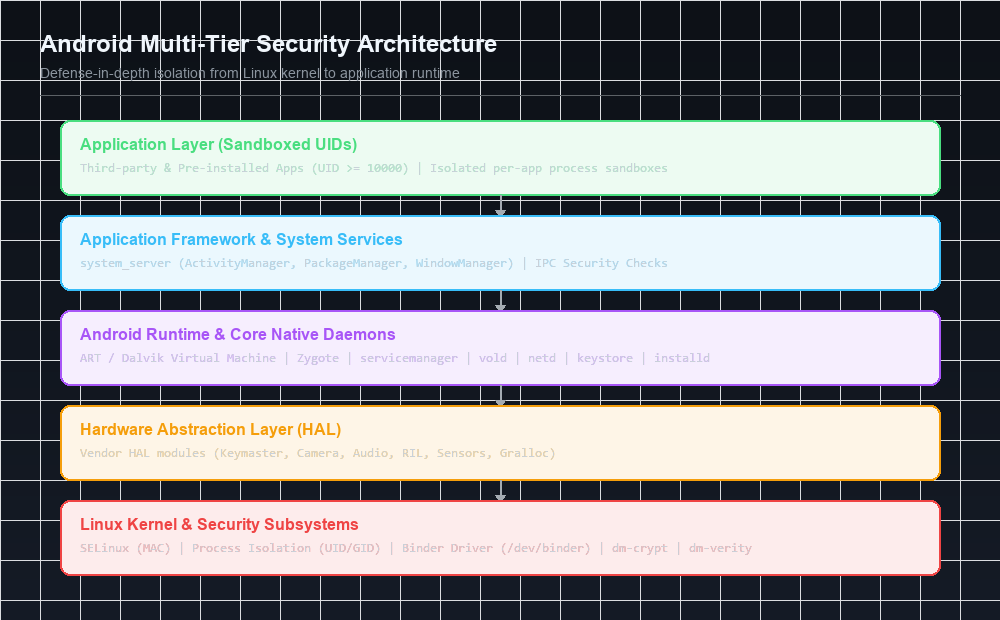
The Layer Hierarchy
- Linux Kernel: Serves as the ultimate hardware abstraction layer and security enforcer. Provides process isolation, memory protection, hardware drivers, and kernel-level mandatory access control (SELinux).
- Native Userspace & Hardware Abstraction Layer (HAL): Contains low-level native binaries (
init,vold,netd,keystore,installd,servicemanager) and vendor-specific dynamic libraries (.so) that expose hardware capabilities (camera, audio, radio, sensors) without revealing proprietary hardware registers to upper layers. - Android Runtime (ART / Dalvik): Executes compiled Dalvik Executable (
.dex) bytecode inside managed memory spaces with garbage collection, JIT/AOT compilation, and strict memory safety boundaries. - Application Framework: Houses system services compiled into Java bytecode running inside the monolithic
system_serverprocess. Services includeActivityManagerService(AMS),PackageManagerService(PMS),WindowManagerService(WMS), andConnectivityService. - Application Sandbox: User-installed applications and non-privileged pre-installed system apps. Each application runs inside its own isolated Linux process under a unique UID.
2. Kernel Hardening & “Androidisms”
Rather than deploying a standard GNU/Linux distribution, Google modified the upstream Linux kernel to accommodate battery, memory, and security constraints peculiar to mobile devices.
Ashmem (Anonymous Shared Memory)
Traditional POSIX shared memory (shmget, shmat) exposes broad memory regions that persist across application lifecycles and lack fine-grained access revocation. Android implemented Ashmem, accessible via /dev/ashmem:
- Ashmem allows processes to share memory buffers via file descriptor passing over Binder IPC.
- Provides a kernel-level memory reclamation mechanism known as pinning and unpinning.
- When system memory is constrained, the kernel can purge unpinned Ashmem memory pages without terminating the owner process.
- If a process attempts to access an unpinned region that was purged, the kernel returns an error code, requiring graceful handling.
1
2
3
4
5
6
7
8
9
// Interacting with Ashmem via ioctl
int fd = open("/dev/ashmem", O_RDWR);
ioctl(fd, ASHMEM_SET_NAME, "MySharedBuffer");
ioctl(fd, ASHMEM_SET_SIZE, 4096);
void* ptr = mmap(NULL, 4096, PROT_READ | PROT_WRITE, MAP_SHARED, fd, 0);

// Pinning memory to prevent kernel reclamation
struct ashmem_pin pin = { .offset = 0, .len = 4096 };
ioctl(fd, ASHMEM_PIN, &pin);
Low Memory Killer (LMK)
Android does not utilize a swap partition on physical flash storage due to flash wear-leveling and write endurance limits. Instead, the kernel’s Low Memory Killer monitors available memory thresholds and kills processes based on their Out-Of-Memory adjustment score (oom_score_adj), located in /proc/[pid]/oom_score_adj:
| Process Category | oom_score_adj Range | Description |
|---|---|---|
| Foreground App | 0 | Active application visible on screen interacting with the user |
| Visible App | 100 | Process hosting an activity visible but partially obscured (e.g., dialog overlay) |
| Perceptible App | 200 | Background process executing user-audible work (e.g., music playback) |
| Service App | 500 | Background service performing pending network or synchronization tasks |
| Cached / Empty App | 900 - 1000 | Process with no active components retained in RAM for fast relaunch |
Paranoid Networking (Socket Restraints)
In standard desktop Linux, any local process can open network sockets via socket(AF_INET, SOCK_STREAM, 0). Android historically restricted raw network socket creation by patching the Linux kernel network stack (af_inet.c) to inspect process supplementary group IDs (GIDs):
AID_INET(GID3003): Required to create IP sockets (SOCK_STREAM,SOCK_DGRAM).AID_NET_RAW(GID3004): Required to create raw sockets (SOCK_RAW) or packet sockets (AF_PACKET).- If an application lacks the
android.permission.INTERNETpermission in its manifest, the Android framework omits GID3003when forking its process, causing the kernelsocket()system call to fail immediately withEACCES(Permission Denied).
3. Sandboxing & Process Isolation: The UID/GID Mapping
The cornerstone of Android’s application isolation is the transformation of the traditional Linux multi-user security model into an application-level isolation sandbox.
UID Allocation Matrix
Android reserves specific ranges of Linux UIDs for system daemons, hardware components, and sandboxed applications:
1
2
3
4
5
6
7
8
9
10
11
12
13
14
0          - AID_ROOT (Kernel root user)
1000       - AID_SYSTEM (System server and core management framework)
1001       - AID_RADIO (Telephony and RIL subsystem)
1002       - AID_BLUETOOTH (Bluetooth stack)
1003       - AID_GRAPHICS (SurfaceFlinger and graphics drivers)
1004       - AID_INPUT (Input device event processing)
1005       - AID_AUDIO (AudioFlinger and sound daemons)
1006       - AID_CAMERA (Camera hardware daemon)
1017       - AID_KEYSTORE (Android KeyStore daemon)
1023       - AID_MEDIA_RW (Internal media storage access)
2000       - AID_SHELL (ADB shell environment)
10000      - FIRST_APPLICATION_UID (AID_APP_START)
19999      - LAST_APPLICATION_UID (AID_APP_END)
99000+     - FIRST_ISOLATED_UID (Isolated process sandbox)
Sandbox Directory Isolation
When PackageManagerService installs an application, it registers an assigned UID in /data/system/packages.list:
1
2
3
# Viewing installed application UIDs and sandbox paths
cat /data/system/packages.list | grep example
com.example.secureapp 10087 0 /data/data/com.example.secureapp default 3003
The application’s private data directory /data/data/com.example.secureapp is created on disk with strict Discretionary Access Control (DAC) permissions:
1
drwx------ 4 u0_a87 u0_a87 4096 2026-11-01 09:12 /data/data/com.example.secureapp
Under these Linux filesystem permissions:
- Only process threads running with effective UID
10087(u0_a87) or UID0(root) can traverse the directory or read/write files inside it. - A malicious application running as
10088(u0_a88) receives an immediate kernel-levelEACCESerror if it attempts to access the files of10087.
Isolated Processes (isolatedProcess="true")
Android provides an extreme isolation mechanism for high-risk untrusted code, such as browser HTML rendering engines:
1
2
3
4
<service
    android:name=".RendererService"
    android:isolatedProcess="true"
    android:process=":renderer" />
Processes launched with isolatedProcess="true":
- Are assigned UIDs in the isolated range (
99000to99999). - Possess zero supplementary GIDs (cannot access the network, external storage, or camera).
- Are blocked from invoking standard Binder IPC calls to system services, communicating exclusively through dedicated IPC pipes with their parent application.
4. Native Userspace Initialization & The Zygote Architecture
The boot sequence transitions from the raw Linux kernel to the rich Android application framework through a series of carefully orchestrated steps.
1
2
3
4
5
6
7
8
9
Linux Kernel -> /init (PID 1) -> init.rc parsing -> daemons spawned
                                       |
                                       v
                                /system/bin/app_process (Zygote)
                                       |
                                       +--> Preloads 3000+ Classes & System Drawables
                                       +--> Opens /dev/socket/zygote
                                       +--> Forks system_server (PID ~500)
                                       +--> Forks Application Sandboxes on demand
The init Daemon (PID 1)
The first userspace process spawned by the Linux kernel is /init. Guided by configuration files (/init.rc and /init.{hardware}.rc), init:
- Mounts virtual filesystems:
/dev,/proc,/sys,/mnt. - Creates essential device nodes and configures global memory and CPU cgroups.
- Initializes the kernel SELinux security policy by loading
/sepolicy. - Spawns core system daemons (
servicemanager,vold,netd,debuggerd,surfaceflinger). - Launches the Zygote runtime parent process.
The Zygote Architecture & COW Efficiency
In standard Java environments, starting a JVM instance incurs substantial startup latency while the virtual machine initializes heaps, loads standard runtime classes (rt.jar), and links native libraries.
Android solves this problem through Zygote:
app_processstarts and initializes a pristine Dalvik/ART virtual machine instance.- Zygote reads
/system/etc/preloaded-classesand loads thousands of core Android framework classes into memory. - Zygote loads common framework resources and drawables (
com.android.internal.R). - Zygote binds to a local UNIX domain socket located at
/dev/socket/zygoteand enters an event polling loop.
When a user taps an application icon:
ActivityManagerServicesends an IPC request to/dev/socket/zygotespecifying the target APK, package name, and assigned UID/GID parameters.- Zygote calls the Linux
fork()system call. - Copy-on-Write (COW): Because the newly created child process shares the physical memory pages of the parent Zygote process, memory is only duplicated when the child writes to a page. All preloaded framework code and read-only memory structures remain shared across all applications on the device.
- Inside the child process, Zygote drops root privileges by calling
setgroups(),setgid(), andsetuid(), configures the process SELinux context, and invokesActivityThread.main().
5. Binder Inter-Process Communication (IPC) Deep Dive
Because every application runs in a strictly isolated process sandbox under a distinct Linux UID, processes cannot directly access each other’s memory address spaces. Traditional Linux IPC mechanisms (pipes, FIFOs, POSIX message queues) lack authenticated caller identification and impose high data copying overhead.
Android solves this by making Binder the central nervous system of the entire OS:
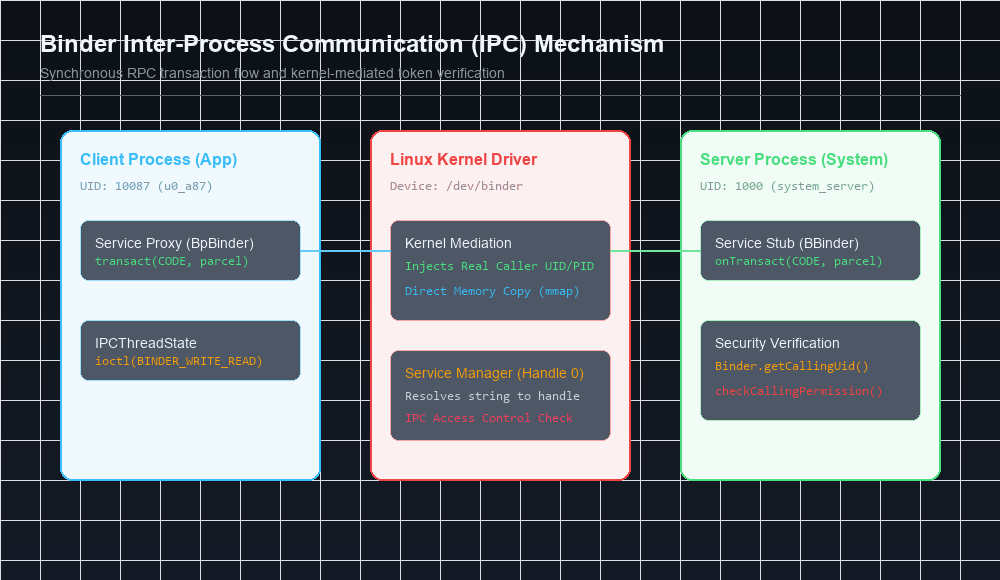
Why Binder?
- High Performance: Binder utilizes shared memory buffers mapped into the receiving process’s address space via
mmap(), requiring only a single memory copy (copy_from_user) from the sender into kernel space, then directly mapped to the receiver. - Kernel-Enforced Caller Identity: The Binder driver injects the authentic
UIDandPIDof the calling process directly into every transaction message. The caller cannot spoof, manipulate, or disguise its security identity. - Reference Counting & Death Notifications: Binder automatically tracks object references across process boundaries. If a client process crashes, Binder notifies registered server objects via
linkToDeath(), preventing memory leaks and orphaned system handles.
The Binder Transaction Pipeline
When an application invokes a system service method (e.g., querying GPS location):
- Service Proxy (
BpBinder): The application interacts with a local Java/C++ interface proxy (BpLocationManager). The method arguments are serialized into a binary buffer known as a Parcel. IPCThreadState: The proxy hands the Parcel toIPCThreadState, which executes anioctl()system call against/dev/binder:1 2 3 4 5 6
struct binder_write_read bwr; bwr.write_buffer = (uintptr_t)writebuf; bwr.write_size = write_size; bwr.read_buffer = (uintptr_t)readbuf; bwr.read_size = read_size; ioctl(binder_fd, BINDER_WRITE_READ, &bwr);
- Binder Kernel Driver (
/dev/binder):- Inspects the transaction command (
BC_TRANSACTION). - Determines the destination node from the target handle.
- Allocates a memory buffer in the receiver’s memory map.
- Copies the parcel payload from the client address space into the receiver’s mapped buffer.
- Attaches the calling process credentials:
1
2
tr.sender_pid = task_tgid_nr(current);
tr.sender_euid = task_euid(current);
- Wakes up a worker thread in the destination process thread pool.
- Inspects the transaction command (
- Service Stub (
BBinder): The server thread unmarshals the Parcel and invokesonTransact(). - Security Enforcement: The system service extracts caller identity using:
1
2
int callingUid = Binder.getCallingUid();
int callingPid = Binder.getCallingPid();
The service validates whether
callingUidpossesses the requisite permissions before executing privileged logic.
Inspecting Binder State via ADB
Security researchers can audit active Binder nodes and transactions directly from the shell:
1
2
3
4
5
6
7
8
# Dump active Binder transactions and process memory stats
cat /d/binder/stats

# View transaction nodes for a specific process PID
cat /d/binder/proc/542

# List all registered system services in ServiceManager
service list
6. Dalvik vs. ART Virtual Machine Security
Historically, Android utilized the Dalvik Virtual Machine (DVM). Modern Android uses the Android Runtime (ART). Both run Dalvik Executable (.dex) bytecode designed specifically for mobile memory constraints.
| Architecture Dimension | Standard Java Virtual Machine (JVM) | Android Dalvik / ART Virtual Machine |
|---|---|---|
| Execution Architecture | Stack-based architecture | Register-based architecture |
| Bytecode Container | Multiple .class files in JAR archives | Single unified classes.dex binary |
| Instruction Size | 1-byte opcode, variable operand length | 2-byte fixed opcode structure |
| Constant Pool | Duplicated across every individual .class file | Consolidated string and type pools across whole APK |
| Compilation Model | Just-In-Time (JIT) runtime compilation | Ahead-Of-Time (AOT via dex2oat) + Profile-Guided JIT |
Bytecode Verification as a Security Barrier
Before executing untrusted bytecode, the runtime conducts a rigorous verification pass:
- Checks branch instructions to ensure jumps target valid instruction boundaries inside method code.
- Enforces register type safety (prevents reading a floating point register as an object reference).
- Validates method access modifiers (
public,private,protected). - Guarantees that local variables are initialized before use, blocking raw memory pointer arithmetic and classic stack-smashing buffer overflows in managed application code.
7. Vulnerability Case Study: CVE-2019-2215 (Binder UAF Exploitation)
The most striking demonstration of Binder’s criticality as an attack surface is CVE-2019-2215, a zero-day vulnerability weaponized in the wild by commercial surveillance vendors (e.g., NSO Group) and documented by Maddie Stone and Jann Horn of Google Project Zero.
The Vulnerability Mechanics
The flaw resided inside the Linux kernel’s Binder driver in drivers/android/binder.c:
- A process could use
epollto monitor/dev/binderusing theBINDER_THREAD_EXITcommand. - In
binder_poll(), the driver added the current thread’s wait queue to theepollwait queue. - When the thread called
BINDER_THREAD_EXIT, the driver freed thebinder_threadstruct. - However, the driver failed to remove the wait queue entry from the
epolllist! - When the process exited,
epollattempted to remove the freed wait queue entry, causing a Use-After-Free (UAF).
1
2
3
4
5
6
7
8
9
// Vulnerable snippet in drivers/android/binder.c
static int binder_poll(struct file *filp, struct poll_table_struct *wait) {
    struct binder_proc *proc = filp->private_data;
    struct binder_thread *thread = NULL;
    // ...
    // Thread waitqueue registered with epoll
    poll_wait(filp, &thread->wait, wait);
    return mask;
}
Exploitation Impact
By spraying iovec structs over the freed memory, attackers converted this Use-After-Free into an arbitrary kernel memory read/write primitive:
- Overwrote the calling process’s credentials in
task_struct(uid = 0, gid = 0). - Overwrote the kernel variable
selinux_enforcing = 0. - Achieved full root execution from within an untrusted browser renderer sandbox without requiring any user interaction.
Next in the Series: Chapter 2 Preview
In the next installment, we explore Chapter 2: Permissions Architecture, dissecting:
- Permission declaration syntax and protection levels (
normal,dangerous,signature,signatureOrSystem). - How
PackageManagerServiceparses permissions into/data/system/packages.xml. - Kernel GID mapping and Supplementary Group allocation.
- Runtime Binder hook checks and Content Provider URI grant mechanics (
grantUriPermission). - StrandHogg task hijacking (CVE-2019-8660) and Confused Deputy exploitation.
References & Authoritative Reading
- Elenkov, Nikolay. Android Security Internals: An In-Depth Guide to Android’s Security Architecture. No Starch Press, 2015. Chapter 1: “Android’s Security Model,” pp. 1–20.
- Drake, Joshua J., et al. Android Hacker’s Handbook. Wiley, 2014.
- Stone, Maddie, and Horn, Jann. CVE-2019-2215: Bad Binder - Android in-the-wild 0-day. Google Project Zero Research, 2019.
- AOSP Documentation - Kernel Security Architecture & Binder Driver
- Levin, Jonathan. Android Internals: A Confectioner’s Cookbook. Technologeeks, 2014.
- OWASP Mobile Application Security Verification Standard (MASVS-PLATFORM)
Let’s Connect
Have questions or insights regarding Android’s kernel sandbox or Binder IPC mechanics?
- Abdulrahman Mohamed
This technical content and everything shared across this blog is dedicated with sincere intention to serve as enduring, beneficial knowledge (علم يُنتفع به) and an ongoing charity (صدقة جارية). If you find value in this research, please remember me and my family in your sincere prayers.